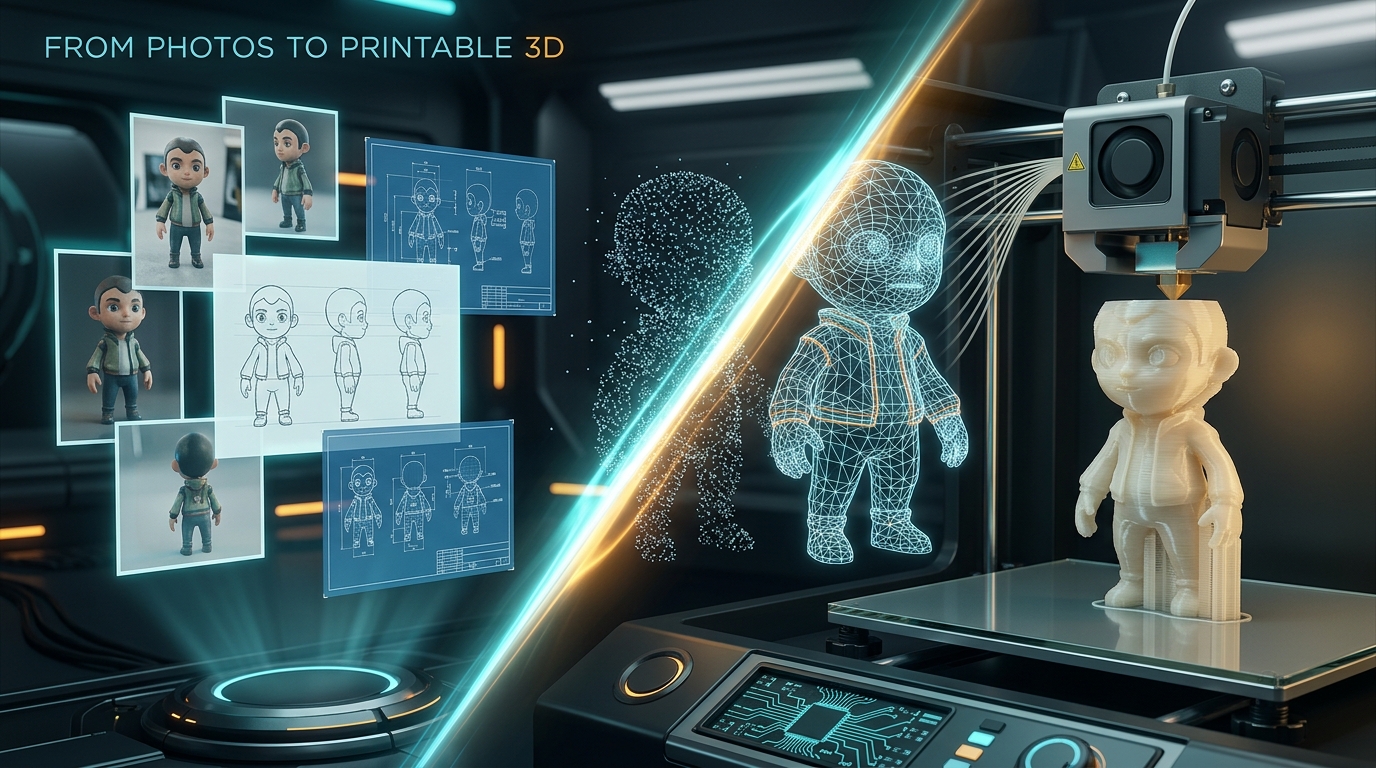
If you have experimented with commercial 3D generation tools like Meshy.ai , Hi3D , or CSM (Common Sense Machines), you know how magical it feels to drop in a single 2D photograph and get a 3D model in return. But as a maker and developer with an AMD workstation, I kept asking myself two questions:
- How do these pipelines actually work under the hood using modern open-source models?
- Can we build a complete, local pipeline that outputs physical, slicer-ready STLs rather than just unprintable visual meshes?
While an open-source hobby project is not trying to displace commercial multi-view reconstruction engines overnight, I wanted to experience firsthand what it takes to build a photo-to-3D tool from scratch using open-source building blocks.
The result is
printable
— a Python toolkit that turns photos, character turnaround sheets, and engineering design specs into watertight, millimeter-scaled STLs validated against real 3D printer constraints.
Here is the story of how it was built, the hurdles of running modern 3D AI on AMD hardware (Strix Halo / ROCm), and what worked best.
1. The Real Problem: “Here is a Mesh” vs “Here is a Print”
Most open-source generative 3D projects stop at generating a visually convincing mesh. The result might be an OBJ, PLY, or GLB that looks great in a 3D viewer, but when you load it into OrcaSlicer, PrusaSlicer, or Bambu Studio, reality strikes:
- Non-manifold geometry & open edges: Holes in the mesh cause slicers to drop walls or fill cavities incorrectly.
- Disconnected floating debris: Floating islands ruin resin and FDM prints alike.
- Arbitrary coordinate systems & scale: The mesh is sized to an arbitrary \([-1, 1]\) bounding box with no real-world millimeter scale.
- No stable print bed contact: Auto-orienting purely for shape visual aesthetics often places standing figures flat on their backs or balances models on tiny contact points without a flat base plate.
In printable, AI generation is only Stage 2 of a 5-stage pipeline:
If a mesh cannot be made watertight, or if it violates minimum wall thickness rules, the pipeline fails loudly at the validation gate rather than handing you a broken STL that fails 8 hours into a 3D print.
2. The Hardware Challenge: Running 3D AI on AMD ROCm (Strix Halo)
Most cutting-edge 3D generative AI repos (such as Microsoft’s TRELLIS, Pixel3D, or SPAR3D) are tightly coupled to NVIDIA CUDA. They frequently rely on custom CUDA extensions like nvdiffrast, spconv, and flash-attn, making them tricky to run on AMD hardware.
My development machine runs an AMD Ryzen AI Max+ 395 (Strix Halo) APU on Ubuntu 26.04 LTS. As covered in my
previous post on setting up ROCm on Strix Halo
, the unified memory architecture (128 GB LPDDR5X) gives us substantial headroom for running large models locally — provided the compute stack and individual native extensions are compatible with gfx1151.
-
BIOS Configuration: Set
UMA Frame Buffer Sizeto 512 MB, allowing the Linuxamdgpudriver to dynamically manage compute memory from system RAM via GTT. -
PyTorch Stack: For this project, the known-good environment uses AMD’s ROCm/TheRock builds targeting
gfx1151. The exact nightly index is important, however: AMD has been restructuring the ROCm/TheRock distribution layout, so an index that worked at one point may not actually provide a current rolling build.
# Example of the gfx1151-specific PyTorch environment
# Use the currently published TheRock index appropriate to your installation.
uv pip install --index-url https://rocm.nightlies.amd.com/v2/gfx1151/ torch torchvision**Important**: Treat the command above as an environment-specific snapshot rather than a permanent installation recipe. During this project I discovered that the index could return an older pinned nightly even though it looked like a current nightly source. A later
TheRocklayout used a different index and package naming scheme, but that newer stack introduced native-extension and CMake compatibility problems on this machine. See §9 for the full A/B test and rollback.AMD’s ROCm 10.0 announcement provides the broader context for this transition: TheRock is now the automated build and release foundation behind ROCm 10.0, bringing the ROCm components and framework packages into a more unified release pipeline.
3. Evaluating the Backends: What Works and What Doesn’t
I experimented with several generative approaches to see how they handled single-image and multi-view inputs.
The important distinction is between experiments and the backends that actually ship in printable today. TRELLIS and SPAR3D were useful experiments during development, but neither survived into the current backend registry because their generated topology was consistently problematic for downstream printable processing.
| Backend | Hardware | Typical Speed | Mesh Quality | Slicer Watertightness |
|---|---|---|---|---|
| TRELLIS (AMD experiment) | GPU | ~30s | Good visual details | ⚠️ Fragmented / disconnected topology |
| SPAR3D (AMD experiment) | GPU | — | Promising | ⚠️ Multi-body fragments on complex poses |
| TripoSR | GPU + CPU | ~10s | Coarse / Draft | ✅ Clean enough for fast print pipeline |
| Tencent Hunyuan3D 2.1 | GPU | ~1–2 min | ⭐ High fidelity | ⭐ Best: Dense, coherent single-body solids |
The current printable backend lineup is four backends:
heightmaplithophanetriposrhunyuan3d
TRELLIS and SPAR3D remain relevant historically because they explain why the pipeline ended up favoring Hunyuan3D, but they are no longer selectable backends in the released codebase.
-
TRELLIS & SPAR3D: Both were promising visually, but their failure modes became apparent only after sending the generated meshes through the actual printable pipeline. TRELLIS frequently produced disconnected outer shells that failed boolean unions, while SPAR3D could fragment complex character poses into multiple bodies. Once Hunyuan3D proved consistently more suitable for downstream repair and print preparation, both were removed rather than left behind as misleading “supported” options.
-
Hi3DGen: considered, never attempted. It looked promising on paper, but its sparse-convolution dependency made it unattractive for this AMD-first pipeline. It remains a candidate for future evaluation if its ROCm story improves.
-
TripoSR: Incredibly fast (~10s) with minimal exotic dependencies. It serves as the draft-mode generator and accelerator spike test. By querying the triplane decoder at surface vertices (
--opt texture=true), it can export a colored.glbpreview alongside the STL. -
Tencent Hunyuan3D 2.1: The clear winner on my AMD workstation. The shape model (
hunyuan3d-dit-v2-1, ~7.4 GB) generates dense, structurally sound geometry that survives quadric decimation and interior wall hollowing without collapsing.
ROCm Tip: Hunyuan3D 2.1 flow matching on ROCm requires enabling PyTorch’s experimental AOTriton attention kernel dispatcher:
TORCH_ROCM_AOTRITON_ENABLE_EXPERIMENTAL=1 printable generate assets/examples/figure.jpg \
  -b hunyuan3d --size 80 --hollow --hollow-wall 1.6 --max-faces 500000 --no-base
4. Benchmark Assets & Antigravity Examples
To systematically test each pipeline without relying on external web URLs, reference assets were curated in assets/examples/ (mostly created and benchmarked using Google Antigravity and Stable Diffusion 1.5):
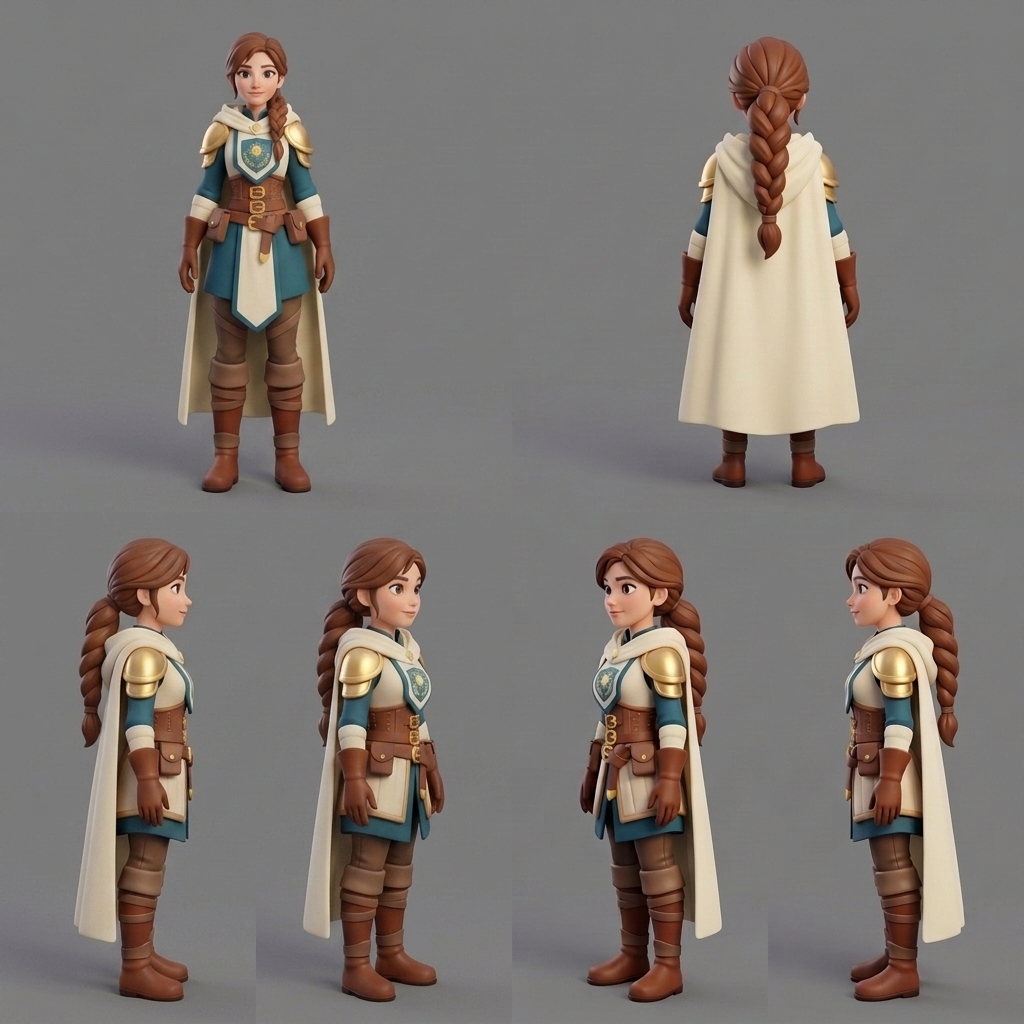
- Turnaround Sheet (
character_female_turnaround.png): Single-image 3D models hallucinate whatever they cannot see. Multi-view sheets provide 4 angles (Front, Back, Left, Right). Withprintable generate --sheet, the pipeline splits the sheet along real seams, runs full reconstruction across all panels, and automatically keeps the one that yields the most watertight, printable result.
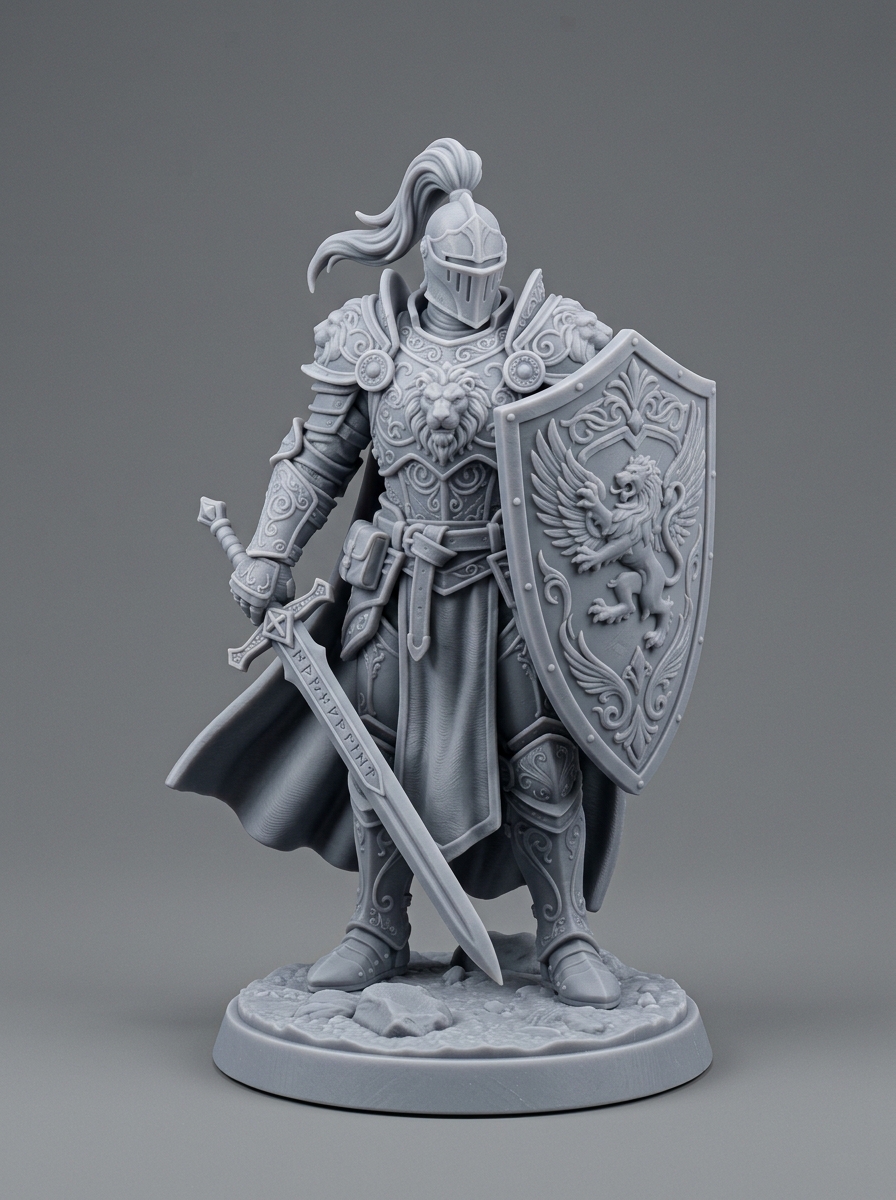
- Miniature Figurine (
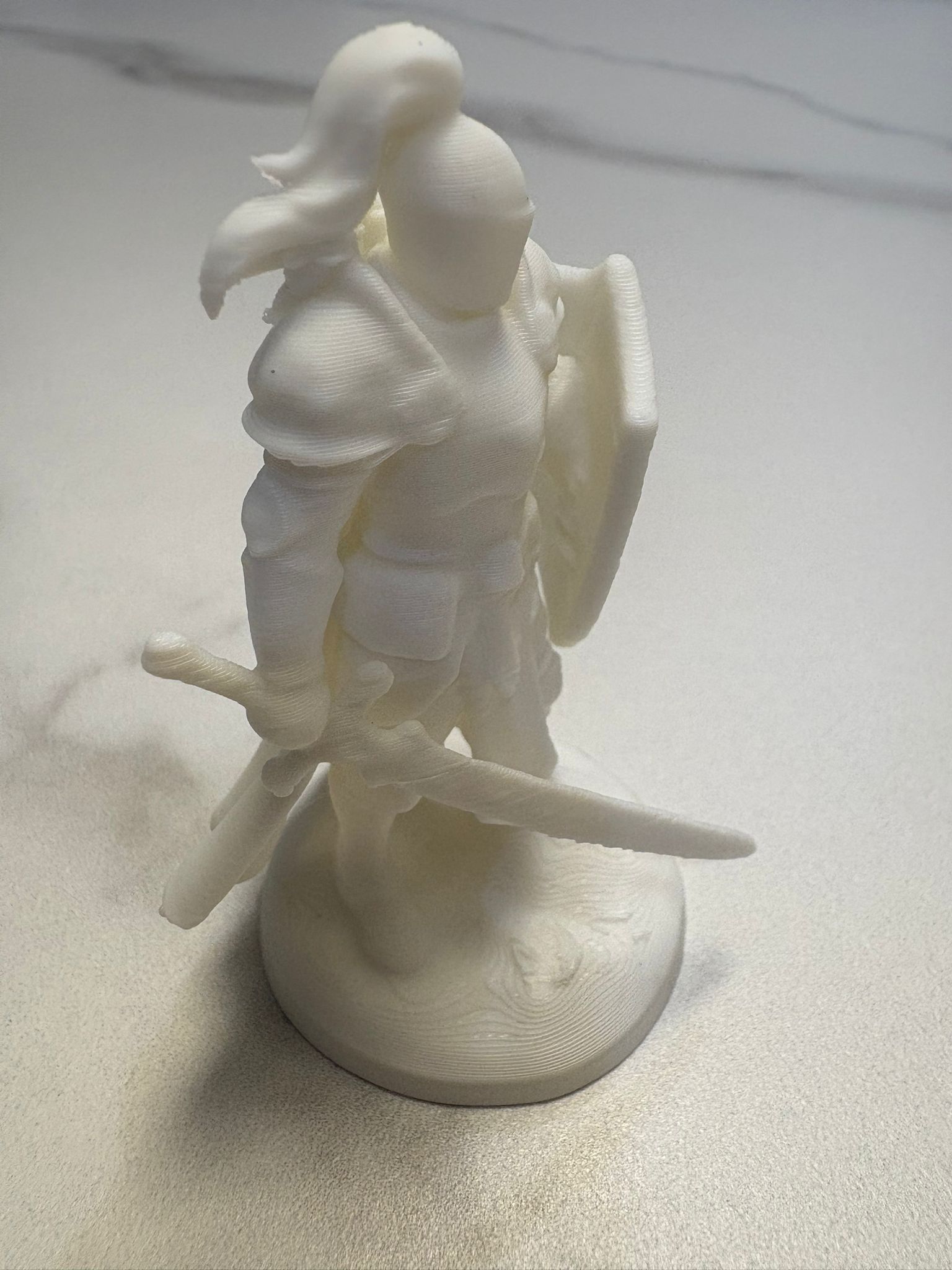
figure.jpg): A paladin figurine used to test interior wall hollowing (--hollow --hollow-wall 1.6) to save resin and filament.
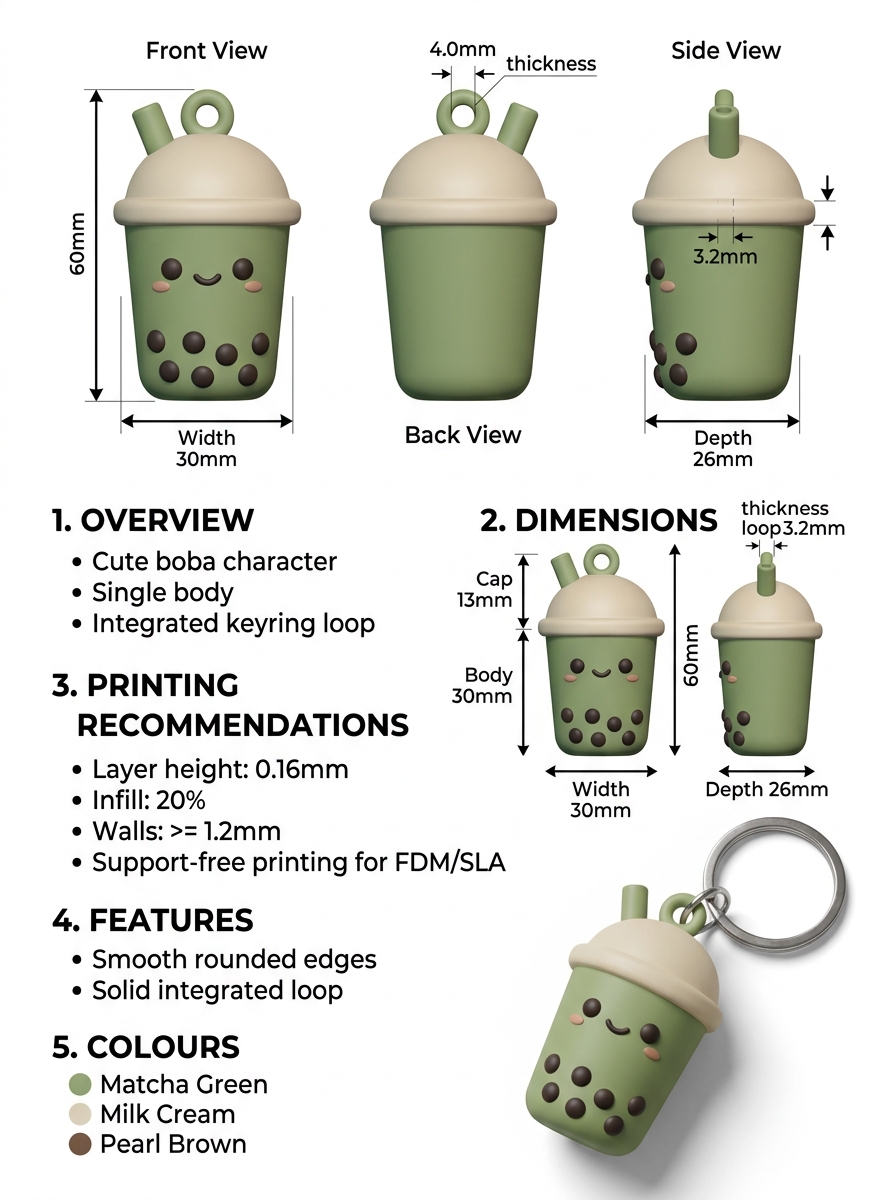
- Infographic Design Spec (
keychain_boba_spec.jpg): A blueprint with orthographic views and dimension callouts (60 mm height, 4 mm keyring hole).
- Stress Tests (
figure_medusa_scale_statue.jpg,figure_xuner_scale_statue.jpg): Complex collectible statues with sheer translucent fabrics and floating crystal formations. These turned out to be genuine edge cases, not just visually busy ones, and worth understanding why: the flowing wing/veil structures behind the figure came out ofhunyuan3das a flat, featureless slab instead of their actual lattice detail — for two compounding reasons, not one bug. First,u2net’s background remover is trained mostly on opaque subjects, so a translucent region with soft, low-contrast edges against the backdrop often gets stripped out as “background” or kept as a shapeless blob rather than segmented cleanly. Second, even with a perfect mask, single-image 3D reconstruction models — trained mostly on solid, everyday objects — tend to flatten fine lace-like or sheer geometry rather than reproduce it. For a subject built from opaque material this is a non-issue; for one built from sheer fabric, glass, or crystal, expect a simplified result. No flag fixes this today — it’s a real capability ceiling, and the honest answer for a piece this intricate is photogrammetry (30+ real photos), not a better single-image model.


5. Vision-Language Models: What They’re Actually Good At
One exciting feature in printable is VLM-guided spec-to-3D generation. When a user hands the pipeline a design spec sheet — dimension arrows, text callouts, orthographic front/back/side renders — standard 3D AI treats all of that text and layout as geometry, creating noisy artifacts. The fix is a local Vision-Language Model that reads the sheet first and extracts structured metadata (design_spec.json) plus clean crops of the actual object, before any geometry generation runs:
# 1. Extract physical dimensions and clean crops via local VLM
printable generate-spec assets/examples/keychain_boba_spec.jpg

# 2. Reconstruct 3D mesh and automatically enforce target dimensions
printable generate --spec interim/design_spec.json --spec-all-views -b hunyuan3dWorth flagging plainly: step 1 needs an external VLM server that isn’t part of this repo — two separate processes on this box, llama-server-rocm actually holding the model in memory, and a thin FastAPI proxy in front of it that does no model loading of its own. Neither printable generate (without --spec) nor manual-backend web UI uploads need any of this; it’s only the spec-sheet and Auto-detect paths that do.
For reference, this is the actual Qwen3.8-27B setup used during development:
# Download the vision projector
hf download unsloth/Qwen3.8-27B-GGUF mmproj-F16.gguf \
  --local-dir ~/models

mv ~/models/mmproj-F16.gguf \
   ~/models/mmproj-Qwen3.8-27B-f16.gguf

# Start the resident VLM server
llama-server-rocm \
  --model ~/models/Qwen3.8-27B-Q4_K_M.gguf \
  --mmproj ~/models/mmproj-Qwen3.8-27B-f16.gguf \
  --alias qwen3.8-27b \
  --n-gpu-layers 99 \
  --ctx-size 32768 \
  --parallel 1 \
  --flash-attn on \
  --jinja \
  --temp 0.7 --top-p 0.8 --top-k 20 --min-p 0 \
  --spec-type draft-mtp --spec-draft-n-max 2 \
  --kv-unified --fit off \
  --image-min-tokens 1024 \
--host 0.0.0.0 --port 8080Why
--ctx-size 32768? Earlier experiments used262144, which unnecessarily pre-allocated a huge KV cache and contributed to memory pressure. For the short image classification and extraction prompts used here, 32K provides ample headroom without reserving hundreds of thousands of tokens.
That much of the plan survived intact. Getting there did not — and the detour taught me more about what local VLMs are actually reliable at than the working feature itself.
The detour: two different bugs, two different models
First attempt: Qwen2.5-VL-7B-Instruct, the obvious choice for a lightweight vision-capable model. It hit a real, documented problem immediately: llama.cpp’s ROCm/HIP vision path garbles any image input on gfx1151 (
ggml-org/llama.cpp#17797
) — a driver-level bug, not something a config flag works around. The fix was to stop using llama.cpp for this model entirely and serve it through transformers/PyTorch directly instead.
That solved the garbling, but revealed a second, unrelated bug: asking the model for multiple bounding boxes in one image — “find the front view, the back view, and the side view” — reliably returned a correct box for the first one and then drifted onto unrelated text blocks for the rest. This is also documented upstream ( QwenLM/Qwen2.5-VL#1257 ): the model was trained on referring expressions that uniquely identify one instance, so its accuracy degrades hard past the first when asked to locate several similar things at once. Restructuring the extraction into one bounding-box call per view (rather than one call asking for everything) didn’t fix it. Neither did rewriting the prompt to explicitly describe the sheet’s layout. The failure mode held.
Switching models — to Qwen3.8-27B, served through this box’s resident llama-server-rocm (the same tool already running this box’s text models, over its OpenAI-compatible endpoint) — sidestepped the ROCm garbling bug entirely: verified with real description and grounding calls, it reads images correctly. But it had its own version of the same underlying weakness: reliably grounding the first/most visually distinct view in a sheet, then either mislabeling or entirely failing to perceive the remaining captions, even after raising the vision token budget (--image-min-tokens 1024) and rewriting the prompt to anchor explicitly on printed caption text rather than visual guessing.
The actual finding
Two different model families, two different serving stacks, the same shape of failure: a single holistic judgement about an image is reliable. Locating and correctly labeling several regions in one image is not. Every test that asked “what is this, as a whole” — describe it, classify it, extract dimensions — came back accurate. Every test that asked “where are these N things, specifically” degraded past the first.
That reframed the actual engineering problem. Reading the pipeline code confirmed something worth stating plainly: no backend in printable fuses multiple views into one reconstruction. --spec-all-views was already just trying each extracted crop as an independent single-image candidate and keeping whichever one reconstructed best. So correct view labeling was never load-bearing for output quality — only crop completeness was. Chasing reliable multi-view grounding was solving a problem that didn’t need solving, using the one capability these models don’t reliably have.
Auto-detect: playing to the strength instead of fighting the weakness
If a single holistic judgement is what these models do well, the useful move is to ask for exactly that — once — and use it to route into whichever pipeline already exists and already works, instead of asking the model to label multiple regions correctly.
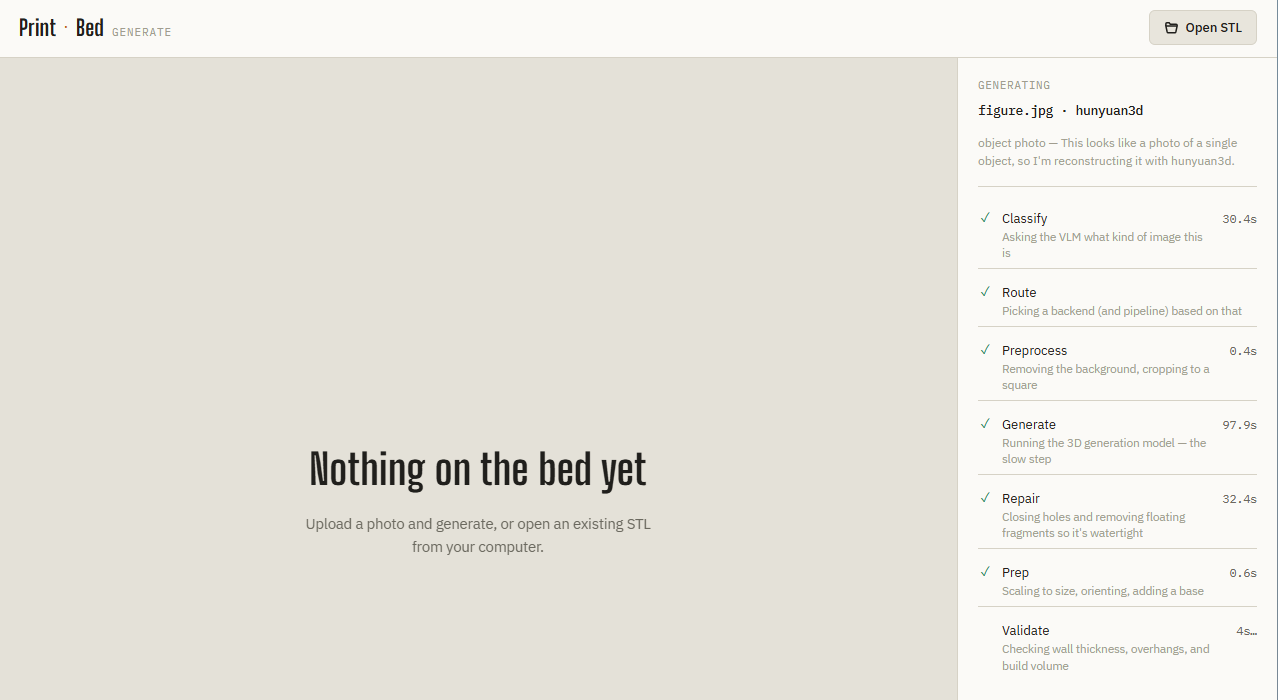
printable serve’s web UI now has an Auto-detect option. One classification call categorizes the upload (design spec sheet, character turnaround, portrait, single-object photo, or “unclear” — never guessed if the model isn’t confident), and the result routes into an existing, already-proven pipeline:
The decision — category, a one-sentence rationale, and the chosen backend — shows up in the progress panel before generation starts, so it’s never a silent guess. Nothing about routing is new engineering; every branch was an existing, working command. The only new code is the classify-then-route step, and it works precisely because it only ever asks the model the one question it answers reliably.
6. The Web Interface: printable serve
Everything up to here has been the CLI. printable serve wraps the same pipeline in a lightweight local web app — for actually looking at what a spec sheet’s crops turned into before committing to a slicer run, or for anyone who’d rather drag-and-drop than remember flags.
# ROCm: needs TORCH_ROCM_AOTRITON_ENABLE_EXPERIMENTAL=1 prefixed, same as any hunyuan3d CLI run
TORCH_ROCM_AOTRITON_ENABLE_EXPERIMENTAL=1 printable serve --host 0.0.0.0 --port 8000Open the printed URL, drop in a photo, and either pick a backend manually (the same choices as -b) or leave Auto-detect on — the classify-then-route behavior described above.
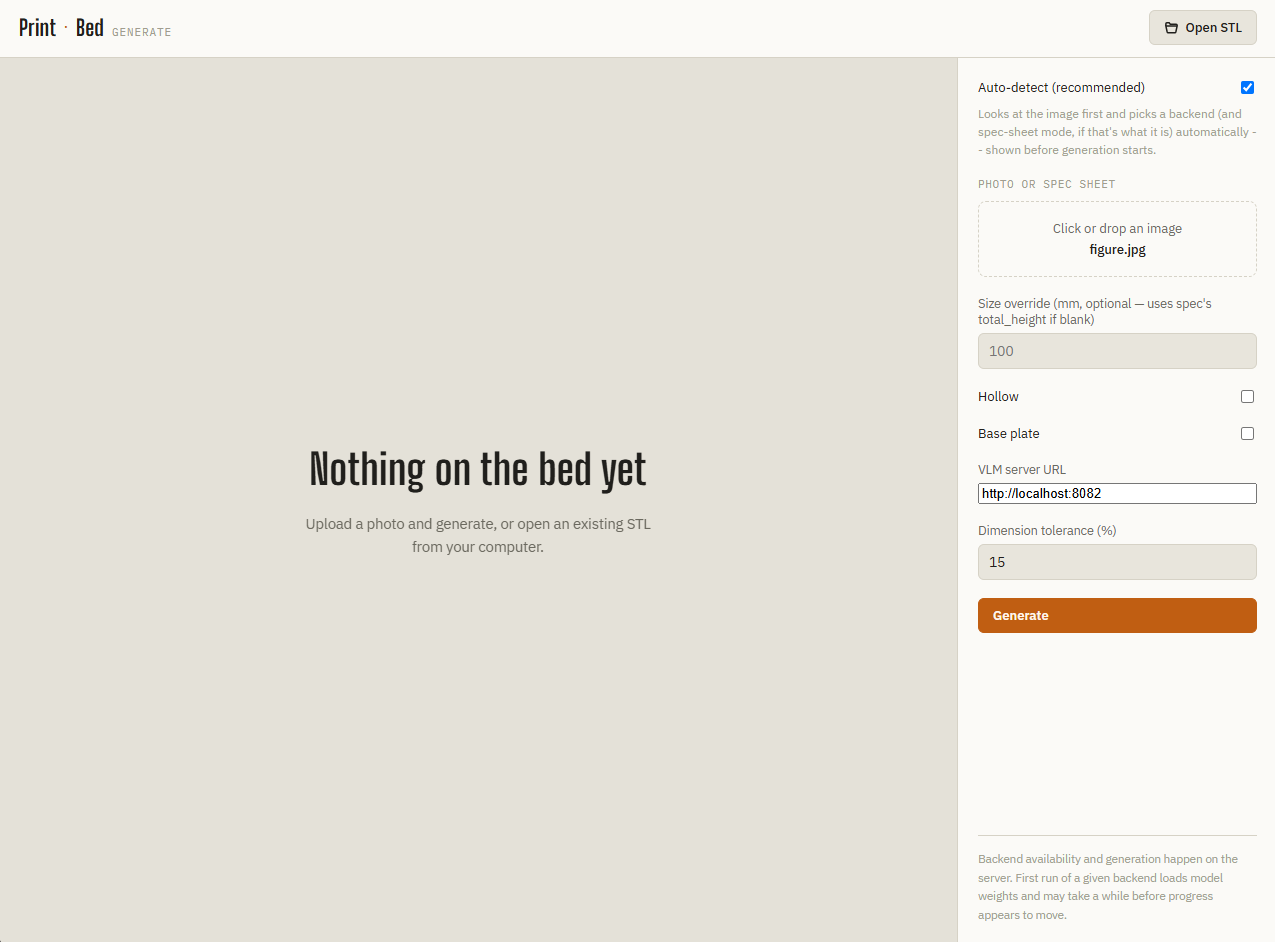
Submitting starts a job and streams live progress over Server-Sent Events — no polling, no page refresh. With Auto-detect on, the first thing that shows up is the classification result itself: category, a one-sentence rationale, and which backend it routed into, before generation even starts.
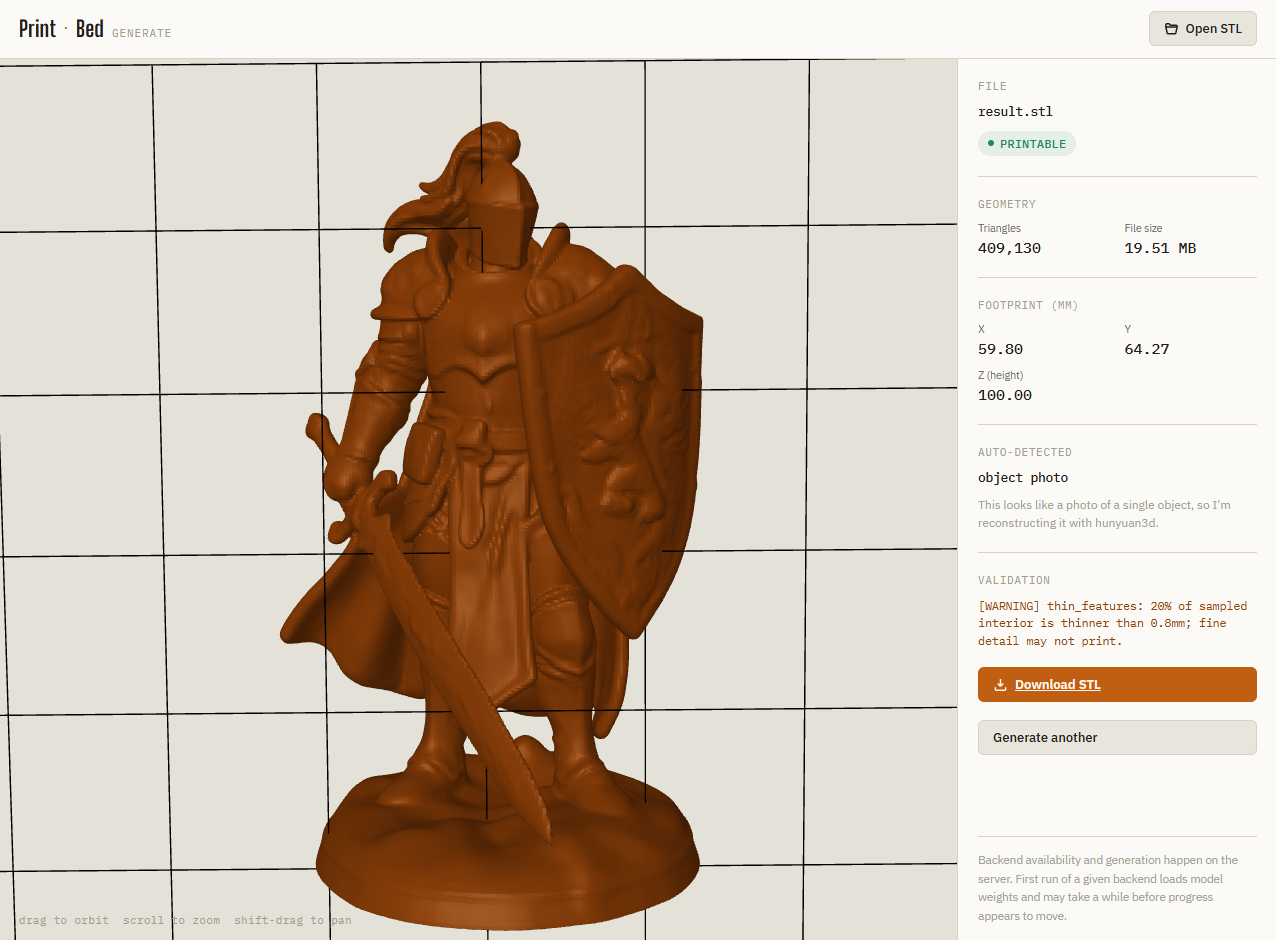
Once the job finishes, the result panel offers both the print-target .stl and, for backends that support it (TripoSR with texture=true), a colored .glb preview download — the same pair covered in §3’s TripoSR overview and §10’s status summary.
7. Hardening for Production: Three Independent Memory Bugs
Running a long-lived web server against real GPU workloads surfaced a run of out-of-memory crashes. The instructive part wasn’t any single fix — it’s that “OOM” was never one bug across this whole investigation. It was three unrelated causes that happened to produce the same symptom, and treating them as one problem would have meant chasing the wrong fix repeatedly.
-
Orphaned duplicate processes. Every time the local VLM server got relaunched (a new flag, a recovery from an earlier crash), the previous
llama-server-rocmprocess sometimes ended up stopped rather than terminated — still holding its full model weights in memory, just suspended. Three of these accumulated silently over one long session, quietly consuming ~9 GB of dead memory before anyone noticed.psshowing multiple instances of the same server was the tell;kill -9on the stale ones (killalone doesn’t reach a stopped process) recovered the memory immediately. -
An oversized KV cache. The VLM server was launched with
--ctx-size 262144— a quarter-million tokens of pre-allocated context, sized at startup regardless of actual use. Real usage for this pipeline’s classify/extract calls — one image, a short prompt, a capped completion — never came close to needing more than roughly 13,500 tokens. Dropping to--ctx-size 32768(still generous headroom, 8x smaller than before) resolved crashes on exactly the image that had previously triggered them. -
A model reload on every single call. This one was in
printable’s own code, not the VLM server. The backend registry created a brand-new backend instance — and reloaded the entire model from disk — on every generation call, including repeated calls to the same backend within one CLI invocation’s own multi-panel or multi-view loop, not just separate web requests. Three consecutivehunyuan3dgenerations in one server process, each a full ~110-second reload, eventually exhausted memory on the third. The fix was to cache backend instances per name, invalidated automatically if the underlying factory changes — a detail that mattered in practice, since it’s exactly what let the existing test suite catch a real regression (a test that swaps in a fake backend for testing was getting shadowed by a stale cached real instance) before calling the fix done.
None of these fixes were guessed. Each one was root-caused from a kernel OOM-killer log line, a systemctl/journalctl trace, or a reproducible test failure, and each fix was verified by reproducing the original failure and confirming it no longer happened — not assumed fixed because the reasoning sounded right.
8. Evaluating lemonade-sdk as an Alternative
lemonade-sdk/lemonade
is a community project with AMD engineer contributions, explicitly targeting Strix Halo/gfx1151, with its own maintained ROCm llama.cpp fork rather than wrapping stock builds. It looked like a promising, lower-maintenance alternative to hand-running llama-server-rocm — unified server management, a model catalog, AMD-tuned defaults instead of hand-derived flags.
The evaluation surfaced real friction, worth recording honestly rather than glossing over:
- A version gap. The PPA-installed CLI reported
10.2.0; the project’s own website catalog reflected a newer11.8.0. A model shown on the website with a ready-to-copylemonade pull <name>command failed locally with a namespace error, because it simply wasn’t in the older, installed catalog yet. Manual registration (--checkpoint main/mmproj,--recipe llamacpp) worked around it. - A cache-location surprise.
lemonade pull’s first run returned success suspiciously fast, with no real download progress — turned out to be a false read of “shares the same model cache” based on file timestamps that predated the pull entirely. Lemonade actually runs as its own systemd service under a dedicated system user, with a completely separate model cache — a second run showed genuine transfer progress into that separate location. Good reminder that a fast “success” message is not proof of what a service actually did; its own logs (journalctl -u lemonade-server) were the only reliable source of truth throughout this evaluation. - Their own suggested model failed to load. Verified byte-for-byte against Lemonade’s own model registry (not just the website) that the pull command used was exactly correct — and it’s their
"suggested": truemodel for this use case. It still failed:llama_model_load: error loading model: missing tensor 'blk.64.ssm_conv1d.weight'on their ROCm backend on this hardware. The tensor name is its own small discovery —ssm_conv1d/ssm_d_inner/ssm_d_stateconfirm Qwen3.8-27B is a hybrid SSM/Mamba+attention architecture, not a plain transformer, which is likely exactly why a general-purpose GGUF conversion pipeline could miss a tensor one of its SSM layers needs. Not a mistake on this end; a real gap in their gfx1151 ROCm support for this specific model as of this writing.
Parked, not abandoned. The practical question this evaluation existed to answer — should the hand-run setup be replaced — is already settled: not yet, and the existing llama-server-rocm setup keeps running untouched. Worth revisiting once Lemonade’s ROCm support for this model matures.
9. Evaluating the Newer ROCm/TheRock Stack: A Same-Day Regression, Reverted Safely
The ROCm/TheRock stack was moving quickly enough that it was worth testing the newer packages against the known-good environment rather than assuming the older setup was still the best option.
The experiment produced an interesting result: the newer PyTorch build showed a real improvement in the ROCm attention path, but upgrading the entire environment also exposed compatibility problems in native extensions that printable depends on.
The older environment was therefore kept as the production baseline while the newer stack was treated as an experimental branch.
What worked, verified with real numbers, not assumed:
| PyTorch build | Unflagged attention | AOTriton experimental flag |
|---|---|---|
| 7.13.0a20260513 (known-good) | 106ms/call, warning fires | 8.66ms/call |
| 10.1.0a20260829 (experimental) | ~4.7ms/call, no warning | ~4.7ms/call |
The result was significant: unflagged attention on the newer build was already faster than flagged attention on the old build. So there is a genuine performance reason to keep watching the newer ROCm stack.
What broke actual printable use
Regenerating a test mesh through triposr — which compiles torchmcubes, a native marching-cubes extension from source — failed with:
vol must be a CPU tensorThe immediate cause was an old torchmcubes build being reused from uv’s cache after the torch upgrade. Clearing that cache and forcing a clean rebuild removed that particular failure.
That exposed a second problem: the new nightly’s ROCm/CMake packaging itself was not yet compatible with the native-extension build used by this pipeline. Torch’s LoadHIP.cmake failed while parsing an empty HIP version variable:
math cannot parse the expression: "( * 100) + ": syntax errorThe newer environment also required additional ROCm SDK setup because the expected hip-lang CMake configuration was not present until the corresponding development package was initialized.
The call: revert, don’t push through
At that point the correct engineering decision was to revert rather than destabilize a working production environment.
I reinstalled the known-good PyTorch build, clean-rebuilt torchmcubes against it, restored printable’s pinned dependencies, and verified the complete path again:
printable generate character.png --backend triposr --size 80 --sheet
→ PRINTABLEThe full test suite was green again.
The conclusion is therefore not “the newer ROCm stack is bad.” Quite the opposite: the attention benchmark is encouraging. The conclusion is that the newer stack was not yet a drop-in replacement for this particular mixed Python/native-extension workload at the time of testing.
For printable, the older environment remains the known-good baseline. The newer TheRock stack is worth retesting as its packaging and native-extension compatibility mature.
10. What’s Next: Hunyuan3D Texture Painting
The immediate next milestone is not basic colored GLB export — that already works through TripoSR and is covered above. The unfinished piece is getting Hunyuan3D’s texture-painting pipeline running reliably on AMD.
Worth being precise about this one, because “ROCm doesn’t support it yet” undersells how far it actually got. Hunyuan3D-2.1’s own README has no ROCm or AMD support story for this pipeline — the porting work described here is entirely this project’s own adaptation.
Shape generation (the part printable actually ships) needed real work but no GPU-kernel porting: a self-contradicting requirements.txt had to be filtered by hand, a missing setup.py was written for hy3dshape, and TORCH_ROCM_AOTRITON_ENABLE_EXPERIMENTAL=1 was required to work around PyTorch’s ROCm attention dispatcher. Underneath, the shape model is largely composed of PyTorch operations, which is why it can run successfully with the native ROCm build.
Texture painting is a different story. Genuine kernel-level porting was attempted rather than stopping at dependency installation. custom_rasterizer and a second extension, DifferentiableRenderer, were compiled natively for gfx1151 using a hipified build.
Getting the pipeline to construct required fixing six separate compatibility problems:
diffusersversion drift- missing Blender Python wheel
- changed
torchvisionAPI - inconsistent upstream checkpoint path
- missing system OpenGL library
trimeshversion drift
After all of that, the remaining failure was a real GPU fault.
custom_rasterizer’s hipified kernels reproducibly triggered a [gfxhub] page fault, with dmesg showing an amdgpu ring timeout and GPU reset. The driver recovered without a reboot, but because the Radeon 8060S is an integrated GPU, the reset temporarily affected other GPU clients on the machine as well.
That makes this fundamentally different from the earlier dependency problems: the pipeline can be made to build, but the rasterizer kernel itself is not yet reliable on this ROCm configuration.
Full setup and troubleshooting details are kept in
docs/SETUP.md
.
For now:
- STL generation: Hunyuan3D 2.1
- Fast/draft generation: TripoSR
- Colored GLB preview: TripoSR
- Hunyuan3D texture painting: experimental / blocked on AMD
- Primary engineering priority: monitor upstream changes or test a different ROCm/kernel combination rather than masking a reproducible GPU page fault
Conclusion & Code
Building printable showed me that turning 2D images into real-world 3D objects is about much more than raw model weights — the magic lies in the unglamorous stages of mesh repair, boolean operations, orientation optimization, and physical validation.
The complete project is open-source under the MIT license:
👉 GitHub Repository: seehiong/printable
If you have an AMD or NVIDIA GPU and a 3D printer, clone the repo, run uv sync, and try turning your favorite character sheet or portrait into a physical model!