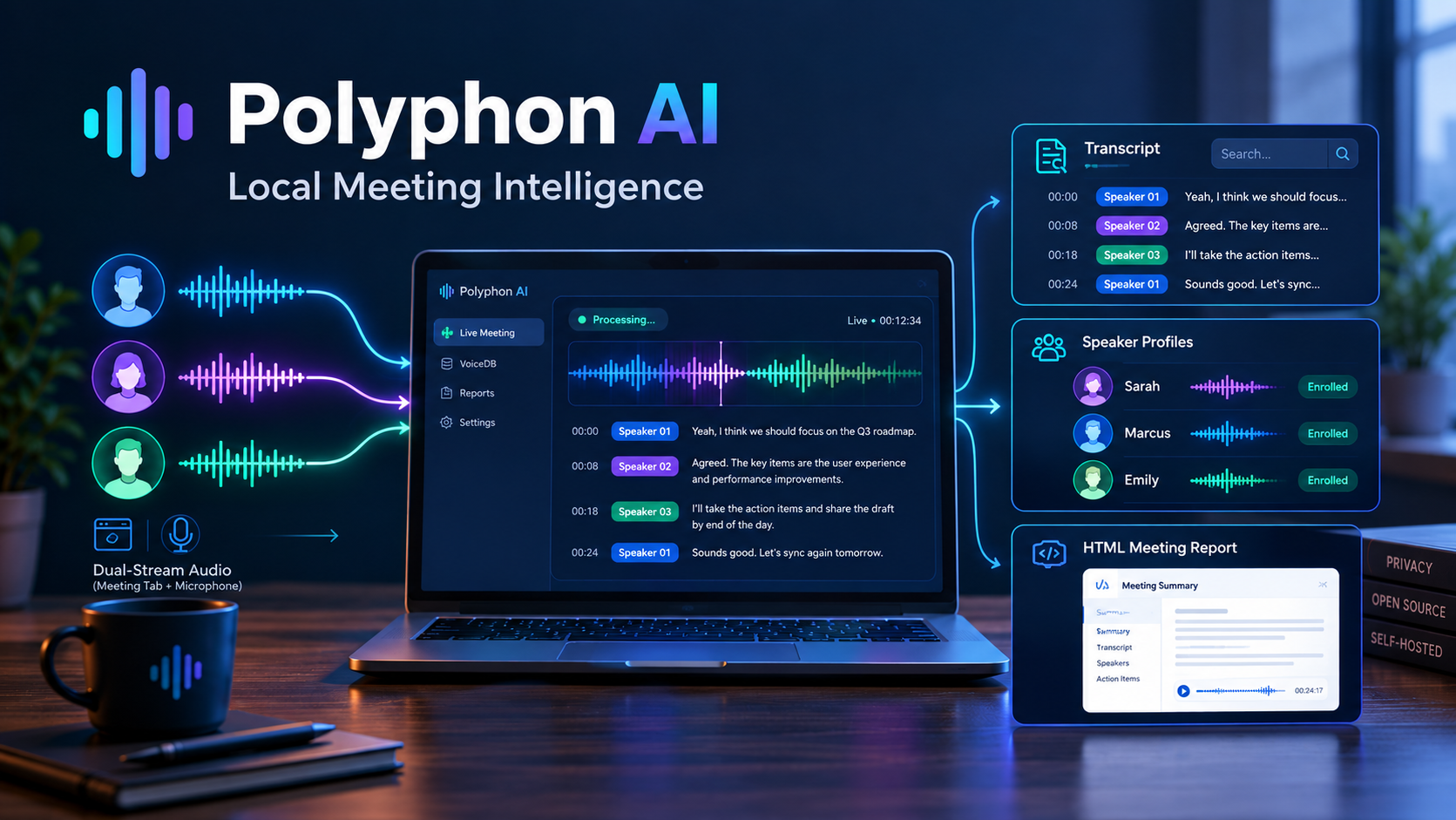
Today, I am releasing
polyphon-ai
(Apache-2.0) — now available on
PyPI (pip install "polyphon-ai[all]")
.
Polyphon AI is a local-first meeting intelligence engine designed to keep meeting audio, transcripts, speaker embeddings, and generated reports under the user’s control. It captures dual-stream audio without kernel-level audio drivers or an always-present meeting bot, delivers low-latency live diarization, maintains persistent speaker identities through VoiceDB, and generates self-contained interactive HTML meeting artifacts.
The core processing pipeline can run entirely on local infrastructure, with optional integration to locally hosted LLM servers for summarization.
The Meeting Bot Tax & The “Speaker 01” Dilemma
Over the past three years, corporate calendars have been overrun by automated transcription bots. Whether it is Otter.ai, Fireflies.ai, Fathom, or Read.ai, joining a Zoom, Google Meet, or Microsoft Teams call now frequently means sharing the virtual room with an uninvited bot participant.
While the convenience of automated summaries is undeniable, this cloud-first approach has hit three major friction points:
- The “Bot Tax” & Social Awkwardness: External clients and executive teams can feel uncomfortable when unannounced third-party bots join confidential calls. In regulated or highly sensitive environments, organizations may also prohibit third-party meeting bots because of privacy, data-residency, retention, or confidentiality requirements.
- The “Speaker 01” Drift: Most diarization pipelines treat every meeting as a separate clustering problem. They typically produce labels such as
Speaker 00,Speaker 01, andSpeaker 02, without persistent identity across sessions. If Sarah speaks on Monday, she may beSpeaker 00; when she joins on Wednesday, she could becomeSpeaker 03. Users are then forced into a repetitive cycle of manually re-labeling attendees. - The Streaming vs. Accuracy Trade-Off: Real-time meeting assistants must balance latency against diarization and transcription quality. Conversely, high-precision offline pipelines can leave users without useful speaker attribution or polished transcripts until after the conversation has ended.
To explore how a local-first system can address these trade-offs, I built Polyphon AI — an open-source meeting intelligence platform designed to run on a user’s local machine or private infrastructure.
┌─────────────────────────────────────────────────────────────────────────┐
│                    THE POLYPHON AI PHILOSOPHY                           │
│                                                                         │
│  1. Local Processing  : Audio & transcripts stay on your infrastructure │
│  2. Driverless Audio  : Web Audio API tab + mic capture (no bots/cables)│
│  3. Persistent Voice  : VoiceDB recognizes speakers across meetings     │
│  4. Dual-Pass Engine  : Sub-second live HUD + Pyannote batch precision  │
│  5. Portable Reports  : Standalone interactive HTML player artifacts    │
└─────────────────────────────────────────────────────────────────────────┘1. Market Landscape: Four Product Archetypes
To understand where Polyphon AI fits, let us look at the current meeting intelligence landscape:
Archetype 1: Cloud Meeting Bots (The Intrusive Joiners)
- Products: Otter.ai, Fireflies.ai, Fathom, Read.ai.
- Mechanism: Headless browser or SIP bot joins the call as a participant, streams audio to vendor cloud servers, and runs cloud-hosted ASR and LLMs.
- Pain Points: Visible bot presence causes attendee friction, raises compliance and consent concerns depending on organizational policy and local jurisdiction, exposes proprietary discussions to multi-tenant cloud storage, and incurs expensive per-seat recurring fees ($18–$40/user/month).
Archetype 2: Local Desktop Recorders (The Desktop Listeners)
- Products: Granola, Limitless, Supernormal, MacWhisper.
- Mechanism: Native desktop applications that capture microphone and/or system audio through OS-level audio facilities.
- Pain Points: Local capture does not necessarily mean zero egress. Depending on the product and configuration, transcripts or downstream AI processing may still involve cloud services. Desktop recording also introduces OS-specific audio-capture constraints, permissions, virtual devices, or mixed system-audio streams that can make clean speaker separation difficult during crosstalk.
Archetype 3: Cloud Speech APIs (The Infrastructure Providers)
- Products: Deepgram Nova-2, AssemblyAI, Speechmatics.
- Mechanism: Managed cloud WebSocket/REST APIs for speech recognition and diarization.
- Pain Points: Unbounded per-minute usage costs ($0.004–$0.015/min) and external data ingestion, requiring developers to build custom user interfaces and storage systems from scratch.
Archetype 4: Local-First Full-Stack Engine (Polyphon AI)
- Polyphon AI combines driverless in-browser audio capture with local neural speech models (Faster-Whisper, NeMo Sortformer, Pyannote 3.1) and on-device LLMs (via Ollama/vLLM). Audio never leaves the local machine, speaker identities persist across calls, and the entire system is open source (Apache-2.0).
2. Feature Comparison Matrix
| Feature | Cloud Bots (Otter / Fireflies) | Local Recorders (Granola) | Cloud APIs (Deepgram) | Polyphon AI (Local-First) |
|---|---|---|---|---|
| Deployment Model | 100% Public Cloud SaaS | Hybrid (Local App + Cloud LLM) | Public Cloud API | Local / Self-Hosted |
| Data Privacy & Egress | ❌ Vendor-hosted processing | ⚠️ Depends on product/configuration | ❌ Streamed to vendor API | ✅ Designed for Local / Self-Hosted Processing |
| Meeting Join Mechanism | External Bot Invited to Room | Virtual Desktop Audio Hook | N/A (API Only) | Driverless Web Audio API (Mic + Tab) |
| Optional Automated Bot | Native | ❌ None | N/A | ✅ Built-in (polyphon bot) |
| Live Streaming Diarization | Proprietary Cloud | ❌ None (Post-Call Batch) | Streaming Clustering | ✅ NeMo Sortformer (Sub-Second) |
| High-Precision Offline Diarization | Cloud Batch | Cloud Batch | Batch Endpoints | ✅ Pyannote 3.1 Engine |
| Persistent Speaker Voiceprints | ⚠️ Basic heuristic name tagging | ❌ None (Re-clusters per call) | ❌ Raw embeddings only | ✅ VoiceDB Embedding Matching |
| Word-Level Karaoke Playback | Partial | ❌ Plain text notes | Timestamps only | ✅ Dynamic CSS Word-Level Sync |
| Clean Verbatim (Timestamp-Preserving) | ⚠️ Cloud post-filter | ❌ None | Post-processing API | ✅ Frame-Accurate Filler Tagging |
| Dual-Pass Model Comparison | ❌ None | ❌ None | ❌ None | ✅ Live vs Batch Side-by-Side Audit |
| LLM Inference Engine | Proprietary Cloud | OpenAI GPT-4o / Claude 3.5 | Vendor LeMUR | ✅ Local Ollama / vLLM / ROCm |
| Package Distribution | Closed SaaS / Web | Closed Binary (Mac) | SDK / Cloud | PyPI (polyphon-ai) / CLI / UV |
| Export Formats | Proprietary Link / TXT | Markdown | JSON only | Interactive HTML, MD, SRT, JSON |
| Licensing | Proprietary Closed Source | Proprietary Closed Source | Proprietary Commercial | Open Source (Apache-2.0) |
| Cost | $18 – $40 / user / mo | $12 – $20 / user / mo | $0.004 – $0.015 / min | Open Source ($0 Software License) |
3. Deep Architectural Breakdown
To address these practical engineering constraints, Polyphon AI is organized around four core design pillars:
Pillar 1: Driverless Dual-Stream Audio Capture
Capturing meeting audio typically involves one of two compromises:
- Inviting a third-party bot into the call, which introduces social friction and policy compliance hurdles in sensitive environments.
- Installing virtual audio loopback drivers (such as BlackHole or Virtual Audio Cable), which require administrative privileges often unavailable on enterprise machines and can inadvertently capture unintended system audio.
Polyphon AI takes a browser-first approach using standard HTML5 Web Audio APIs. By combining getDisplayMedia (capturing remote meeting tab audio) and getUserMedia (capturing the local microphone), the browser captures clean dual-stream audio directly from the meeting tab without requiring virtual soundcards, kernel drivers, or bot participants.
Here is the core Web Audio capture pipeline implemented in
src/polyphon/server/static/js/stream.js
:
// src/polyphon/server/static/js/stream.js - Web Audio API Dual Stream Mixer
async function startDualCapture() {
    // 1. Capture local microphone
    const micStream = await navigator.mediaDevices.getUserMedia({
        audio: { channelCount: 1, sampleRate: 16000, echoCancellation: true, noiseSuppression: true }
    });

    // 2. Capture meeting tab audio (remote participants / speaker output)
    const displayStream = await navigator.mediaDevices.getDisplayMedia({
        video: true, // Required by browser API to capture tab audio
        audio: { echoCancellation: false, noiseSuppression: false, autoGainControl: false }
    });
    // Discard video tracks immediately to eliminate CPU/GPU rendering overhead
    displayStream.getVideoTracks().forEach(track => track.stop());

    // 3. Web Audio API Mixing Graph (16kHz AudioContext)
    const audioContext = new (window.AudioContext || window.webkitAudioContext)({ sampleRate: 16000 });
    const mixer = audioContext.createGain();

    const micSource = audioContext.createMediaStreamSource(micStream);
    const micGain = audioContext.createGain();
    micSource.connect(micGain).connect(mixer);

    const displaySource = audioContext.createMediaStreamSource(displayStream);
    const displayGain = audioContext.createGain();
    displaySource.connect(displayGain).connect(mixer);

    // 4. Capture mixed stream via ScriptProcessorNode
    const processorNode = audioContext.createScriptProcessor(4096, 1, 1);
    mixer.connect(processorNode);

    // 5. Connect to a zero-gain silent sink to prevent acoustic feedback/echo
    // while keeping the browser audio processing graph running continuously
    const silentSink = audioContext.createGain();
    silentSink.gain.value = 0;
    processorNode.connect(silentSink).connect(audioContext.destination);

    // 6. Convert float samples to PCM16 and stream over WebSocket (/api/stream/ws)
    processorNode.onaudioprocess = (e) => {
        if (!isLiveStreaming || ws.readyState !== WebSocket.OPEN) return;
        const inputData = e.inputBuffer.getChannelData(0); // 16kHz float32
        const buffer = new ArrayBuffer(inputData.length * 2);
        const view = new DataView(buffer);
        for (let i = 0; i < inputData.length; i++) {
            const s = Math.max(-1, Math.min(1, inputData[i]));
            view.setInt16(i * 2, s < 0 ? s * 0x8000 : s * 0x7FFF, true);
        }
        ws.send(buffer); // Raw 16kHz PCM16 chunk streamed to backend
    };
}silentSink.gain = 0), keeping the recording pipeline fully energized while letting you listen to your call without echo. At the same time, echoCancellation: true on the microphone ensures physical speaker output doesn’t bleed back into the mic.
When an unattended recording is needed for open WebRTC platforms (such as Jitsi Meet or public webinars), Polyphon AI also provides a headless virtual attendee powered by Playwright:
# Join an open WebRTC meeting room (e.g., Jitsi Meet) as a headless attendee:
polyphon bot "https://meet.jit.si/my-project-room" --name "Polyphon AI Notetaker"🎙️+💻 Mic & Meeting) runs directly in your authenticated browser tab via the Web Audio API — giving you reliable zero-bot recording for corporate calls, while reserving polyphon bot for open WebRTC rooms.
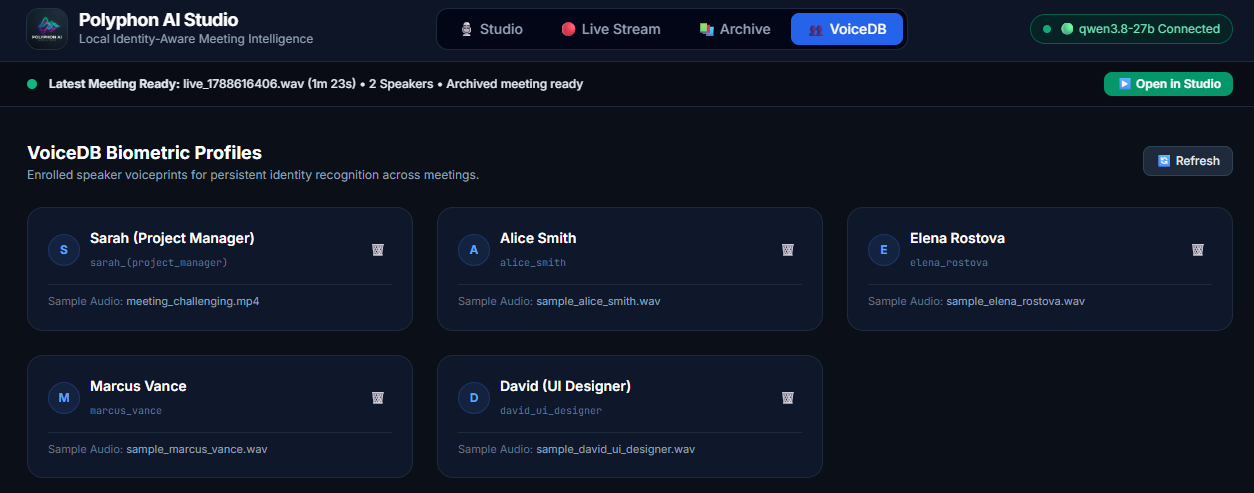
Pillar 2: Persistent Cross-Meeting Identity (VoiceDB)
In standard diarization workflows, speakers are re-clustered from scratch on every run. Sarah might be SPEAKER_00 on Monday and SPEAKER_02 on Wednesday. Existing solutions either force users into tedious manual re-labeling or store raw audio on proprietary clouds.
Polyphon AI introduces VoiceDB — a lightweight, persistent local speaker-embedding database built around Pyannote speaker representations and vectorized NumPy mathematics, requiring no external vector-database daemon or cloud service.
VoiceDB stores normalized speaker representations locally and uses cosine similarity to associate newly observed diarization clusters with previously enrolled identities.
┌─────────────────────────┐       Extract Cleanest High-SNR Turns
│  Recorded Audio Stream  │ ──────────────────────────────────────────┐
└─────────────────────────┘                                           │
             │                                                        ▼
             ▼                                           ┌─────────────────────────┐
┌─────────────────────────┐                              │    Pyannote Speaker     │
│  Pyannote Diarization   │                              │     Embedding Model     │
│  Clusters: S0, S1, S2   │                              └─────────────────────────┘
└─────────────────────────┘                                           │
             │                                                        ▼
             │  Vectorized Batch Query                   ┌─────────────────────────┐
             └─────────────────────────────────────────► │ L2 Normalized Vector    │
                                                         │       q ∈ ℝᴰ            │
                                                         └─────────────────────────┘
                                                                      │
                                                                      ▼
                                                         ┌─────────────────────────┐
                                                         │ VoiceDB Unit Vectors    │
                                                         │  emb_matrix · q ≥ 0.65? │
                                                         └─────────────────────────┘
                                                               /             \
                                                        [YES] /               \ [NO]
                                                             ▼                 ▼
                                                 ┌───────────────────────┐   ┌───────────────────────┐
                                                 │ Auto-Map to Identity: │   │ Verbal Discovery / UI │
                                                 │ "Sarah (Lead Eng)"    │   │ Prompt: [👤 Enroll]   │
                                                 └───────────────────────┘   └───────────────────────┘
                                                             │                           │
                                                             ▼                           ▼
                                                 ┌───────────────────────┐   ┌───────────────────────┐
                                                 │ 70/30 Centroid Blend: │   │ Create New Profile:   │
                                                 │ norm(0.7·v_old+0.3·q) │   │ VoiceDB.enroll(name,q)│
└───────────────────────┘ └───────────────────────┘Production Code: VoiceDB Core Architecture
Below is the production implementation from
src/polyphon/voicedb/base.py
, demonstrating normalized centroid updates and vectorized multi-speaker matching:
# src/polyphon/voicedb/base.py - Persistent Local Speaker Embedding Engine
from __future__ import annotations
import json
import warnings
from pathlib import Path
import numpy as np

class VoiceDB:
    """Persistent local database for speaker voice embeddings and identity matching."""

    def __init__(self, db_path: str | Path = "~/.polyphon/voicedb"):
        self.db_dir = Path(db_path).expanduser()
        self.db_dir.mkdir(parents=True, exist_ok=True)
        self.registry_path = self.db_dir / "registry.json"
        self.embeddings_dir = self.db_dir / "embeddings"
        self.embeddings_dir.mkdir(exist_ok=True)
        self._embedding_cache: dict[str, np.ndarray] = {}
        self._load_registry()

    def enroll(
        self,
        name: str,
        embedding: np.ndarray,
        speaker_id: str | None = None,
        audio_path: str | None = None,
    ) -> str:
        """Enroll a new speaker or update an existing profile with 70/30 centroid blending."""
        spk_id = speaker_id or name.lower().replace(" ", "_")
        embedding_file = self.embeddings_dir / f"{spk_id}.npy"

        # L2-normalize input embedding vector
        norm = np.linalg.norm(embedding)
        norm_emb = (embedding / norm) if norm > 0 else embedding

        # 70/30 Centroid Blending Adaptation
        if embedding_file.exists():
            try:
                existing = np.load(embedding_file)
                combined = 0.7 * existing + 0.3 * norm_emb
                combined_norm = np.linalg.norm(combined)
                norm_emb = combined / combined_norm if combined_norm > 0 else combined
            except (OSError, ValueError):
                pass

        np.save(embedding_file, norm_emb)
        self._embedding_cache[spk_id] = norm_emb.copy()

        self.registry[spk_id] = {
            "name": name,
            "id": spk_id,
            "embedding_file": str(embedding_file),
            "sample_audio": str(audio_path) if audio_path else None,
        }
        self._save_registry()
        return spk_id

    def identify(
        self,
        query_embedding: np.ndarray,
        threshold: float = 0.65
    ) -> tuple[str | None, float]:
        """Match query embedding against enrolled voiceprints using vectorized cosine similarity."""
        if not self.registry:
            return None, 0.0

        q_norm = np.linalg.norm(query_embedding)
        if q_norm == 0:
            return None, 0.0
        q_vec = query_embedding / q_norm

        dim = q_vec.shape[-1]
        spk_ids = [sid for sid, vec in self._embedding_cache.items() if vec.shape[-1] == dim]
        if not spk_ids:
            return None, 0.0

        # Vectorized batch cosine similarity via single BLAS matrix-vector product
        emb_matrix = np.stack([self._embedding_cache[sid] for sid in spk_ids])
        similarities = np.dot(emb_matrix, q_vec)

        best_idx = int(np.argmax(similarities))
        best_sim = float(similarities[best_idx])
        best_spk_id = spk_ids[best_idx]
        best_name = self.registry.get(best_spk_id, {}).get("name")

        if best_sim >= threshold and best_name:
            return best_name, best_sim

return None, max(0.0, best_sim)Addressing Identity Drift: 5 Key Architectural Properties of VoiceDB
-
Continuous Online Adaptation (70/30 Centroid Blending):
A person’s acoustic profile can vary across sessions due to microphone changes, vocal fatigue, background noise, room acoustics, and recording conditions. Rather than discarding the historical profile or creating a completely independent identity, VoiceDB blends the existing representation with the new observation:
\(\mathbf{v}_{\text{combined}} = \text{norm}\left(0.7 \times \mathbf{v}_{\text{existing}} + 0.3 \times \mathbf{v}_{\text{new}}\right)\)
This gives historical observations greater weight while allowing the stored representation to adapt gradually to changing acoustic conditions.
-
Vectorized Matrix Dot-Product Matching (
O(ND)): Instead of iterating through speakers in a Python loop, VoiceDB packs cached unit-vectors into a 2D NumPy matrix (emb_matrix). Matching an unknown speaker cluster is then performed using a single optimized matrix-vector operation (np.dot(emb_matrix, q_vec)). For a modest number of enrolled speakers, this keeps matching extremely lightweight while moving the numerical work into optimized native linear-algebra routines. -
Zero-Touch Verbal Discovery (
--infer-names&--auto-enroll):Users do not necessarily need to enroll every attendee before a meeting. Polyphon AI can inspect early conversational turns for natural self-introductions such as “Good morning, this is Marcus” or “Hi everyone, I’m Sarah from backend engineering”. When a name can be confidently associated with a diarized speaker, Polyphon AI can map that speaker label to the inferred name and, when
--auto-enrollis enabled, store the corresponding speaker embedding in VoiceDB.This turns a simple verbal introduction into an optional starting point for persistent speaker recognition in subsequent meetings.
-
Multi-Cluster Resolution for Solo & Uneven Recordings: Unsupervised clustering models often fragment a single speaker into
SPEAKER_00andSPEAKER_01due to head turns or dynamic vocal volume. Usingpolyphon assign --map 0="Alice" --map 1="Alice" --enroll, Polyphon AI automatically consolidates the disjoint clusters, normalizes talk-time statistics to 100%, and unifies both acoustic profiles into Alice’s single VoiceDB centroid. -
One-Click Studio Enrollment with Audio Previews: In Polyphon AI Studio, users simply click
[👤 Enroll]on any speaker card. Polyphon AI extracts the cleanest speech frames, updatesoutputs/{id}.json, renames dialogue turns in-place in the web UI, slices a clean 1–5s audio preview (outputs/samples/sample_<slug>.wav) for the VoiceDB catalog player, and regenerates all standalone HTML, Markdown, and SRT reports instantly.
Pillar 3: Dual-Pass Streaming & Batch Diarization
Meeting intelligence systems must balance responsiveness against the amount of context available to the recognition and diarization models. Streaming inference has strict latency constraints, while offline processing can revisit the complete recording with more context and more computational budget.
Polyphon AI implements a Dual-Pass Hybrid Architecture:
-
Pass 1 (Real-Time Live HUD): Uses Nvidia NeMo’s streaming Sortformer model paired with streaming Faster-Whisper to provide low-latency speaker attribution, live dialogue turns, speaking cadence (Words Per Minute), and talk-time telemetry.
-
Pass 2 (Post-Call Reconciliation): Once the call concludes, Polyphon AI runs an offline reconciliation pass using Pyannote 3.1 and full-context Faster-Whisper Large-v3, refining the transcript and speaker segmentation and matching recognized speakers against VoiceDB.
-
Side-by-Side Audit Modal: Polyphon AI Studio includes a dedicated Benchmark & Comparison Modal (
compare.js) allowing users to inspect the live streaming output against the processed batch output side by side. This makes the trade-off between low latency and post-call refinement visible rather than hidden.
Pass 1 (Live HUD)    : [Sub-Second Stream] ──► Sortformer + Streaming Whisper ──► Live Turns & WPM
                                                                                     │
                                                      ┌──────────────────────────────┘
                                                      ▼
Pass 2 (Post-Call)   : [Full 16kHz WAV]    ──► Pyannote 3.1 + Whisper Large-v3  ──► VoiceDB Match & LLM Notes
                                                                                     │
                                                      ┌──────────────────────────────┘
                                                      ▼
Audit & Verification : [Side-by-Side View] ──► Real-Time WER & Diarization Comparison ModalPillar 4: Portable Artifacts & Timestamp-Preserving Clean Verbatim
Instead of locking meeting notes behind a proprietary SaaS portal, Polyphon AI generates self-contained, portable artifacts designed to remain useful independently of the Polyphon AI server or an active cloud subscription:
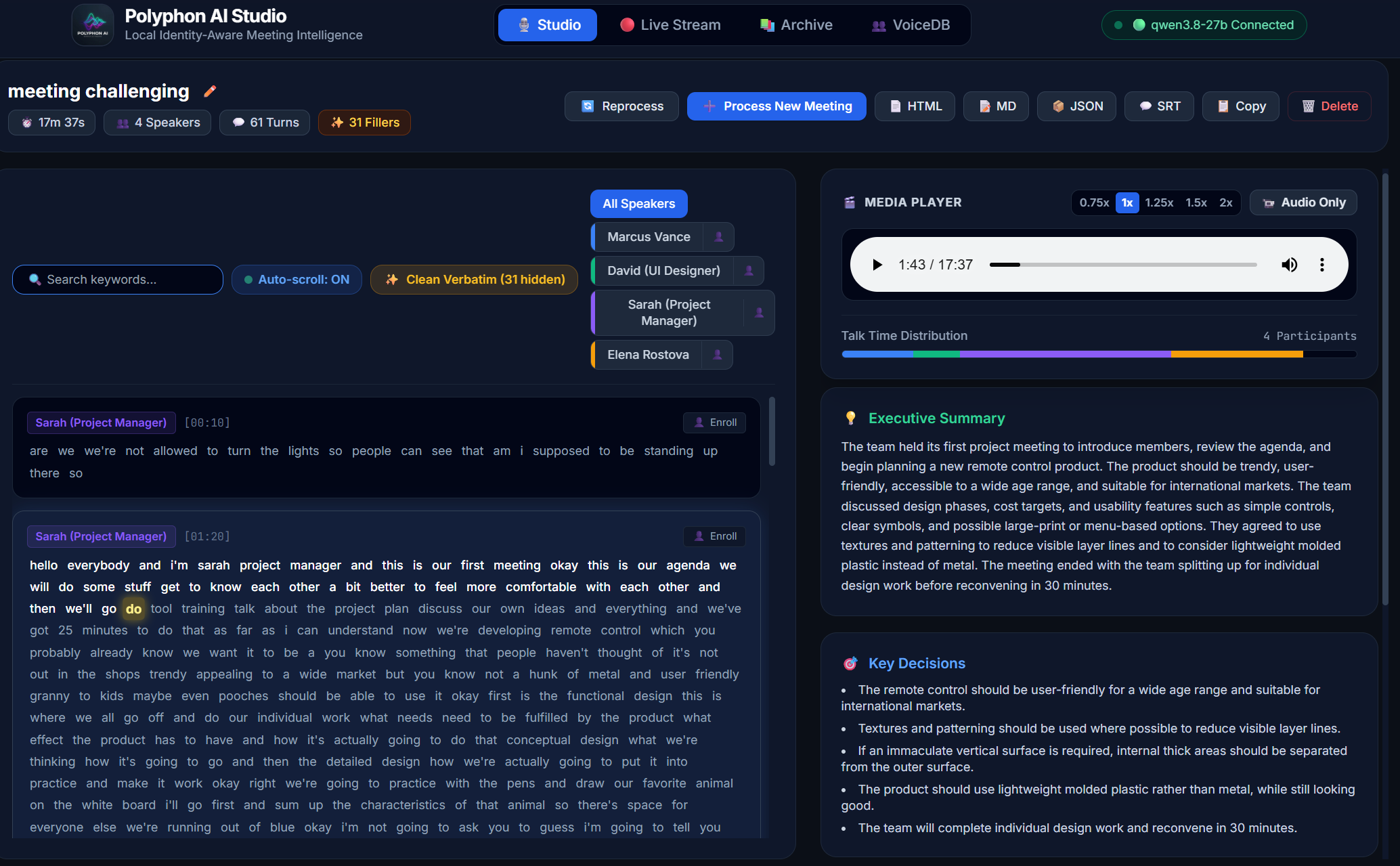
- Interactive Standalone HTML Report (
--format html): A single, portable.htmlfile embedding the media player, word-level clickable karaoke synchronization, proportional speaker talk-time visualizer, instant keyword search, speaker isolation filters, checkable action items (- [ ] task (@assignee)), and executive summaries. - Clean Verbatim Mode (
--clean-fillers): Professional meeting notes often benefit from removing vocal disfluencies (“um”, “uh”, “er”, “ah”, “hmm”). Conventional approaches may either remove words destructively or leave disfluencies intact. Polyphon AI instead tags disfluencies at the token level: text reports and clipboard exports can present a clean transcript while preserving the original token timing information for audio scrubbing and karaoke-style highlighting. Viewers can toggle between raw and clean verbatim in real time using the in-report✨ Clean Verbatimbutton. - Standardized Exports: Markdown (
.md), SubRip Subtitles (.srt), and rich JSON manifest (.json).
outputs/
├── meeting.html       <-- Standalone interactive player, karaoke sync & insights
├── meeting.md         <-- Clean Markdown formatted transcript & action item checklist
├── meeting.srt         <-- Frame-accurate video/audio subtitle track
├── meeting.json       <-- Machine-readable manifest (word timestamps & VoiceDB IDs)
└── audio.wav <-- 16kHz mono master audio recording4. Getting Started with Polyphon AI
Polyphon AI is designed to run locally across a range of hardware, from capable CPU-based systems to high-VRAM NVIDIA workstations, Apple Silicon Macs, and AMD unified-memory APUs such as Strix Halo. Actual transcription and diarization throughput depends heavily on the selected models and available compute.
Prerequisites
- Python 3.10+
- FFmpeg (Shared Build): Speaker diarization relies on
torchcodec, which dynamically loads FFmpeg shared runtime libraries (avcodec,avformat,avutil). On Windows, install viawinget install Gyan.FFmpeg.Sharedor download a shared release. - Hugging Face Token: Accept model access agreements on
hf.co/pyannote/speaker-diarization-3.1
and export
HF_TOKEN="hf_...". - Local LLM Server (Optional for
--summarize): Any OpenAI-compatible server (Ollama,llama-server, vLLM, LM Studio) running locally or on your LAN.
Installation Options
Option A: Install from PyPI (Recommended)
Polyphon AI is officially published on PyPI. You can install the complete pipeline including speech recognition, neural diarization, FastAPI server, and Playwright bot:
# Complete offline pipeline
pip install "polyphon-ai[all]"

# Or install as an isolated global CLI tool:
pipx install "polyphon-ai[all]"
# or:
uv tool install "polyphon-ai[all]"

# Validate runtime dependencies and FFmpeg shared libraries
polyphon doctorSelective Installation Extras:
polyphon-ai: Core lightweight CLI & reconciliation engine (no heavy PyTorch dependencies).polyphon-ai[asr]: Speech recognition (faster-whisper).polyphon-ai[diarization]: Neural speaker diarization (pyannote.audio+torch).polyphon-ai[server]: WebUI dashboard & REST/WebSocket server (fastapi+uvicorn).polyphon-ai[bot]: Automated meeting bot attendee (playwright).polyphon-ai[all]: Complete offline meeting intelligence pipeline.
Option B: Clone & Run from Source (Contributors)
# 1. Clone repository
git clone https://github.com/seehiong/polyphon-ai.git
cd polyphon-ai

# 2. Sync all dependencies using Astral uv
uv sync --all-extras

# 3. Verify environment & dependencies
uv run polyphon doctorGuided 3-Step CLI Tour
Polyphon AI’s CLI is built around structured manifests, making speaker attribution and voiceprint management effortless:
# Step 1: Transcribe media to a structured JSON manifest
polyphon transcribe meeting.mp4 --diarize --format json

# Step 2: Assign real identities, auto-enroll voiceprints into VoiceDB, and synthesize notes
polyphon assign outputs/meeting.json \
  --map SPEAKER_00="Marcus Vance" \
  --map SPEAKER_01="David (UI Designer)" \
  --enroll \
  --summarize

# Step 3: Any future meeting now recognizes those enrolled voices via VoiceDB!
polyphon transcribe meeting_q4.mp4 --diarize --identify --summarize --format htmlYou can also run zero-touch transcription where Polyphon AI discovers speaker names verbally and auto-enrolls them on the fly:
polyphon transcribe meeting.mp4 --diarize --infer-names --auto-enroll --summarize --format htmlLaunching Polyphon AI Studio (Web Workspace)
Polyphon AI Studio offers a 4-tab web workspace (Studio, Live Stream, Archive, VoiceDB) served directly with zero frontend build steps:
# Recommended for LAN access (enables HTTPS & microphone permissions across devices):
polyphon serve --self-signed --host 0.0.0.0 --port 7860--self-signed is Key for LAN Access:
Modern browsers restrict microphone and Web Audio capture strictly to Secure Contexts (HTTPS). When accessing Polyphon AI from other devices on your home or office network (http://192.168.x.x:7860), browsers block microphone recording over plain HTTP. Passing --self-signed automatically generates local SSL certificates, allowing seamless dual-capture and live streaming from any laptop, tablet, or phone on your private network.
Open https://localhost:7860:
- Navigate to Live Stream and select
🎙️+💻 Mic & Meeting(Dual Capture). - Select your meeting browser tab (Google Meet / Teams / Zoom) and enable Share tab audio.
- Select your local microphone.
- Watch real-time dialogue turns, speaking speed (WPM), and active speaker telemetry stream into the Live HUD.
- Click Stop & Finalize to generate your interactive report, enroll speaker profiles, and inspect live vs batch benchmarks.
5. Market Outlook & Strategic Takeaways
Where is meeting intelligence heading over the next few years?
-
The Move Toward User-Controlled Capture: As organizations become more sensitive to meeting data, there is increasing value in architectures where users control how audio is captured, processed, stored, and shared — whether that means local applications, private infrastructure, or enterprise-managed deployments.
-
On-Device Small Language Models (SLMs): Compact models running locally can increasingly handle summarization, extraction, classification, and other post-transcription tasks without requiring sensitive meeting transcripts to leave the environment.
-
Persistent Context Beyond Transcription: Speech recognition is only one layer of meeting intelligence. Persistent speaker identity, historical context, roles, action items, and relationships between conversations can turn independent transcripts into a longitudinal knowledge system.
This is the direction I believe makes local-first meeting intelligence particularly interesting: the transcript becomes the beginning of the memory layer, rather than the end product.
Summary & Open Source Repository
Polyphon AI brings together:
- Local-First Processing: Runs the core meeting intelligence pipeline on local or private infrastructure without recurring SaaS processing fees.
- Now on PyPI: Simple installation via
pip install "polyphon-ai[all]"or an isolated CLI withuv tool install. - Driverless Dual-Stream Capture: Web Audio API captures meeting-tab and microphone audio without requiring virtual soundcard drivers or a persistent meeting bot.
- Persistent Speaker Identity (VoiceDB): Local speaker embeddings, 70/30 centroid adaptation, verbal name inference (
--infer-names), and vectorized cosine matching reduce repetitiveSpeaker 01manual labeling across meetings. - Dual-Pass Processing: Low-latency Sortformer streaming feedback is paired with higher-context Pyannote 3.1 offline reconciliation.
- Timestamp-Preserving Clean Verbatim: Token-level filler tagging allows clean transcripts while retaining the original timing information required for synchronized playback.
- Self-Contained Interactive HTML Artifacts: Portable meeting reports with transcript synchronization, speaker information, search, and meeting insights.
📦 PyPI Package: https://pypi.org/project/polyphon-ai/
📦 GitHub Repository: https://github.com/seehiong/polyphon-ai
Feel free to clone the repository, install it from PyPI, test it with your own meetings, and experiment with persistent speaker profiles through VoiceDB.