polyphon-audio
is a small, local-first project for text-to-speech, voice cloning, and sound generation — voice cloning from a short reference clip, multi-voice narration, voice design from a text description, sound effects and music, and a live conversational voice loop, all running on your own GPU with no network round-trip.
Let’s get the framing right up front, because it matters more than the feature list: this is not an attempt to compete with ElevenLabs. ElevenLabs and services like it are good — genuinely good — at what they do, and they’re the right choice for most people most of the time. This project exists for a narrower reason: it’s a playground for learning what local, offline TTS can actually do on consumer hardware in 2026, and for the specific cases where “my script and my cloned voice go through a third party, metered per character” is a real cost rather than a footnote — a hobbyist audiobook, a voice you don’t want leaving your machine, an experiment that shouldn’t need an internet connection to run.
Standing on audio.cpp
None of this would exist without
audio.cpp
— a native, ggml-based inference engine covering TTS, ASR, voice cloning, voice design, and sound/music generation, with no Python runtime required, across NVIDIA, AMD, Apple Silicon, and CPU-only machines. All the actual model inference in this project — every waveform that comes out — is audio.cpp doing the work. Full credit to
0xShug0
for building and maintaining it.
What audio.cpp doesn’t give you out of the box is a product on top of the engine: it has no concept of a persona, a named voice that persists across calls, a multi-speaker script, or a conversation with memory. That’s the gap polyphon-audio fills — a thin integration layer, not a reimplementation of anything audio.cpp already does well.
The resident server, and why it matters
audio.cpp ships audiocpp_cli (one model, one invocation, exits when done) and audiocpp_server (loads models once, serves requests over HTTP for as long as it runs). For anything conversational, the difference is the whole ballgame — reloading a TTS model from disk on every turn of a conversation is a non-starter for anything that needs to feel live.
The server is configured with a plain JSON file listing which models to load and under what id. Here is the full server.json for the complete stack — voice cloning, ASR, voice design, and sound generation all resident at once:
{
  "host": "127.0.0.1", "port": 8091, "backend": "hip", "device": 0,
  "threads": 4, "lazy_load": true, "max_loaded_models": 0,
  "models": [
    {"id": "chatterbox",    "family": "chatterbox",   "task": "clon", "mode": "offline",
     "path": "models/Chatterbox-GGUF/chatterbox-q8_0.gguf"},
    {"id": "nemotron-asr",  "family": "nemotron_asr", "task": "asr",  "mode": "offline",
     "path": "models/Nemotron-3.5-ASR-Streaming-0.6B-GGUF/nemotron-3.5-asr-streaming-0.6b-q8_0.gguf"},
    {"id": "voice-design",  "family": "qwen3_tts",    "task": "vdes", "mode": "offline",
     "path": "models/Qwen3-TTS-12Hz-1.7B-VoiceDesign-GGUF/qwen3-tts-12hz-1.7b-voicedesign-q8_0.gguf"},
    {"id": "sound-music",   "family": "stable_audio", "task": "gen",  "mode": "offline",
     "path": "models/Stable-Audio-3-Small-Music-GGUF/stable-audio-3-small-music-q8_0.gguf"},
    {"id": "sound-sfx",     "family": "stable_audio", "task": "gen",  "mode": "offline",
     "path": "models/Stable-Audio-3-Small-SFX-GGUF/stable-audio-3-small-sfx-q8_0.gguf"}
  ]
}lazy_load plus max_loaded_models: 0 means every model in the list loads on first use and stays resident — useful when a single GPU is juggling an ASR model, a cloning model, a voice-design model, and two sound-generation models across one session, without knowing in advance which one gets used first.
The server speaks an OpenAI-compatible audio API: POST /v1/audio/speech for synthesis, POST /v1/audio/transcriptions for ASR — the same wire shapes the OpenAI audio API uses, which means anything already written against that API is most of the way to working against a fully local backend instead.
The live conversation loop
The real-time voice loop lives in
scripts/realtime/bot_fastrtc.py
and is built on
FastRTC
: browser mic → Silero VAD (ReplyOnPause) → Nemotron ASR → local LLM (streaming, sentence-by-sentence) → Chatterbox TTS → spoken reply, with barge-in support. The whole pipeline is async so FastRTC can actually cancel an in-flight reply when the user interrupts.
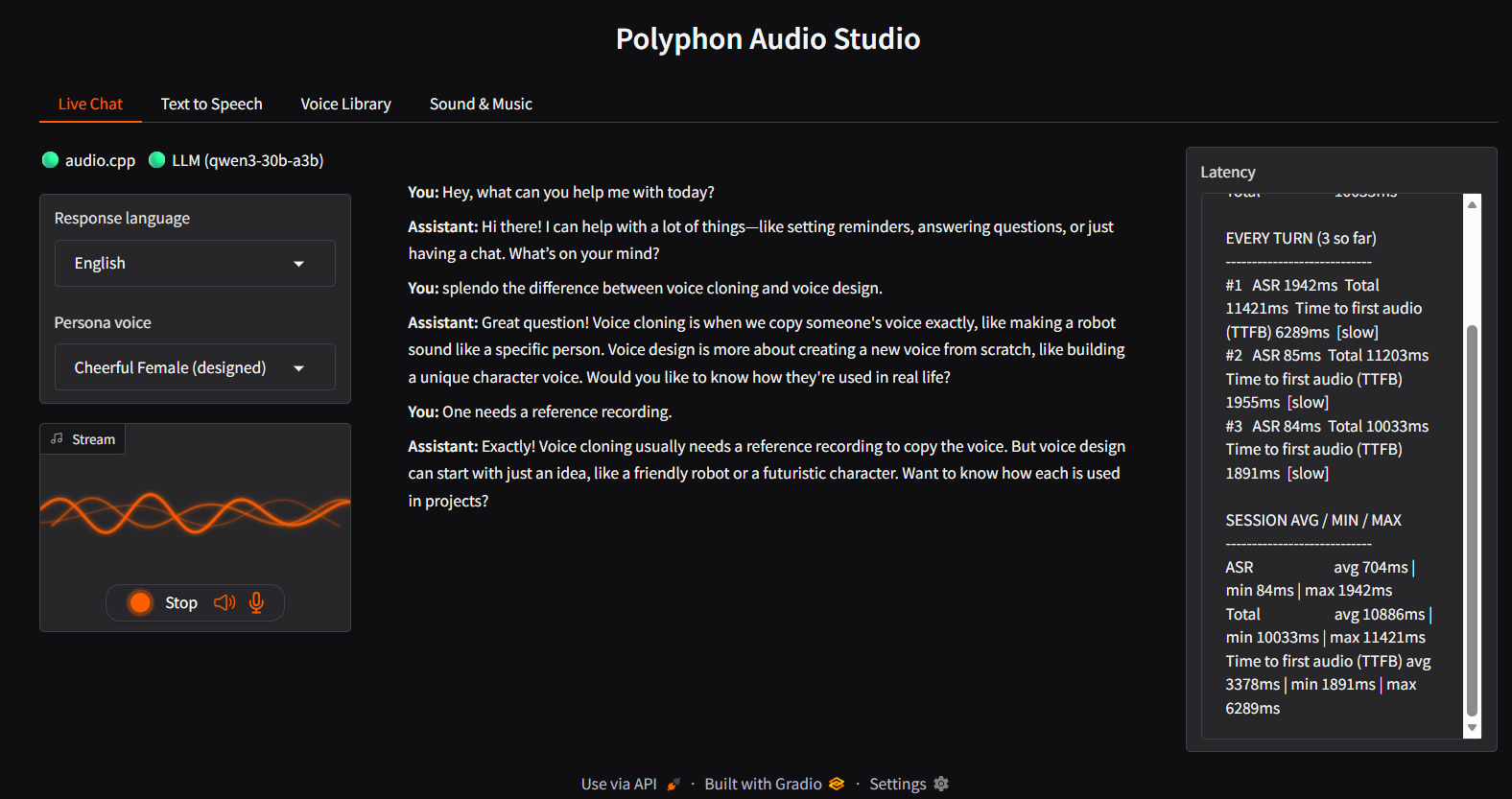
The speak() method on the Conversation class is the TTS entry point. It now delegates to synthesize_speech_with_pauses — shared with the Studio’s Text to Speech tab — which honors inline [pause Ns] markers in the LLM’s reply by synthesizing each spoken chunk separately and splicing real silence in for the gap (Chatterbox has no pause token of its own and would read [pause 0.6s] aloud literally otherwise):
# scripts/realtime/bot_fastrtc.py — Conversation.speak()
async def speak(self, text: str) -> tuple[int, np.ndarray]:
    """Speaks text via the resident server, honoring inline '[pause Ns]'
    markers (see synthesize_speech_with_pauses above).
    """
    wav_bytes = await synthesize_speech_with_pauses(
        self.client, self.audiocpp_url, text, self.voice_ref, self.exaggeration
    )
    with wave.open(BytesIO(wav_bytes), "rb") as w:
        rate = w.getframerate()
        pcm = np.frombuffer(w.readframes(w.getnframes()), dtype=np.int16)
return rate, pcmvoice_ref is the entire cloning interface: point it at a short reference clip once, and every call speaks in that voice — no fine-tuning, no training run, the model conditions on the reference audio directly. The LLM reply streams sentence-by-sentence so the first sentence’s audio starts before the last one is even generated; markdown is stripped before TTS (asterisks and backticks break sentence-boundary detection and vocalize as noise); and long sessions are kept within the LLM’s context window by maybe_compact(), which folds older turns into a rolling summary post-turn so it never adds latency to the reply the user is waiting on.
Batch paths: narration and the CLI synthesizer
For anything that isn’t a live conversation — batch narration, one-off voice cloning — there’s no reason to keep a server resident at all. Those scripts shell out to audiocpp_cli directly via synthesize():
# scripts/persona_turn.py — synthesize()
def synthesize(cli: Path, model_path: Path, backend: str, text: str, voice_ref: str, out_path: Path) -> None:
    out_path.parent.mkdir(parents=True, exist_ok=True)
    result = subprocess.run(
        [
            str(cli),
            "--task", "clon",
            "--family", "chatterbox",
            "--model", str(model_path),
            "--backend", backend,
            "--device", "0",
            "--text", text,
            "--voice-ref", voice_ref,
            "--out", str(out_path),
            "--metrics",
        ],
        capture_output=True,
        text=True,
        check=False,
    )
    if result.returncode != 0:
        sys.exit(f"audiocpp_cli TTS failed:\n{result.stderr[-4000:]}")
print(result.stdout, file=sys.stderr)The [pause Ns] marker handling (synthesize_with_pauses in persona_turn.py) applies here too — the batch narration script (narrate.py) uses the same helper, so a multi-voice dialogue script can include natural pauses without the synthesizer reading them aloud.
Multi-voice narration: feed it a voices registry and a script, get one WAV per line and a stitched full-dialogue file:
# scripts/narrate.py (excerpt)
for i, line in enumerate(lines):
    speaker = line["speaker"]
    text = line["text"]
    out_path = out_dir / f"line_{i:04d}_{speaker}.wav"
    synthesize_with_pauses(
        text,
        out_path,
        lambda chunk, path, _ref=voices[speaker]: synthesize(cli, tts_model, args.backend, chunk, _ref, path),
)The multi-turn session script (persona_session.py) keeps message history across turns — same pattern as the live loop, but driven from a JSON script of {"text": "..."} or {"audio": "path/to/clip.wav"} turns rather than real-time mic input. It accumulates a session_transcript.json alongside the per-turn WAV files.
The integration layer, concretely
Above that HTTP/CLI surface, polyphon-audio adds the pieces audio.cpp deliberately doesn’t have an opinion about:
- a named-voice registry (
voices/registry.json), so “the narrator” or “Alex” maps to a specific reference clip consistently across a whole script; - multi-voice narration — a script with multiple speaker tags in, one stitched audio file out, with inline
[pause Ns]markers supported; - a conversational loop with real turn-by-turn memory, sentence-level streaming from the LLM straight into TTS, barge-in support, and rolling context compaction for long sessions;
- a meeting integration script (
persona_meeting.py) that takes apolyphon-aitranscript JSON directly and turns it into a spoken reply in one command.
That combination — local LLM plus local persona voice cloning, no cloud round-trip anywhere in the loop — is the actual reason this is a separate project and not just “audio.cpp plus a wrapper script.” Cloud voice-agent stacks don’t run offline and don’t let you swap in your own transcript source or LLM; this does, by construction, because every piece of it is a process you’re running yourself.
Polyphon Audio Studio
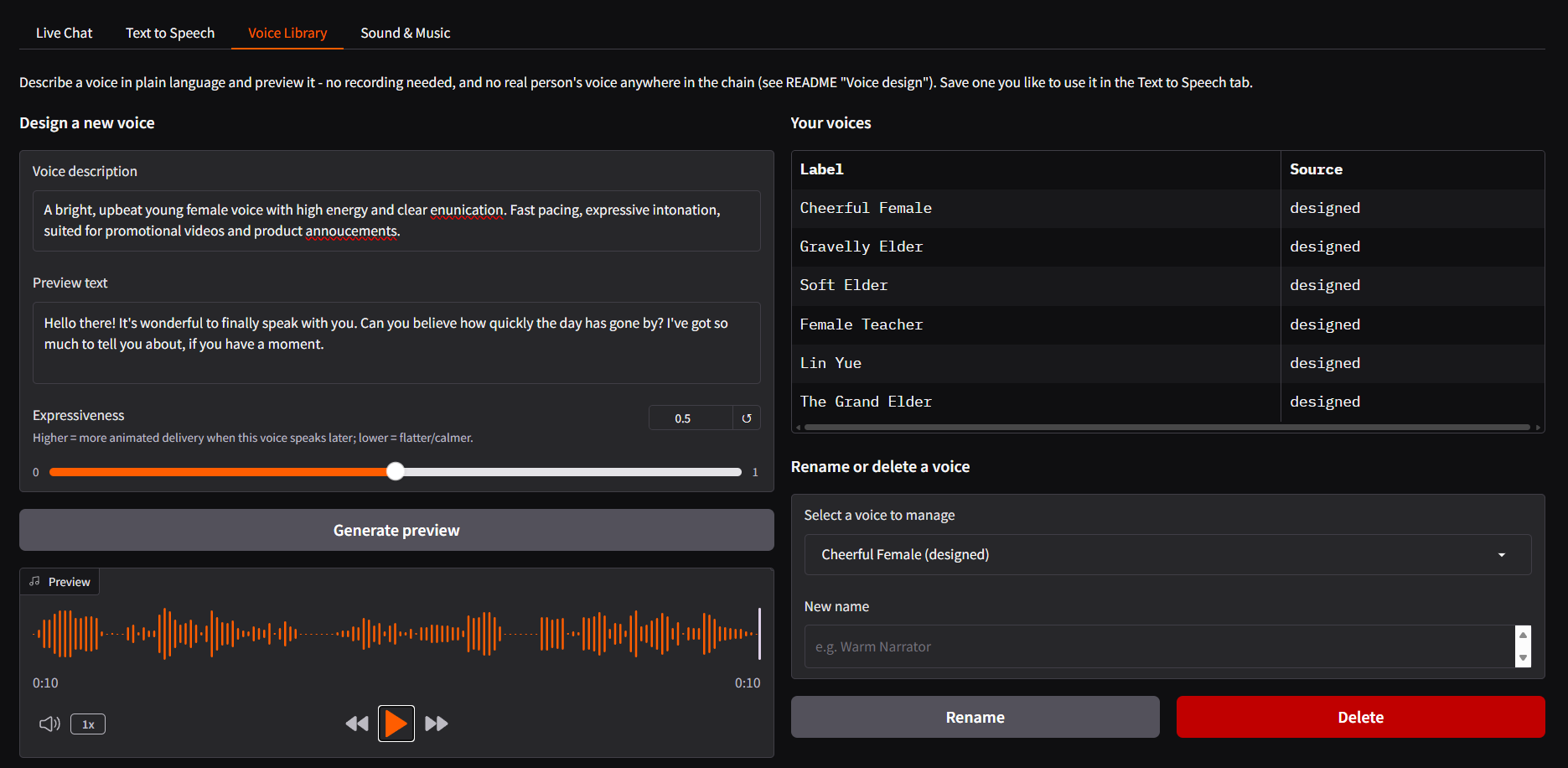
The project now ships a four-tab Gradio web UI (
scripts/studio.py
), all backed by the same resident audiocpp_server:
| Tab | What it does |
|---|---|
| Live Chat | Real-time voice loop from bot_fastrtc.py, reused as-is (no fork) |
| Text to Speech | Batch synthesis from typed text, pick a voice from the library, download the clip |
| Voice Library | Design a brand-new synthetic voice from a text description (qwen3_tts vdes task), preview it, save it under a name; saved voices immediately appear in other tabs |
| Sound & Music | Short text-to-music or text-to-sound-effect clips (stable_audio family, gen task) for game audio, video stingers, or ambience |
Run it with:
# Recommended for LAN access (enables HTTPS & microphone permissions):
.venv-fastrtc/Scripts/python.exe scripts/studio.py --self-signed
# Then open the printed https://<host>:7861 URLThe Voice Library tab uses audio.cpp’s qwen3_tts “vdes” family — voice design from a text description alone, no reference recording required. A new voice saved here immediately shows up in the Text to Speech tab’s picker and the Live Chat tab’s voice selector, because all three read from the same voices/registry.json.
Composes with polyphon-ai
polyphon-audio is independent — its own dependencies, its own release cadence — but it composes with a sibling project,
polyphon-ai
(local transcription and speaker diarization), when the point is specifically to get audio back out. If you haven’t seen it yet,
Polyphon AI: Local Meeting Intelligence
covers the full pipeline — dual-stream capture, VoiceDB persistent speaker identity, and portable HTML meeting artifacts.
The meeting integration is concrete and scriptable via persona_meeting.py: give it a polyphon-ai transcript JSON, an instruction for the LLM, and a voice reference, and it speaks a reply in one shot:
audio/video in ──► polyphon-ai ──► named, diarized transcript (JSON)
                                          │
                                          ▼
                           persona_meeting.py + local LLM
                                          │
                                          ▼
Chatterbox TTS ──► spoken reply WAVpython scripts/persona_meeting.py \
--transcript outputs/meeting.json \
--instruction "Summarize what was decided and what happens next." \
--voice-ref examples/voice_synthetic.wav \
--out reply.wavWorth being honest about the limit here: polyphon-ai already produces readable meeting minutes as text on its own, and turning that into audio isn’t automatically better than reading it. It’s a genuine win specifically when audio is the point — a spoken recap for a commute, an accessibility need, or feeding a summary into another voice-first tool downstream — not the headline reason either project exists.
What’s next: a platformer, scored entirely offline
The sound-music and sound-sfx model entries in server.json above aren’t there for narration — I’m using this project’s sound-generation path (audio.cpp’s stable_audio family) to score a 2D platformer game: procedurally-directed background music and one-off sound effects generated from text descriptions instead of licensed or hand-recorded assets.
The game itself — art, level design, and the 3D-printable-adjacent asset pipeline (somewhere between the fully 3D-printable models from
printable
and fully non-printable, fully colored GLB models for in-game use) — is its own project and out of scope here. But the audio side of it is a real, ongoing use of everything above, and a good test of whether “generate a sound effect from a sentence” holds up outside a demo. More on that game in a future post.
Try it
The full setup (audio.cpp build, server.json, the Python UI) is in the
README
. Apache-2.0, same as audio.cpp itself and the rest of the Polyphon projects.