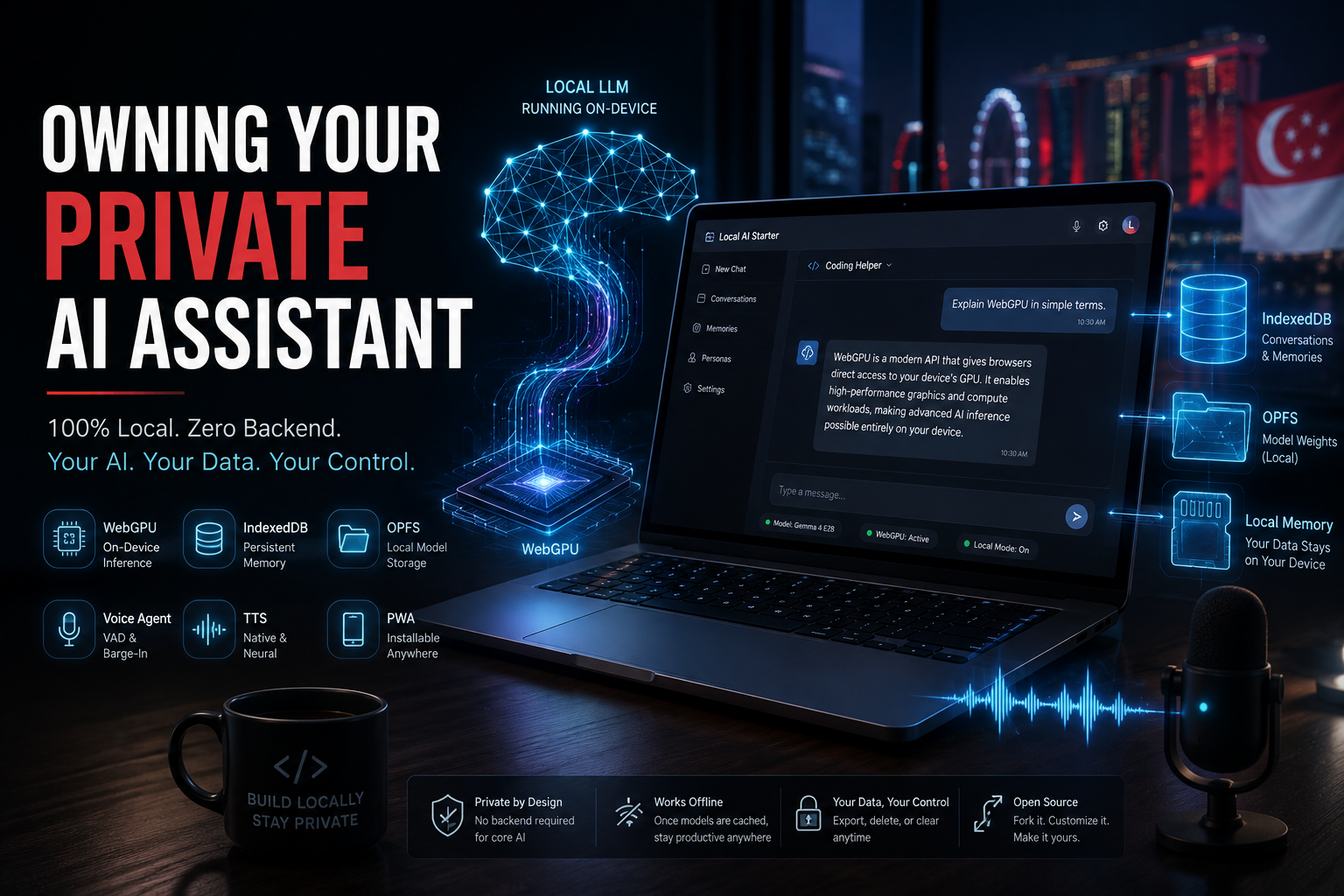
Happy 61st Singapore National Day!
Wishing everyone in Singapore and around the world a wonderful, restful holiday.
As we celebrate independence and self-reliance, it is also an interesting time to think about digital sovereignty. AI assistants are increasingly delivered as cloud services, often tied to subscriptions, API usage, and third-party infrastructure. That raises an interesting question:
What would it take to actually own your AI assistant?
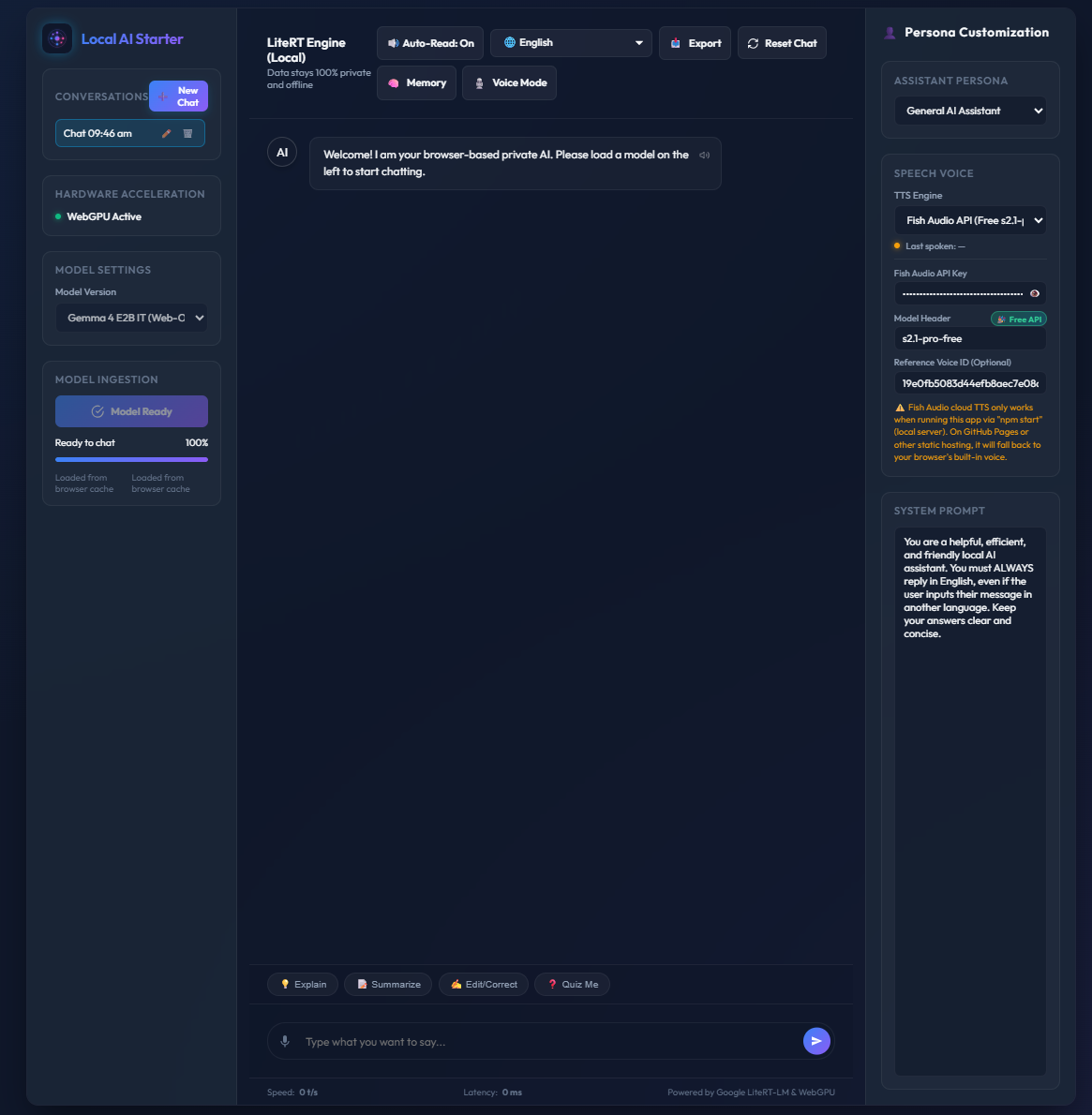
Today, I am releasing Local AI Starter — a 100% client-side, zero-backend starter project designed to make it possible to deploy a private, browser-based AI assistant with minimal infrastructure.
The goal is not to compete with large hosted AI services. Instead, it is to explore how far we can go with modern browsers, WebGPU, local model execution, browser storage, and open-source tooling.
The Vision: AI Sovereignty in the Browser
The core motivation behind Local AI Starter is simple:
You shouldn’t need a server farm, a monthly subscription, or a complex backend stack just to experiment with a capable, privacy-focused AI assistant.
Modern browsers have become surprisingly capable application runtimes. With WebGPU and lightweight models such as Google’s LiteRT-LM-compatible Gemma models, neural inference can run directly on the user’s device. That changes the architecture considerably.
Instead of:
Browser → Backend → AI API → Databasewe can build something closer to:
Browser
   │
   ├── Local Model
   ├── Local Memory
   ├── Local Conversations
└── Local Application StateThe browser becomes the application runtime, inference engine, and local data store.
Two Ways to Get Started Immediately
Whether you simply want to try the assistant or create your own customized version, there are two straightforward ways to get started.
Option 1: Instant Launch — Zero Setup
Open the Live Demo using a recent version of Google Chrome or Microsoft Edge.
Select a Gemma model, allow the model weights to be cached locally, and start chatting. There is no account creation, API key, or application backend required for the core local inference experience.
Model files are cached using the Origin Private File System (OPFS) where available, with a Cache API fallback. Once the model has been cached, the core AI experience can continue without an active network connection.
Note: The optional Fish Audio neural TTS integration is different because it is a cloud service. On static deployments such as GitHub Pages, direct requests to
api.fish.audioare blocked by browser CORS policies, so the application automatically falls back to your browser’s built-in speech synthesis.
Option 2: Own Your Own Fork in 5 Minutes
The more interesting option is to make the project yours.
-
Fork the repository
Go to github.com/seehiong/local-ai-starter and click Fork.
-
Customize the configuration
Edit
config.jsonto change your application title, theme colours, logo, default models, and prompt templates. -
Deploy with GitHub Pages
Open your repository’s Settings → Pages, select the
mainbranch and/ (root)as the deployment source, then click Save.
GitHub Pages will publish the application as a static site. At that point, you have your own browser-based AI assistant running under your own GitHub repository and domain.
Security, Privacy & Data Retention
One of the most important design questions for a local AI assistant is:
Where does my conversation data actually go?
The answer in Local AI Starter is intentionally simple: the core conversation and memory data stays inside the browser.
The architecture uses browser-native storage rather than a remote application database.
Local Browser Architecture
1. No Application Backend for Core Inference
The LLM inference pipeline runs locally through WebGPU. Prompts, conversation history, and persistent memories used by the local assistant do not need to be sent to an application server.
This is one of the main architectural differences between this project and a conventional cloud-hosted AI application.
2. Offline Capability
Once the model has been downloaded and cached, the core inference experience can operate without an active internet connection. This makes the project particularly interesting as a local-first application rather than simply a web application that happens to call an AI API.
Of course, optional cloud integrations such as neural TTS are a separate matter.
3. A Deliberate Trade-Off: Local Knowledge vs. External Tools
There is an important architectural trade-off here. A useful AI assistant often benefits from external tools:
- Web search
- APIs
- Databases
- Retrieval systems
- External services
But every external tool introduces another boundary where data may leave the device. For Local AI Starter, I intentionally chose to keep the core assistant tool-free.
That gives us three benefits:
- Local knowledge: responses are generated from the locally loaded model.
- Privacy: the core conversation does not require sending queries to external services.
- Simplicity: a lightweight local model does not need to manage complex tool-calling schemas for the basic assistant experience.
This is a conscious architectural constraint rather than a claim that local models are inherently better than cloud models.
Persistent Memory with IndexedDB
A local assistant still needs memory. Otherwise, every conversation starts from zero. Local AI Starter implements persistent client-side memory using IndexedDB through db.js.
The database is divided into three primary stores:
sessions— conversation metadata, timestamps, titles, and persona state.messages— individual conversation turns associated with each session.memories— longer-lived facts and preferences that the assistant can reuse across conversations.
For example:
// db.js - Native Client-Side IndexedDB Storage Schema

request.onupgradeneeded = (event) => {
    const db = event.target.result;

    const sessionStore =
        db.createObjectStore('sessions', { keyPath: 'id' });

    sessionStore.createIndex(
        'updatedAt',
        'updatedAt',
        { unique: false }
    );

    const messageStore =
        db.createObjectStore('messages', { keyPath: 'id' });

    messageStore.createIndex(
        'sessionId',
        'sessionId',
        { unique: false }
    );

    messageStore.createIndex(
        'timestamp',
        'timestamp',
        { unique: false }
    );

    const memoryStore =
        db.createObjectStore('memories', { keyPath: 'id' });

    memoryStore.createIndex(
        'createdAt',
        'createdAt',
        { unique: false }
    );
};The important part is that none of this requires a remote database.
Complete Data Ownership & Control
Local storage also changes the relationship between the user and their data. Users can:
- View, add, or delete saved memories.
- Export conversations to Markdown, plain text, or JSON.
- Delete individual conversations.
- Clear the application’s local IndexedDB data.
The result is a much more explicit data model:
The browser is the data store, and the user controls that browser storage.
System Architecture & Code Implementation
Under the hood, Local AI Starter deliberately avoids a heavy frontend framework. There is no React, Next.js, or mandatory build pipeline. The application is primarily built using:
- Vanilla JavaScript ES modules
- HTML5
- CSS3
- WebGPU
- LiteRT-LM
- IndexedDB
- Origin Private File System
- Cache API
- Web Audio API
The overall architecture looks like this:
1. WebGPU On-Device Inference Pipeline
The application imports @litert-lm/core directly into the browser. Model weights are downloaded as .litertlm files and cached locally. The application first attempts to use OPFS, followed by browser cache and buffered-blob fallbacks where necessary.
Once available, the model is passed to the LiteRT engine and compiled for WebGPU execution. A simplified version looks like this:
// app.js - WebGPU LiteRT-LM Engine Initialization

import { Engine }
    from 'https://cdn.jsdelivr.net/npm/@litert-lm/core/+esm';

const engine = await Engine.create({
    model: blob,
    mainExecutorSettings: {
        maxNumTokens: 8192
    }
});

const conversation = await engine.createConversation({
    preface: {
        messages: prefaceMsgs
    }
});

const stream =
    conversation.sendMessageStreaming(prompt);

for await (const chunk of stream) {
    appendAssistantChunk(
        chunk.content[0].text
    );
}The important architectural detail is that generation happens inside the browser. There is no application server sitting between the user and the model.
See
app.js
for the complete model download, caching, and initialization pipeline.
2. Hands-Free Voice Agent & VAD Barge-In
The project also includes a lightweight voice-agent runtime.
Rather than treating voice as simply “speech-to-text plus text-to-speech”, the application maintains a small runtime state machine:
IDLE
  │
  ▼
LISTENING
  │
  ▼
THINKING
  │
  ▼
SPEAKING
  │
└──── user interrupts ────► LISTENINGThe implementation uses the Web Audio API to calculate RMS energy and detect when the user starts and stops speaking. A simplified section looks like this:
startVadAnalysis() {
    const bufferLength =
        this.analyser.frequencyBinCount;

    const dataArray =
        new Float32Array(bufferLength);

    const analyze = () => {
        if (this.state === 'IDLE') return;

        this.analyser.getFloatTimeDomainData(
            dataArray
        );

        let sumSq = 0;

        for (let i = 0; i < bufferLength; i++) {
            sumSq += dataArray[i] * dataArray[i];
        }

        const rms =
            Math.sqrt(sumSq / bufferLength);

        // User starts speaking while AI is talking.
        if (
            this.state === 'SPEAKING' &&
            rms > this.speechStartThreshold
        ) {
            if (this.onBargeIn) {
                this.onBargeIn();
            }

            this.setState('LISTENING');
        }

        // Detect silence after user speech.
        if (
            this.state === 'LISTENING' &&
            rms < this.silenceThreshold
        ) {
            this.silenceTimer = setTimeout(() => {
                this.triggerAutoSubmit();
            }, this.silenceTimeoutMs);
        }

        this.animFrameId =
            requestAnimationFrame(analyze);
    };

    analyze();
}The interesting part is the barge-in behaviour. If the assistant is speaking and the user starts talking, the voice agent can interrupt the current audio playback and return to the listening state.
That makes the interaction feel much closer to a conversational voice assistant.
3. Persona System & Memory Context Injection
The AI model itself is not responsible for defining the application’s entire identity. Personas are stored separately as JSON files under personas/. This allows the same underlying model to be configured as different assistants without changing the inference engine.
For example:
personas/
├── coding-helper.json
├── math-tutor.json
├── language-tutor.json
└── travel-guide.jsonPersistent user memories are retrieved from IndexedDB and injected into the conversation’s system context. A simplified version:
async function rehydrateConversationEngine(
    historyMsgs = []
) {
    let sysContent =
        systemPromptInput.value;

    if (
        userMemories &&
        userMemories.length > 0
    ) {
        const memText =
            userMemories
                .map(m => `- ${m.text}`)
                .join('\n');

        sysContent +=
            `\n\n[Persistent User Context & Memory]:\n${memText}`;
    }

    const prefaceMsgs = [
        {
            role: 'system',
            content: sysContent
        }
    ];

    historyMsgs.forEach(m => {
        prefaceMsgs.push({
            role:
                m.role === 'assistant'
                    ? 'assistant'
                    : 'user',
            content: m.content
        });
    });

    conversation =
        await engine.createConversation({
            preface: {
                messages: prefaceMsgs
            }
        });
}This separation gives the project a useful architecture:
Model
  │
  ├── Persona
  │
  ├── Persistent Memory
  │
  └── Conversation History
          │
          ▼
      Local Context
          │
          ▼
Inference4. Dual-Engine Text-to-Speech & Fallback
For voice output, Local AI Starter supports two approaches:
- Browser-native
SpeechSynthesis - Optional Fish Audio neural TTS
The routing logic is intentionally designed to fail gracefully. If the neural TTS service is unavailable, the application falls back to the browser’s built-in speech engine. A simplified version:
async function speakText(
    text,
    useOfflineVoice = false
) {
    const cleanedText = text
        .replace(/\p{Extended_Pictographic}/gu, '')
        .replace(/[*_`#-]/g, ' ')
        .trim();

    if (
        activeEngine === 'fishAudio' &&
        !useOfflineVoice
    ) {
        // Attempt Fish Audio request...

        try {
            // Cloud TTS request
            // ...

            const audio =
                new Audio(
                    URL.createObjectURL(
                        await res.blob()
                    )
                );

            await audio.play();
            return;

        } catch (err) {
            showNotification(
                'Fish Audio unavailable. ' +
                'Falling back to browser voice.',
                'error'
            );
        }
    }

    // Native browser fallback
    window.speechSynthesis.speak(
        new SpeechSynthesisUtterance(cleanedText)
    );
}The principle here is simple:
An optional cloud feature should never prevent the core application from working.
Voice Agent vs. Persona Prompts
A question that came up while designing the system was:
What is the difference between a Voice Agent and a Persona?
They solve fundamentally different problems.
| Dimension | Voice Agent Engine | Persona System |
|---|---|---|
| Role | Runtime interaction loop | Cognitive identity |
| Responsibility | Audio lifecycle, speech detection, microphone events | Behaviour, tone, domain constraints |
| State | IDLE → LISTENING → THINKING → SPEAKING |
Prompt configuration |
| Key capability | VAD, silence detection, barge-in | Domain and behavioural boundaries |
The voice agent controls how the interaction happens.
The persona controls how the assistant behaves.
Keeping those concerns separate means I can change the voice runtime without rewriting the persona system — and vice versa.
Multi-Turn Conversation: Agent vs. Prompt Engineering
Local models introduce another interesting engineering problem. Unlike a server-side application where context windows can be extremely large, browser-based inference has practical constraints around GPU memory, model size, and context length.
So simply appending every previous message forever is not a good strategy. Local AI Starter uses a sliding conversation context:
1. Token Budget & Persona Design
Persona prompts are intentionally concise. The objective is to avoid unnecessary preambles, repetition, and conversational filler that consume valuable context-window space. This becomes particularly important when running smaller models locally.
2. Persistent Memory
Instead of keeping every historical conversation turn in the active context, important facts can be promoted into persistent memory. Those memories are stored in IndexedDB and re-injected into the system context when a conversation is reconstructed. This allows the assistant to retain useful information without continuously expanding the active conversation history.
3. Voice Loop Stability
The same principle applies to voice interaction. When the user interrupts the assistant, the voice agent needs to coordinate several things:
- Stop audio playback.
- Stop or cancel active generation.
- Update the state machine.
- Return to listening.
- Wait for the next user utterance.
This coordination is what makes a voice interface feel responsive rather than like a simple push-to-talk application.
Bonus: Zero-Build PWA & Mobile Safeguards
There are a few other design decisions in the project that are worth highlighting.
1. Zero Build-Step Architecture
The application deliberately avoids a traditional frontend build pipeline. There is:
- No React
- No Webpack
- No Vite requirement
- No mandatory
npm installfor the client application
The code uses native browser ES modules:
<script type="module">This keeps the project easy to inspect and modify. The goal is that someone can fork the repository, edit the files, and understand what is actually running in their browser.
2. Native Progressive Web App
The project also includes a standard PWA setup through:
manifest.jsonsw.js
This allows users to install the application from Chrome or Edge and add it to a mobile home screen. The installed application runs in a standalone window rather than inside a normal browser tab. The PWA model is particularly useful for a local AI application because it reinforces the idea that this is an application running on your device, rather than simply a webpage calling a remote AI service.
3. Mobile Memory Safeguards
Mobile devices have much tighter memory constraints than desktop GPUs. The application therefore uses lightweight model selection for mobile environments.
The current configuration favours Gemma 4 E2B, approximately 1.2 GB, on mobile devices rather than attempting to load larger models that may cause GPU or browser-tab out-of-memory failures. This is an important practical consideration when moving local AI from a desktop demonstration to an actual mobile application.
Bonus: High-Quality Voice Synthesis with Fish Audio
To make voice interactions more natural, Local AI Starter includes an optional integration with Fish Audio’s cloud neural TTS API alongside the browser’s native SpeechSynthesis. Before configuring the integration, you can use the Fish Audio Playground to experiment with different voices, test the available models, and identify the voice ID you want to use in your assistant.
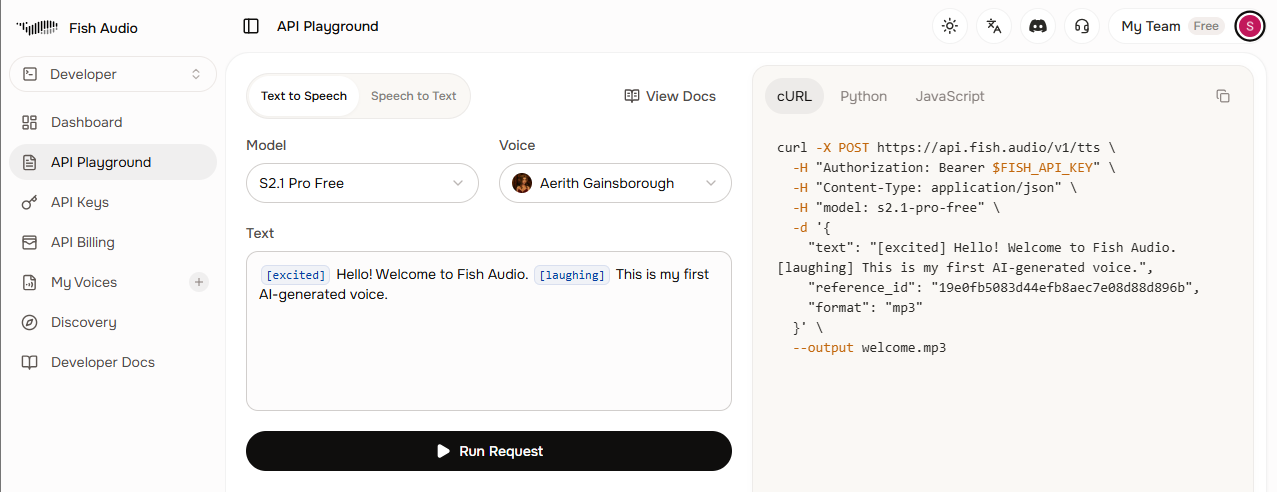
Testing and selecting a voice in the Fish Audio Playground before configuring it in Local AI Starter. At the time of writing, Fish Audio is also offering free API access for developers to its s2.1-pro-free model through the end of August 2026.
See the Fish Audio announcement for the current promotion details.
The Engineering Gotcha: Browser CORS vs. Server-to-Server Requests
One of the more interesting problems encountered during development had nothing to do with the local LLM. It was CORS. When a Python application or backend service calls:
https://api.fish.audio/v1/ttsthe request is server-to-server.
Browser security policies do not apply in the same way. But when JavaScript running on a static site such as GitHub Pages attempts the same request, the browser enforces its cross-origin security policy. If the target API does not provide the appropriate CORS headers, the browser blocks the request. The result looks something like:
TypeError: Failed to fetchThis distinction is easy to overlook when moving an application from a backend environment into a fully client-side architecture.
What works in each deployment model
1. Local Development with npm start
The project includes a lightweight Node.js server.js. The server:
- Serves the static application.
- Provides the
/api/fish-ttsroute. - Forwards the TTS request server-to-server.
This avoids the browser CORS restriction.
2. GitHub Pages and Other Static Hosts
GitHub Pages does not run server.js. Therefore:
Browser
   │
   │ POST
   ▼
api.fish.audiois subject to browser CORS restrictions. To use Fish Audio on a static deployment, a developer can deploy a self-hosted proxy (such as a Cloudflare Worker or Vercel function mirroring server.js) and adapt the endpoint in app.js. By default, Local AI Starter intentionally avoids public third-party proxies to preserve your zero-leakage privacy guarantee, automatically falling back to browser TTS when running statically.
3. Self-Healing Fallback
Regardless of the failure mode, the application does not treat TTS as a critical dependency. If Fish Audio fails because of:
- CORS
- Network connectivity
- Missing proxy
- API failure
the application falls back to the browser’s native SpeechSynthesis. The assistant can therefore continue speaking even when the neural TTS service is unavailable.
What I Learned Building It
The interesting part of this project was not simply getting an LLM to run inside a browser. The more interesting challenge was discovering how many pieces of a conventional AI application can actually be moved into the browser itself. The resulting architecture looks surprisingly small:
There is no mandatory application backend. No remote database is required for the core assistant. No API key is required for local inference. And the entire project can be deployed as a static website.
That is what makes Local AI Starter interesting to me. It is less about building yet another chatbot and more about exploring what a local-first AI application can look like when the browser itself becomes the runtime.
Summary & Happy National Day!
Local AI Starter combines:
- WebGPU-based local inference
- LiteRT-LM
- Local model caching
- IndexedDB conversation memory
- JSON-based personas
- Voice Activity Detection
- Voice barge-in
- Progressive Web App support
- Browser-native TTS
- Optional neural cloud TTS
- A zero-build frontend architecture
The result is a small, hackable starting point for anyone interested in experimenting with private, local AI assistants in the browser.
🔗 Live Demo: https://seehiong.github.io/local-ai-starter/
📦 GitHub Repository: https://github.com/seehiong/local-ai-starter
If you are interested in local AI, WebGPU, browser-native inference, or simply want to understand what is possible without a traditional AI backend, feel free to fork it and experiment.
Happy building, and once again — Happy National Day!