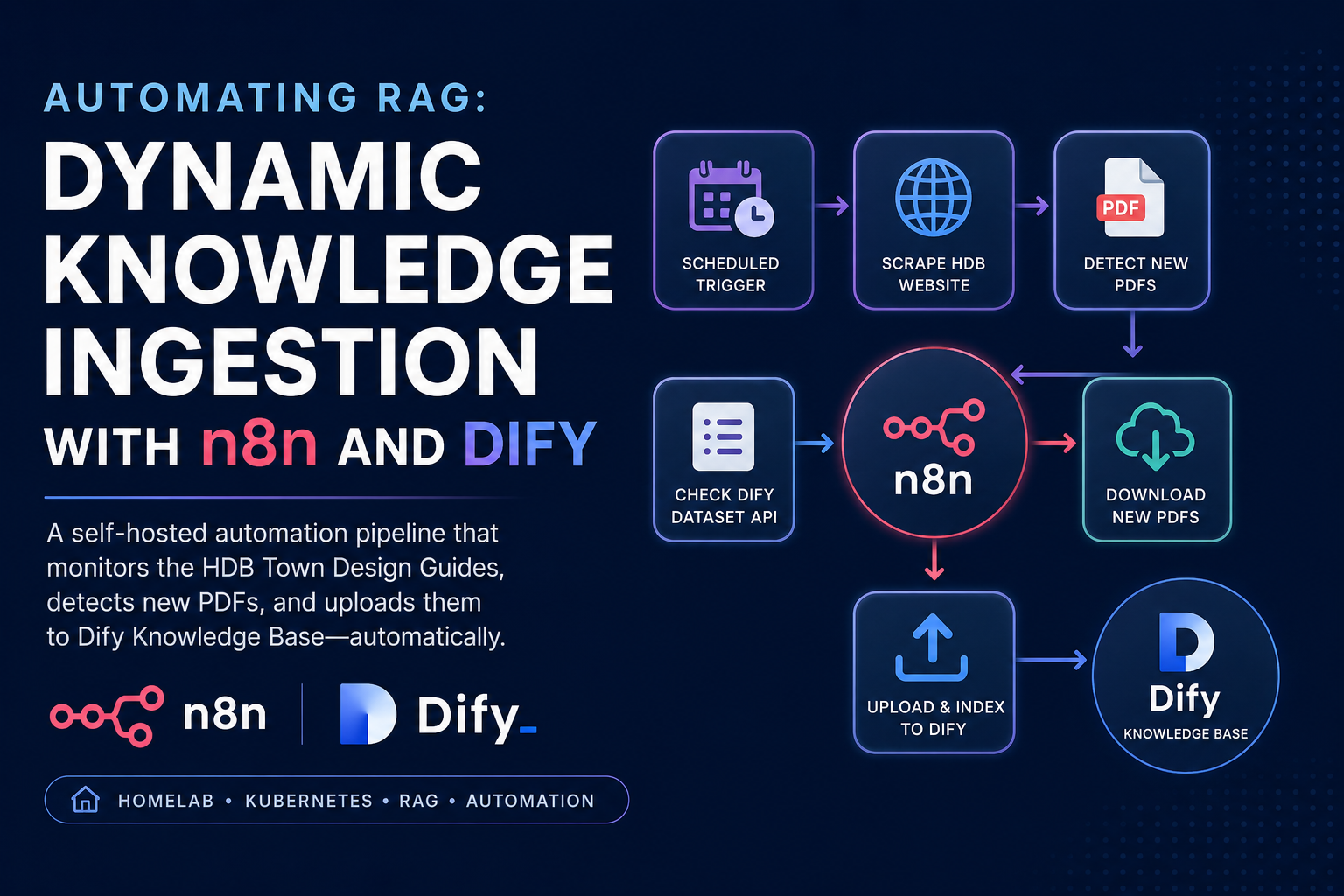
In my previous homelab post , we built a self-hosted conversational assistant using Dify, grounding it in Singapore HDB township planning guidelines. While the results were excellent, the setup relied on manually downloading PDFs and uploading them to Dify’s Knowledge Base.
For static data, manual uploads are acceptable. But what happens when HDB publishes a new town guide (e.g., Tengah’s final masterplan), or updates existing guidelines? To avoid manual maintenance and ensure the knowledge base remains current, we need an automated ingestion pipeline.
This guide demonstrates how to bridge the gap by combining n8n (our automation engine—see our n8n deployment guide ) and Dify (our RAG platform). We will build a pipeline that monitors the HDB Town Design Guides website, detects new files, downloads them, and uploads them to Dify’s Dataset API—all running inside our homelab Kubernetes cluster.
The Pipeline Architecture
Instead of maintaining a separate state store (such as PostgreSQL or Redis) to track ingested documents, we can treat Dify itself as the source of truth. TThe workflow queries Dify for the current document inventory, compares it against the live HDB website, and ingests only newly discovered files.
This design keeps the workflow simple and operationally lightweight. Since Dify already maintains metadata for indexed documents, there is no need to introduce an additional persistence layer solely for tracking ingestion state.
1. Prepare Dify Dataset API Key
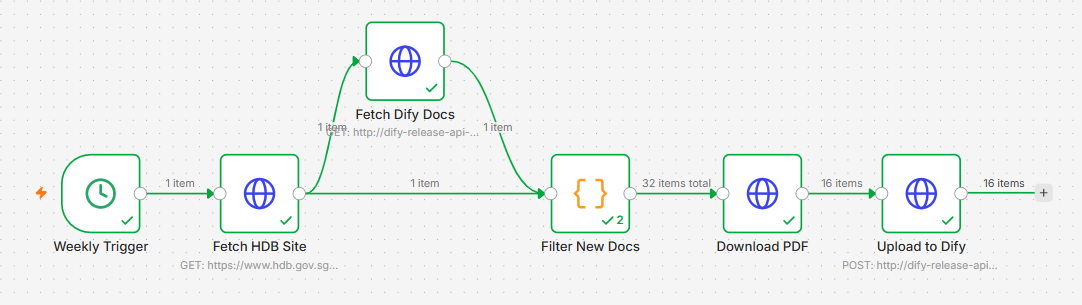
Before writing the workflow, we need to authorize n8n to talk to Dify’s Knowledge Base.
- Navigate to your Dify console (
https://dify.lan) and go to the Knowledge tab. - Select your existing Knowledge Base (e.g.,
HDB Township Planning). - In the bottom-left corner of the
Knowledge Base, click on Service API. - Click Create API Key and copy the token. It will look like
dataset-xxxxxxxxxxxx.
2. Dify API Reference for Ingestion
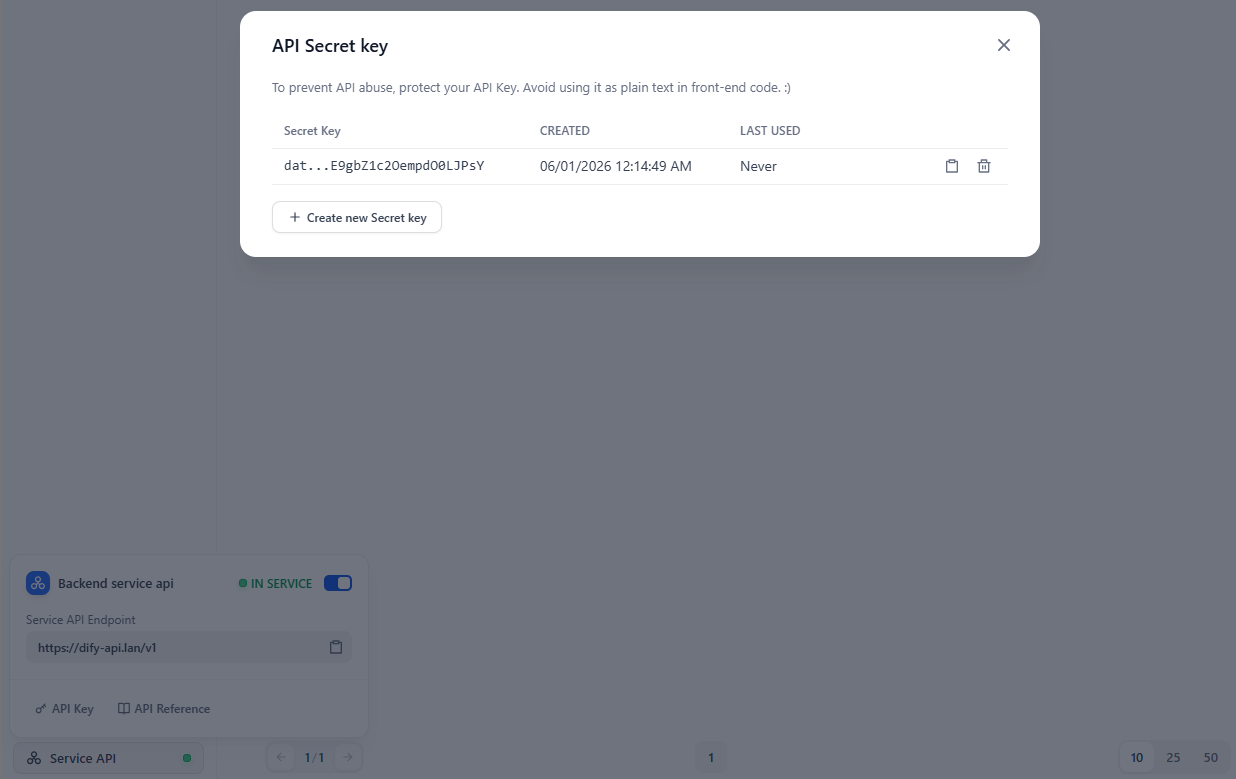
We will interact with two Dify Dataset API endpoints:
2.1. List Documents in Dataset
To fetch the existing documents in our knowledge base:
- Method:
GET - URL:
http://dify-release-api-svc.dify.svc.cluster.local:5001/v1/datasets/{dataset_id}/documents - Headers:
Authorization: Bearer <DATASET_API_KEY>
2.2. Upload Document from File
To upload a new binary file and trigger automatic chunking and indexing:
- Method:
POST - URL:
http://dify-release-api-svc.dify.svc.cluster.local:5001/v1/datasets/{dataset_id}/document/create-by-file - Headers:
Authorization: Bearer <DATASET_API_KEY>Content-Type: multipart/form-data
- Body Form Data:
file: The binary PDF file.data: A stringified JSON configuration specifying chunking parameters:{ "indexing_technique": "high_quality", "doc_form": "hierarchical_model", "process_rule": { "mode": "hierarchical", "rules": { "pre_processing_rules": [ { "id": "remove_extra_spaces", "enabled": true }, { "id": "remove_urls_emails", "enabled": false } ], "parent_mode": "paragraph", "segmentation": { "separator": "\n\n", "max_tokens": 1000 }, "subchunk_segmentation": { "separator": "\n", "max_tokens": 500 } } } }
3. Designing the n8n Workflow
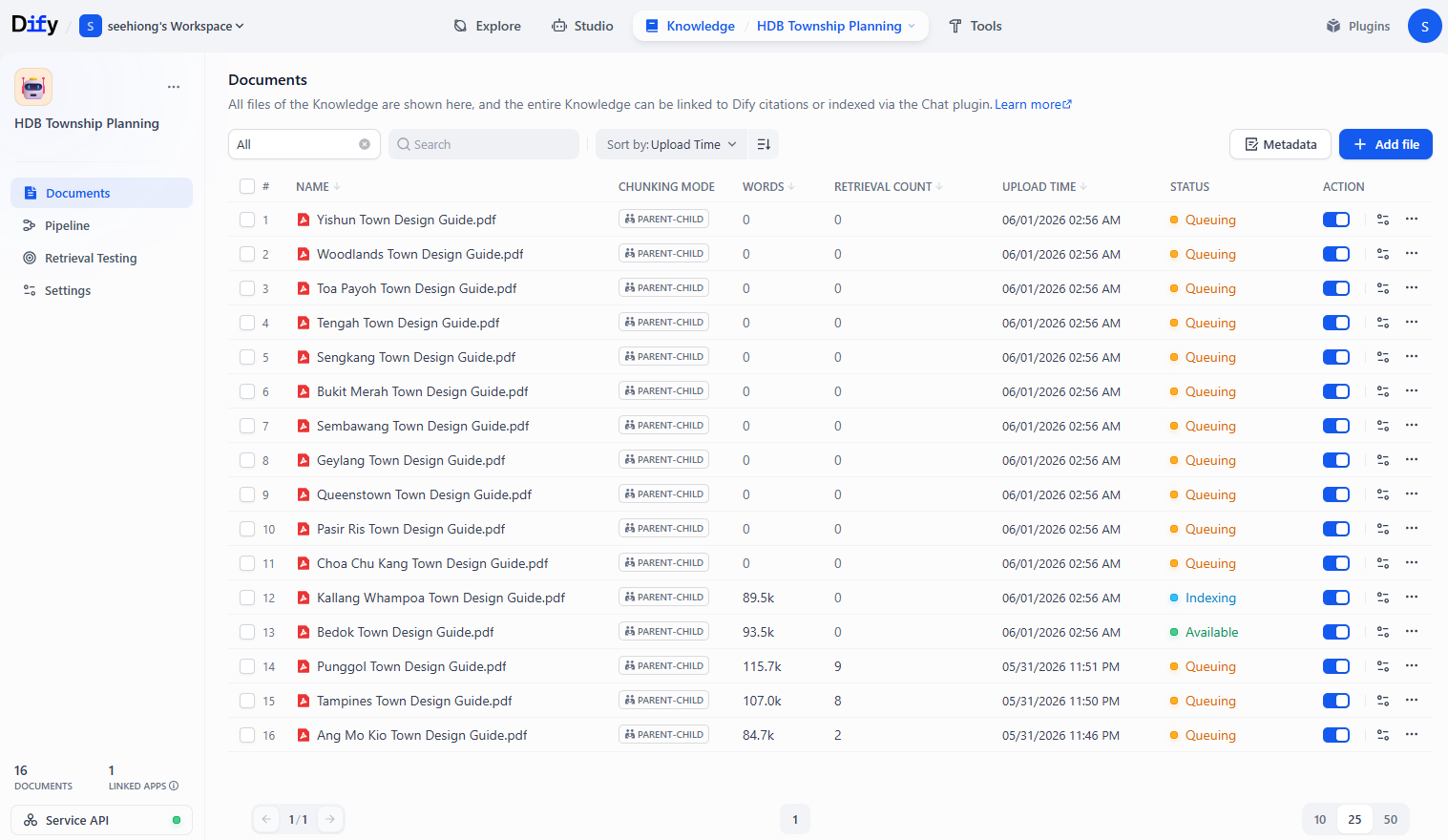
The workflow consists of the following n8n nodes:
3.1 Schedule Trigger
Configure the workflow to trigger on a schedule—for example, every Sunday night at 2:00 AM, since planning guidelines do not change frequently.
3.2 Fetch HDB Webpage
Add an HTTP Request node to fetch the target HTML page:
- Method:
GET - URL:
https://www.hdb.gov.sg/about-us/our-role/plan-and-design-towns/town-design-guides - Response Format:
Text (HTML) - Headers: Add a
User-Agentheader with a browser value (e.g.Mozilla/5.0 (Windows NT 10.0; Win64; x64) AppleWebKit/537.36 (KHTML, like Gecko) Chrome/120.0.0.0 Safari/537.36) to bypass HDB’s CloudFront/WAF bot blocking.
3.3 Fetch Existing Dify Documents
Add another HTTP Request node to query Dify’s Dataset API:
- Method:
GET - URL:
http://dify-release-api-svc.dify.svc.cluster.local:5001/v1/datasets/{{ $vars.datasetId }}/documents?page=1&limit=100 - Headers:
Authorization:Bearer dataset-xxxxxxxxxxxxxxxxxxxx
3.4 Identify New Documents
Add a Code node (JavaScript) to extract the PDF links from the raw HDB HTML page and filter out the ones already uploaded to Dify:
// Retrieve inputs from Dify documents API node
const difyDocs = $('Fetch Dify Docs').first().json.data || [];
const difyFilenames = new Set(difyDocs.map(doc => doc.name));

// Retrieve raw HTML from Fetch HDB Site node
const hdbHtml = $('Fetch HDB Site').first().json.data || '';

// Extract all PDF links from the raw HTML using regex (works with client-side Next.js hydration data)
const pdfRegex = /\/-\/media\/[a-zA-Z0-9\-_\/]+\.pdf/g;
const webUrls = hdbHtml.match(pdfRegex) || [];

const newDocuments = [];
const processedUrls = new Set(); // Prevent duplicates if the URL appears multiple times on the page

for (const url of webUrls) {
  if (processedUrls.has(url)) continue;
  processedUrls.add(url);

  // Extract filename from URL (e.g. Tampines-Town-Design-Guide.pdf)
  const decodedUrl = decodeURIComponent(url);
  const filename = decodedUrl.substring(decodedUrl.lastIndexOf('/') + 1);

  // If the document name is not in Dify, add it to the download list
  if (!difyFilenames.has(filename)) {
    newDocuments.push({
      json: {
        url: `https://www.hdb.gov.sg${url}`,
        filename: filename
      }
    });
  }
}

return newDocuments;In production, I would normally prefer parsing the DOM structure directly. However, the HDB site exposes the PDF links within its rendered content in a predictable format, making a lightweight regex sufficient for this use case.
3.5 Download PDF
Add an HTTP Request node to download the PDF:
- Method:
GET - URL:
={{ $json.url }} - Response Format:
File(This saves the PDF as binary data in n8n’s memory/disk) - Headers: Add the same browser
User-Agentheader to prevent 403 Forbidden errors when downloading the PDF binary files.
3.6 Upload into Dify
Add the final HTTP Request node to upload the binary file to Dify:
- Method:
POST - URL:
http://dify-release-api-svc.dify.svc.cluster.local:5001/v1/datasets/YOUR_DATASET_ID/document/create-by-file - Headers:
Authorization:Bearer dataset-xxxxxxxxxxxxxxxxxxxx
- Send Body:
true - Body Content Type:
n8n-nodes-base.multipart(Form-Data) - Parameters:
- Name:
file, Value:={{ $binary.data }}(Select binary file parameter) - Name:
data, Value: (Paste the stringified JSON chunking configuration shown in Step 2)
- Name:
3.7 Operational Considerations
In a production environment, consider adding:
- Retry logic for transient network failures.
- Notifications (e.g. Slack, email, or Discord) when ingestion fails.
- Pagination support for large datasets.
- Validation checks to ensure downloaded files are valid PDFs before upload.
4. Complete n8n Workflow JSON
You can copy the entire workflow definition below and paste it directly into your n8n workspace canvas:
Show full n8n workflow JSON
{
  "name": "Dify Knowledge Base Autopilot (HDB Guides)",
  "nodes": [
    {
      "parameters": {
        "url": "={{ $json.url }}",
        "sendHeaders": true,
        "headerParameters": {
          "parameters": [
            {
              "name": "User-Agent",
              "value": "Mozilla/5.0 (Windows NT 10.0; Win64; x64) AppleWebKit/537.36 (KHTML, like Gecko) Chrome/120.0.0.0 Safari/537.36"
            }
          ]
        }
      },
      "type": "n8n-nodes-base.httpRequest",
      "typeVersion": 4.1,
      "position": [
        900,
        300
      ],
      "id": "download-pdf",
      "name": "Download PDF",
      "executeOnce": false
    },
    {
      "parameters": {
        "method": "POST",
        "url": "http://dify-release-api-svc.dify.svc.cluster.local:5001/v1/datasets/YOUR_DATASET_ID/document/create-by-file",
        "sendHeaders": true,
        "headerParameters": {
          "parameters": [
            {
              "name": "Authorization",
              "value": "Bearer dataset-YOUR_API_KEY"
            }
          ]
        },
        "sendBody": true,
        "contentType": "multipart-form-data",
        "bodyParameters": {
          "parameters": [
            {
              "parameterType": "formBinaryData",
              "name": "file",
              "inputDataFieldName": "data"
            },
            {
              "name": "data",
              "value": "{\"indexing_technique\":\"high_quality\",\"doc_form\":\"hierarchical_model\",\"process_rule\":{\"mode\":\"hierarchical\",\"rules\":{\"pre_processing_rules\":[{\"id\":\"remove_extra_spaces\",\"enabled\":true},{\"id\":\"remove_urls_emails\",\"enabled\":false}],\"parent_mode\":\"paragraph\",\"segmentation\":{\"separator\":\"\\n\\n\",\"max_tokens\":1000},\"subchunk_segmentation\":{\"separator\":\"\\n\",\"max_tokens\":500}}}}"
            }
          ]
        }
      },
      "type": "n8n-nodes-base.httpRequest",
      "typeVersion": 4.1,
      "position": [
        1100,
        300
      ],
      "id": "upload-dify",
      "name": "Upload to Dify"
    },
    {
      "parameters": {
        "url": "https://www.hdb.gov.sg/about-us/our-role/plan-and-design-towns/town-design-guides",
        "sendHeaders": true,
        "headerParameters": {
          "parameters": [
            {
              "name": "User-Agent",
              "value": "Mozilla/5.0 (Windows NT 10.0; Win64; x64) AppleWebKit/537.36 (KHTML, like Gecko) Chrome/120.0.0.0 Safari/537.36"
            }
          ]
        },
        "options": {}
      },
      "type": "n8n-nodes-base.httpRequest",
      "typeVersion": 4.1,
      "position": [
        300,
        300
      ],
      "id": "fetch-hdb-site",
      "name": "Fetch HDB Site"
    },

    {
      "parameters": {
        "url": "http://dify-release-api-svc.dify.svc.cluster.local:5001/v1/datasets/YOUR_DATASET_ID/documents",
        "sendHeaders": true,
        "headerParameters": {
          "parameters": [
            {
              "name": "Authorization",
              "value": "Bearer dataset-YOUR_API_KEY"
            }
          ]
        },
        "options": {}
      },
      "type": "n8n-nodes-base.httpRequest",
      "typeVersion": 4.1,
      "position": [
        480,
        140
      ],
      "id": "fetch-dify-docs",
      "name": "Fetch Dify Docs"
    },
    {
      "parameters": {
        "jsCode": "const difyDocs = $('Fetch Dify Docs').first().json.data || [];\nconst difyFilenames = new Set(difyDocs.map(doc => doc.name));\nconst hdbHtml = $('Fetch HDB Site').first().json.data || '';\nconst pdfRegex = /\\/-\\/media\\/[a-zA-Z0-9\\-_\\/]+\\.pdf/g;\nconst webUrls = hdbHtml.match(pdfRegex) || [];\nconst newDocuments = [];\nconst processedUrls = new Set();\n\nfor (const url of webUrls) {\n  if (processedUrls.has(url)) continue;\n  processedUrls.add(url);\n  const decodedUrl = decodeURIComponent(url);\n  const filename = decodedUrl.substring(decodedUrl.lastIndexOf('/') + 1);\n  \n  if (!difyFilenames.has(filename)) {\n    newDocuments.push({\n      json: {\n        url: `https://www.hdb.gov.sg${url}`,\n        filename: filename\n      }\n    });\n  }\n}\nreturn newDocuments;"
      },
      "type": "n8n-nodes-base.code",
      "typeVersion": 2,
      "position": [
        700,
        300
      ],
      "id": "filter-new-docs",
      "name": "Filter New Docs"
    },
    {
      "parameters": {
        "triggerTimes": {
          "value": [
            {
              "hour": 2
            }
          ]
        }
      },
      "type": "n8n-nodes-base.cron",
      "typeVersion": 1,
      "position": [
        100,
        300
      ],
      "id": "weekly-trigger",
      "name": "Weekly Trigger"
    }
  ],
  "connections": {
    "Weekly Trigger": {
      "main": [
        [
          {
            "node": "Fetch HDB Site",
            "type": "main",
            "index": 0
          }
        ]
      ]
    },
    "Fetch HDB Site": {
      "main": [
        [
          {
            "node": "Fetch Dify Docs",
            "type": "main",
            "index": 0
          },
          {
            "node": "Filter New Docs",
            "type": "main",
            "index": 0
          }
        ]
      ]
    },
    "Fetch Dify Docs": {
      "main": [
        [
          {
            "node": "Filter New Docs",
            "type": "main",
            "index": 0
          }
        ]
      ]
    },
    "Filter New Docs": {
      "main": [
        [
          {
            "node": "Download PDF",
            "type": "main",
            "index": 0
          }
        ]
      ]
    },
    "Download PDF": {
      "main": [
        [
          {
            "node": "Upload to Dify",
            "type": "main",
            "index": 0
          }
        ]
      ]
    }
  },
  "settings": {}
}
Conclusion
By hooking n8n’s workflow capability into Dify’s Dataset API, we’ve automated the most tedious part of self-hosted RAG: document synchronization. The result is a self-maintaining RAG pipeline that continuously synchronizes its knowledge base with authoritative source documents, eliminating the need for manual uploads and reducing operational overhead.
This pattern is highly reusable. You can easily adapt this workflow to monitor other sources—such as homelab wiki pages, RSS feeds of release notes, or local log directories—and feed them directly into your self-hosted LLM assistants.