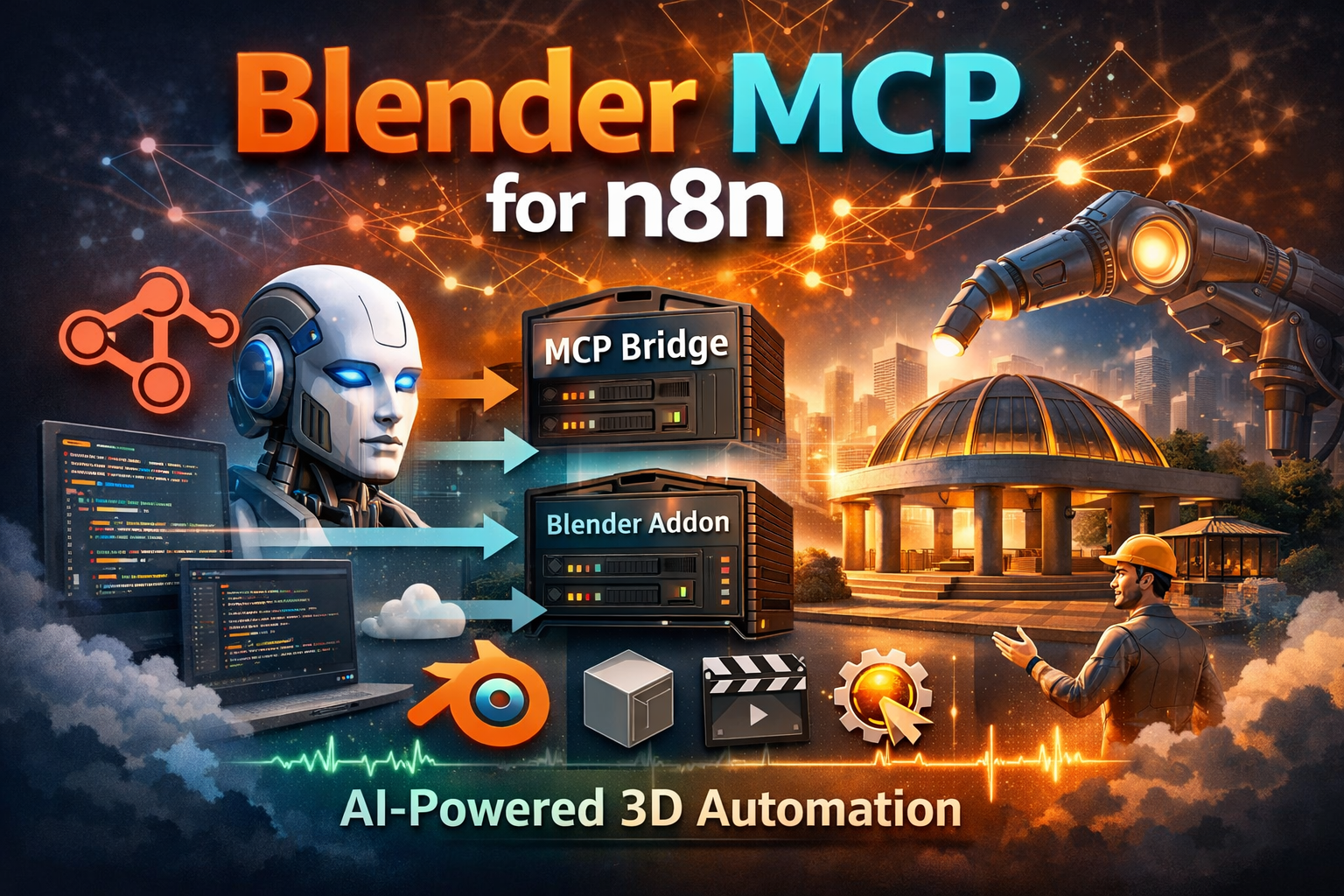
This project implements a Model Context Protocol (MCP) server for Blender, enabling n8n AI workflows to directly control Blender’s Python API. In this post, I’ll walk through the architecture, key design decisions, and how you can use it to automate complex 3D workflows entirely through natural language.
System Overview
The project consists of two core components that work together to bridge an AI agent running in n8n all the way through to Blender’s Python API:
-
Blender MCP Addon — A plugin installed inside Blender. It runs an embedded WebSocket server that sits on the main thread queue, receives commands, and manipulates the 3D scene safely.
-
MCP Bridge Server — A standalone Python server (
src/) that acts as the gateway. Clients such as n8n connect via the HTTP Streamable MCP transport, and the Bridge forwards every tool call over a local WebSocket to the active Blender Addon.
n8n AI Agent
      ↓
MCP Client (HTTP Streamable / JSON-RPC)
      ↓
MCP Bridge Server (ASGI)
      ↓
TCP Socket Bridge
      ↓
Blender Addon (Main Thread Queue)
      ↓
Blender Scene (Persistent State)Because many MCP clients (including n8n) operate in a stateless lifecycle — Initialize → Discover Tools → Call Tool → Close per interaction — the bridge implements an explicit stateless fallback mode. When no active HTTP Streamable session exists, requests are handled via standard JSON-RPC over HTTP.
Each tool response includes a human-readable "message" field (prefixed with ✓ by the addon), allowing the AI agent to confirm completion without re-executing prior steps.
Why This Matters
Most AI-driven creative tooling today stops at code generation. This project pushes further — enabling persistent, stateful control over a live 3D environment. By combining MCP transport, deterministic tool schemas, and recordable sessions, Blender becomes a reproducible AI execution engine rather than relying on one-off generated scripts.
Setup
1. Checkout the Code
🔗 Source Code: https://github.com/seehiong/blender-mcp-n8n
git clone https://github.com/seehiong/blender-mcp-n8n.git
cd blender-mcp-n8n2. Create a Virtual Environment (optional but recommended)
python -m venv venv

# Windows
venv\Scripts\activate

# macOS / Linux
source venv/bin/activate3. Install Dependencies
pip install -r requirements.txt4. Install the Blender Addon
Method 1 — Zip & Install (Recommended)
- Compress the
blender_mcp_addondirectory into blender_mcp_addon.zip. - Open Blender → Edit > Preferences > Add-ons → Install from disk…
- Select the
.zipfile, search for “Blender MCP” and enable the checkbox.
Method 2 — Manual Copy (Developer)
- Copy
blender_mcp_addon/to your Blender addons directory:- Windows:
%USERPROFILE%\AppData\Roaming\Blender Foundation\Blender\4.x\scripts\addons - macOS:
~/Library/Application Support/Blender/4.x/scripts/addons
- Windows:
- Restart Blender, then enable “Blender MCP” in Preferences.
5. Configure the Environment
Create a .env file in the project root:
| Variable | Description | Default |
|---|---|---|
MCP_BRIDGE_HOST |
Host IP for the MCP Bridge Server | 0.0.0.0 |
MCP_BRIDGE_PORT |
Port n8n connects to | 8008 |
BLENDER_ADDON_HOST |
IP where Blender is running | 127.0.0.1 |
BLENDER_ADDON_PORT |
Port the Blender addon listens on | 8888 |
BLENDER_ASSETS_DIR |
Directory for textures / HDRIs | (optional) |
6. Start Everything
# In Blender: N Panel → Blender MCP (n8n) → Start MCP Server

# In your terminal:
python -m src.main serveThe bridge starts on http://0.0.0.0:8008 with the MCP endpoint at /mcp.

7. Configure the n8n Workflow
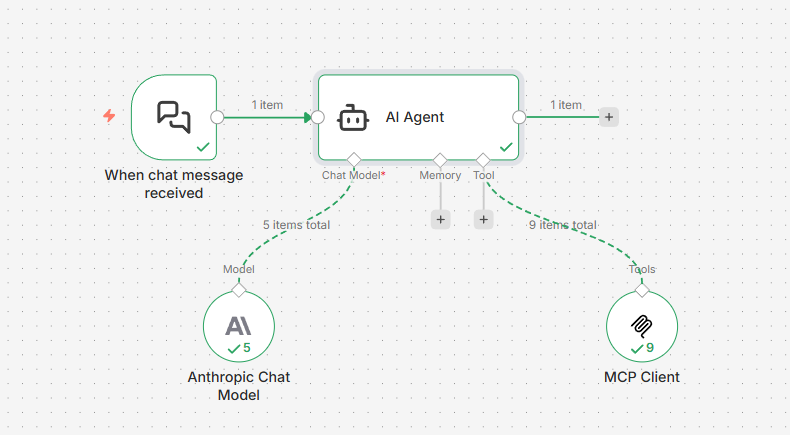
- Add an MCP Client Tool node.
- Set HTTP Streamable Endpoint →
http://localhost:8008/mcp, Authentication → None, Tools to Include → All. - Connect to an AI Agent node and start prompting!
Key Components
1. Blender MCP Addon
The addon (blender_mcp_addon/) is structured as a multi-module package rather than a single file. This modular structure keeps the 1,800+ lines of logic maintainable and easier to reason about:
blender_mcp_addon/
├── __init__.py       # Registration entry point
├── server.py         # WebSocket server & main-thread command queue
├── tools/            # Functional modules per category
│   ├── modeling/
│   ├── materials.py
│   ├── animation.py
│ └── ...All Blender operations are dispatched through a main-thread command queue to prevent dependency graph errors that would crash the addon when Python callbacks try to modify the scene from a background thread.
# blender_mcp_addon/server.py

class BlenderMCPServer(...):
    def __init__(self):
        self.command_queue = queue.Queue()  # thread-safe producer/consumer queue
        ...
        bpy.app.timers.register(self._process_queue)  # runs on Blender's main thread

    # Called from the background socket thread — only enqueues, never touches bpy
    def handle_command(self, command):
        result_event, res_container = threading.Event(), {"result": None}
        self.command_queue.put(
            {"command": command, "event": result_event, "container": res_container}
        )
        if not result_event.wait(timeout=60.0):
            return {"status": "error", "message": "Command timed out"}
        return res_container["result"]

    # Polled every 5 ms by Blender's timer system on the main thread — safe to call bpy
    def _process_queue(self):
        while not self.command_queue.empty():
            item = self.command_queue.get_nowait()
            cmd, event, res = item["command"], item["event"], item["container"]
            try:
                res["result"] = self.execute_command(cmd)
                # Push each state-changing command onto Blender’s undo stack
                if not cmd["type"].startswith("get_"):
                    bpy.ops.ed.undo_push(message=f"MCP: {cmd['type']}")
            except Exception as e:
                res["result"] = {"status": "error", "message": str(e)}
            finally:
                event.set()  # unblocks handle_command in the socket thread
        return 0.005  # re-schedule timer in 5 ms

    # Dispatches to the correct tool method and stamps the ✓ prefix on success
    def execute_command(self, command):
        handler = methods.get(command["type"])
        result = handler(**command.get("params", {}))
        if isinstance(result, dict) and "message" in result:
            msg = result["message"]
            result["message"] = f"✓ [{rid}] {msg}" if not msg.startswith("✓") else msg
return {"status": "success", "result": result}The addon exposes 70+ tools across eleven categories:
| Category | Example Tools |
|---|---|
| Inspection | get_scene_info, get_viewport_screenshot |
| Collections | create_collection, duplicate_collection |
| Modeling | boolean_operation, circular_array, extrude_mesh |
| Architectural | build_room_shell, build_wall_with_door, build_column |
| MEP Systems | build_pipe_run, build_cable_tray, add_auto_cable_drops |
| Materials | create_material, assign_builtin_texture, assign_texture_map |
| Animation | set_keyframe, play_animation |
| Rendering | configure_render_settings, render_frame |
| Camera | create_camera, camera_look_at |
| Lighting | create_light, configure_light |
| History | undo, redo |
2. MCP Bridge Server
The Bridge (src/) is a modular Python package powered by the MCP SDK (v1.8.0+) using the HTTP Streamable transport:
src/
├── main.py        # CLI entry point (serve / play sub-commands)
├── server.py      # MCP server registration & tool routing
├── connection.py  # WebSocket client to the Blender addon
├── sessions.py    # Record & playback session logic
├── config.py      # Environment-variable configuration
└── tools/ # Tool definitions & schemas (mirrors addon)Bridge Server Code
Bridge Server uses a StreamableHTTPSessionManager to handle MCP requests and a custom ASGI middleware to detect transport types and route calls to Blender.
# src/server.py

# 1. SDK session manager runs in stateless mode by default
session_manager = StreamableHTTPSessionManager(
    app=app, json_response=True, stateless=True
)

# 2. Per-request transport detection heuristic
async def mcp_asgi(scope, receive, send):
    if scope["type"] == "http":
        method  = scope.get("method", "POST")
        headers = scope.get("headers", [])
        query   = scope.get("query_string", b"").decode("utf-8")

        # Explicit overrides from the client
        explicit_stateless = any(h[0] == b"x-mcp-model" and h[1] == b"stateless" for h in headers)
        explicit_stateful  = "transport=stateful" in query

        # Heuristic: a GET with Accept: text/event-stream → SSE handshake = stateful
        is_handshake = method == "GET" and any(
            h[0] == b"accept" and b"text/event-stream" in h[1] for h in headers
        )
        is_root = scope.get("path", "") in ("/", "", "/mcp", "/mcp/")

        if explicit_stateful or is_handshake:
            transport_var.set("Stateful")
        elif explicit_stateless or is_root:
            transport_var.set("Stateless")

    await session_manager.handle_request(scope, receive, send)

# 3. The addon's execute_command stamps ✓ on success; the bridge just forwards the result
@app.call_tool()
async def call_tool(name: str, arguments: dict):
    ...
    blender_res = blender.send_command(name, clean_args, rid)

    # Normalise None returns
    if blender_res is None:
        blender_res = {"status": "success", "message": f"{name} completed (no result returned)."}

    # Stamp a human-readable message so the agent confirms completion
    if isinstance(blender_res, dict) and "message" not in blender_res:
        if blender_res.get("status") == "success":
            blender_res["message"] = f"{name} completed successfully."

return [types.TextContent(type="text", text=json.dumps(blender_res, indent=2))]Recording Mode Code
Recording mode saves every tool call to a JSON session file. This is achieved by plugging a SessionRecorder into the main tool call handler:
# src/server.py

@app.call_tool()
async def call_tool(name: str, arguments: dict):
    # ...
    if recorder:
        recorder.record_command(name, clean_args)

    blender_res = blender.send_command(name, clean_args, rid)
# ...To start recording:
python -m src.main serve --record path/to/session.json --name "My Project" --description "Optional description"Any tool calls made by n8n or other clients will be automatically saved to the JSON file.
Playback Mode Code
Playback mode enables replaying recorded executions via a reliable SessionPlayer that supports both stateful and stateless transports:
# src/sessions.py

class SessionPlayer:
    async def play(self, session: BridgeSession):
        client = await self._get_client()
        for i, cmd in enumerate(session.commands):
            print(f"Calling {cmd.tool}...")
await client.call_tool_async(cmd.tool, cmd.arguments)To playback a previously recorded session:
# Stateful (fast — persistent connection)
python -m src.main play path/to/session.json

# Stateless (standard HTTP — slower due to per-call handshake)
python -m src.main play path/to/session.json --transport statelessSessions are plain JSON files containing metadata (name, description, timestamp) and an ordered list of command objects, making them easy to version-control or share.
3. Session Editor
The project ships a built-in static web editor (session_editor/index.html) for inspecting and editing recorded sessions without writing code:
- Load any
session.jsonand browse every command. - Filter commands by tool name.
- Add & Edit Commands using an interactive modal with live schema validation — safely modify arguments or insert entirely new steps.
- Reorder or Delete commands to clean up failed experiments.
- Export JSON to save the cleaned session file.
The Session Editor is particularly useful before sharing a recording with the community: load, trim the mistakes, and export a clean replay.
Static Web Architecture
The editor is a pure frontend application (HTML/JS/CSS). It uses the browser’s Blob and URL.createObjectURL APIs to “download” your edited session as a new JSON file without needing a backend for file storage:
// session_editor/app.js

saveBtn.addEventListener('click', () => {
    if (!currentSession) return;

    // Create a blob from the modified session object
    const data = JSON.stringify(currentSession, null, 2);
    const blob = new Blob([data], { type: 'application/json' });

    // Generate a temporary URL and trigger a virtual click to download
    const url = URL.createObjectURL(blob);
    const a = document.createElement('a');
    a.href = url;
    a.download = 'session_edited.json';
    a.click();
});4. Integration Tests
The project includes a CLI-driven integration test suite that actually calls Blender tools and verifies the resulting scene against a stored benchmark snapshot.
Running Tests
# Grid scenario — primitives, modifiers, collections, booleans, transforms
python tests/run_integration.py run --scenario grid

# Arch scenario — full 3D floor plan with walls, columns, doors, and room labels
python tests/run_integration.py run --scenario arch

# Run and verify against the stored benchmark in a single step
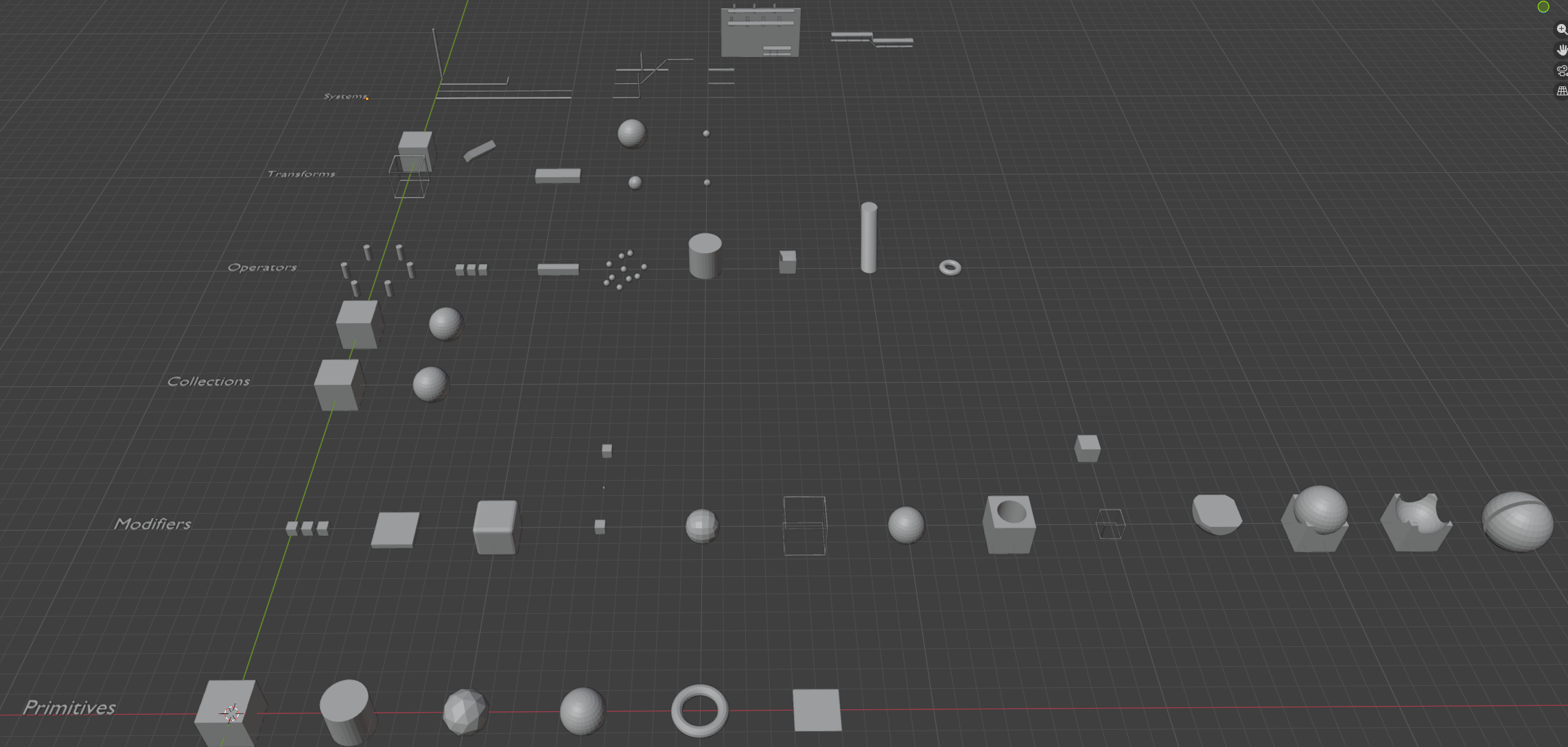
python tests/run_integration.py run -s grid --verifyGrid Scenario builds a structured grid of Blender objects:
- Row 1 — Primitives: Cube, Sphere, Cylinder, Torus, Plane, IcoSphere
- Row 2 — Modifiers: Bevel, Array, Subdivision Surface
- Row 3 — Collections with hierarchy and visibility
- Row 4 — Boolean operations: Union, Difference, Intersect
- Row 5 — Transforms: Move, Rotate, Scale, Duplicate, Batch
- Row 6 — Systems (MEP): Parametric pipe runs (Fire, Gas, Chiller, Drainage) and cable trays with automated supports (Trapeze, Cantilever)
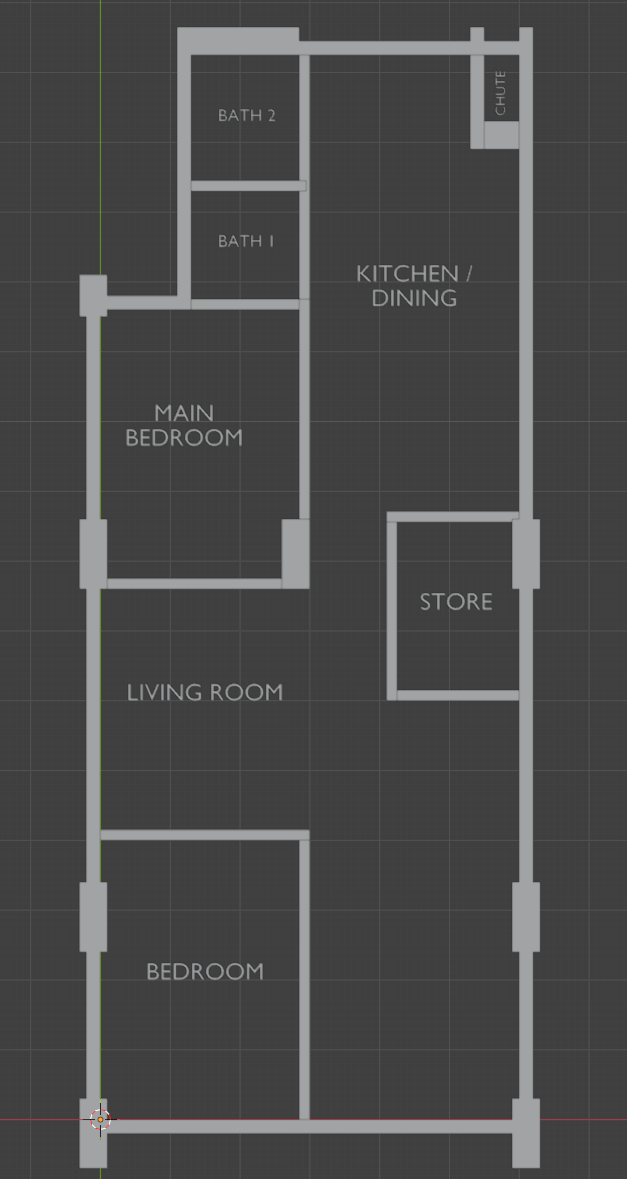
Arch Scenario constructs a complete parametric floor plan:
- Outer shell with floor slab, exterior walls (0.2 m), and hidden ceiling
- Structural columns merged with walls via Boolean Union
- Bedroom partitions with door and window cutouts
- 3D text labels for each room with rotation support
Benchmark Workflow
# Approve the current run as the new baseline
python tests/run_integration.py approve -s archBaselines live in tests/benchmarks/ as JSON snapshots. If you intentionally change addon logic, run the scenario and approve the result to update the expected state.
Integration Testing in Action
The video below demonstrates the significant performance difference between the two transport modes during execution of the same recorded session:
- Stateless (JSON-RPC over HTTP): Robust and standard, but overhead accumulates as every single tool call requires a full TCP handshake and MCP initialization sequence.
- Stateful (Persistent SSE/WebSocket): Up to 10x faster for complex scenes. By maintaining a live session, commands are dispatched instantly through the persistent connection.
Community
The community/ directory serves as a replayable gallery of recorded AI-driven build sessions. Each project demonstrates a different modeling strategy, tool composition pattern, or architectural workflow.
Condominium Tower
Model: Claude Haiku 4.5
A complete 20-storey procedural tower built entirely from natural language prompts — 20 arrayed floor slabs, glass facades, torus railings, vertical facade fins, a penthouse level, and 30 randomly distributed landscape trees. Finished with golden-hour sun lighting, an HDRI sky, and a cinematic hero-shot camera.
# Playback in Stateless mode (Standard JSON-RPC over HTTP)
python -m src.main play community/condominium_tower/session.json --transport statelessHighlight: This session illustrates the stateless transport model used by n8n, where each tool call is executed as an isolated, self-contained request.
Boolean Pavilion
Model: gpt-5-nano
A modern architectural pavilion demonstrating boolean workflows: four tapered pillars (sheared inward with shear_mesh) unified with a torus dome via a single join_objects call, finished with frosted glass and gold-metal materials, warm sun and cool interior area lights, and a dramatic camera setup.
Playback via Session Editor
- Open
session_editor/index.html. - Load
community/boolean_pavilion/session.json. - Hit Play All to watch the session execute in real-time.
Highlight: This project showcases the Visual Editor experience, allowing you to inspect, prune, and execute recorded sessions through a clean web interface.
Data Center with MEP Systems
Model: gpt-4.1
A realistic 18 m × 16 m server hall featuring parametric rack libraries (Boolean hollowed frames, shelves, glass doors), 24-rack hot-aisle rows duplicated across three hot aisles, layered LADDER and SOLID cable trays for power and data routing at different heights, vertical tray risers along the side wall, and a full build_room_shell enclosure with door and conduit sleeve openings.
# Playback in Default Stateful mode (Persistent HTTP Streamable)
python -m src.main play community/data_center_with_mep/session.jsonHighlight: Replaying this large infrastructure session in stateful mode highlights the performance and stability advantages of persistent MCP transport.
💡 Share Your Work: Record your build session, clean it with the Session Editor, and open a Pull Request to add your project under
community/your_project/.
Limitations & Future Work
- Stateless transport introduces measurable overhead: Each n8n tool call performs a full MCP handshake. On large scenes, repeated initialization cycles may increase latency or trigger rate limits depending on the upstream AI provider. Use bulk tools like
create_and_array,batch_transform, andcreate_material(pattern=...)to minimise round-trips. - Blender version dependency: The addon targets Blender 4.x. Older versions may have different Python API signatures.
- Planned: An indexed community gallery (e.g. Firestore-backed catalog), more MEP tool categories, and direct Geometry Nodes support.
Conclusion
Blender MCP for n8n transforms Blender from a tool that traditionally requires custom Python scripting for automation into a programmable environment that can be orchestrated entirely through natural language. By exposing 70+ carefully designed tools — from simple primitive creation to full architectural shells and MEP cable routing — and combining them with a record-and-replay session system, the project makes complex Blender workflows reproducible, testable, and accessible to anyone who can describe what they want.
The showcase sessions demonstrate that even intricate, multi-step scenes can be constructed deterministically and replayed reliably through AI-directed tool calls — turning Blender into a controllable execution engine rather than a one-off script generation target.
Give it a try, record your own session, and share it with the community!