
Following up on my previous post, Building a LangGraph Multi-Agent System , this article extends that foundation into a fully autonomous, DeepAgents-powered multi-agent pipeline for HDB insights.
This iteration brings together:
- Geospatial reasoning across MRT exits, HDB building polygons, and a foundation that can be extended to schools, parks, and amenities in the future
- A LangGraph state machine orchestrating intent → SQL → geospatial queries → MRT enrichment → summarization
- A streamlined CLI (and optional Gradio UI) for natural-language property search
The result is an autonomous HDB insights assistant that can answer complex, real-world questions such as:
- “Find 4-room units in Toa Payoh under 600k near MRT exits.”
- “Show me flats within 500m of Bukit Batok MRT with good value.”
- “Which Bishan blocks have resale units closest to public transport?”
Setup
PostgreSQL Extensions
We begin by enabling PostGIS, which powers all geospatial queries in this pipeline:
CREATE EXTENSION IF NOT EXISTS postgis;

SELECT extname, extversion
FROM pg_extension
WHERE extname IN ('postgis');
-- Expected resulta:
-- extversion	extname
-- 3.6.1 postgisInit Project
git clone https://github.com/seehiong/autonomous-hdb-deepagents.git
cd autonomous-hdb-deepagents

uv sync
.venv\Scripts\activateData Ingestion
This project relies on three primary data pillars:
- HDB building geometries
- MRT station exits
- Geocoded points of interest (via OneMap)
These form the critical spatial substrate that allows the deep agent to “reason” about distance, proximity, and locality.
HDB - Existing Building Dataset
Dataset:
Housing & Development Board. (2023). HDB Existing Building (2025) [Dataset]. data.gov.sg. Retrieved December 3, 2025 from https://data.gov.sg/datasets/d_16b157c52ed637edd6ba1232e026258d/view
This dataset is used to build the infrastructure table for HDB block shapes and centroids. Create a Jupyter notebook named hdb-existing-building.ipynb.
1. SQL Table Creation
CREATE TABLE IF NOT EXISTS public.hdb_blocks (
    objectid BIGINT,
    blk_no TEXT,
    street_code TEXT,
    entity_id BIGINT,
    postal_code TEXT,
    inc_crc TEXT,
    updated_at TEXT,
    shape_area DOUBLE PRECISION,
    shape_len DOUBLE PRECISION,
    geom_4326 geometry(MultiPolygon, 4326),
    geom_3414 geometry(MultiPolygon, 3414),
    centroid_4326 geometry(Point, 4326),
    centroid_3414 geometry(Point, 3414)
);2. Load GeoJSON
This step extracts polygons and centroids, preparing them for spatial indexing.
import json
import pandas as pd
from shapely.geometry import shape
from shapely.wkt import dumps as wkt_dumps

geo_path = "data/HDBExistingBuilding.geojson"

with open(geo_path, "r") as f:
    gj = json.load(f)

rows = []
for feature in gj["features"]:
    geom = shape(feature["geometry"])
    props = feature["properties"]

    rows.append({
        "objectid": props.get("OBJECTID"),
        "blk_no": props.get("BLK_NO"),
        "street_code": props.get("ST_COD"),
        "entity_id": props.get("ENTITYID"),
        "postal_code": props.get("POSTAL_COD"),
        "inc_crc": props.get("INC_CRC"),
        "updated_at": props.get("FMEL_UPD_D"),
        "shape_area": props.get("SHAPE.AREA"),
        "shape_len": props.get("SHAPE.LEN"),
        "geom_wkt": wkt_dumps(geom),
        "centroid_wkt": wkt_dumps(geom.centroid)
    })

df = pd.DataFrame(rows)
df.head()

# Sample Outputs
# objectid	blk_no	street_code	entity_id	postal_code	inc_crc	            updated_at	    shape_area	shape_len	geom_wkt	                                        centroid_wkt
# 0	898584	514	    BUS14E	    8235	    650514	    74585E59F18D2E73	20130426120328	1033.685604	253.971941	POLYGON ((103.7529821808343655 1.3544208894918...	POINT (103.7525891826131073 1.3544681945247203)
# 1 898585 21 TEG02M 6192 600021 1550C06FF96161F6 20130426120305 1046.092028 397.417077 POLYGON ((103.7392355494047109 1.3236971900920... POINT (103.7392896961472388 1.3236959487788726)3. Insert into Postgres
This batch insertion ensures efficient ingestion of ~13k block geometries.
from sqlalchemy import create_engine, text
import time

import requests
import pandas as pd
import time
from sqlalchemy import create_engine, text
from tqdm.auto import tqdm

# DB connection
engine = create_engine("postgresql://postgres:postgres@postgres-postgresql.postgres:5432/postgres")

BATCH_SIZE = 50
MAX_RETRIES = 3

def insert_batch(batch_df, retry_count=0):
    try:
        with engine.begin() as conn:
            for _, row in batch_df.iterrows():
                conn.execute(text("""
                    INSERT INTO public.hdb_blocks (
                        objectid, blk_no, street_code, entity_id, postal_code,
                        inc_crc, updated_at, shape_area, shape_len,
                        geom_4326, geom_3414,
                        centroid_4326, centroid_3414
                    )
                    VALUES (
                        :objectid, :blk_no, :street_code, :entity_id, :postal_code,
                        :inc_crc, :updated_at, :shape_area, :shape_len,
                        ST_SetSRID(ST_GeomFromText(:geom_4326), 4326),
                        ST_Transform(ST_SetSRID(ST_GeomFromText(:geom_4326), 4326), 3414),
                        ST_SetSRID(ST_GeomFromText(:centroid_4326), 4326),
                        ST_Transform(ST_SetSRID(ST_GeomFromText(:centroid_4326), 4326), 3414)
                    );
                """), {
                    "objectid": row["objectid"],
                    "blk_no": row["blk_no"],
                    "street_code": row["street_code"],
                    "entity_id": row["entity_id"],
                    "postal_code": row["postal_code"],
                    "inc_crc": row["inc_crc"],
                    "updated_at": row["updated_at"],
                    "shape_area": row["shape_area"],
                    "shape_len": row["shape_len"],
                    "geom_4326": row["geom_wkt"],
                    "centroid_4326": row["centroid_wkt"],
                })
        return True
    except Exception as e:
        if retry_count < MAX_RETRIES:
            print(f"⚠ Batch failed: {str(e)[:100]}... Retrying ({retry_count + 1}/{MAX_RETRIES})...")
            time.sleep(2 ** retry_count)  # Exponential backoff
            return insert_batch(batch_df, retry_count + 1)
        else:
            print(f"✗ Batch failed after {MAX_RETRIES} retries")
            return False

# Process in batches
total_batches = (len(df) + BATCH_SIZE - 1) // BATCH_SIZE
successful = 0

for i in range(0, len(df), BATCH_SIZE):
    batch = df.iloc[i:i+BATCH_SIZE]
    batch_num = i // BATCH_SIZE + 1
    print(f"Processing batch {batch_num}/{total_batches}...")

    if insert_batch(batch):
        successful += len(batch)
        print(f"  ✔ Batch {batch_num} complete ({successful}/{len(df)} total)")
    else:
        print(f"  ✗ Batch {batch_num} failed")

print(f"\n✔ Completed: {successful}/{len(df)} records inserted")

# Sample Outputs
# Processing batch 1/268...
#   ✔ Batch 1 complete (50/13352 total)
# Processing batch 2/268...
# ✔ Batch 2 complete (100/13352 total)LTA - MRT Station Exit
Dataset:
Land Transport Authority. (2019). LTA MRT Station Exit (GEOJSON) (2025) [Dataset]. data.gov.sg. Retrieved December 3, 2025 from https://data.gov.sg/datasets/d_b39d3a0871985372d7e1637193335da5/view
Create the notebook lta-mrt-exits.ipynb.
1. SQL Table for MRT Exits
CREATE TABLE public.mrt_exits (
    objectid INTEGER,
    station_name TEXT,
    exit_code TEXT,
    inc_crc TEXT,
    updated_at TEXT,
    lon DOUBLE PRECISION,
    lat DOUBLE PRECISION,
    geom_4326 geometry(Point, 4326),
    geom_3414 geometry(Point, 3414)
)2. Load GeoJSON into DataFrame
import json
import pandas as pd
from sqlalchemy import create_engine, text

# Load GeoJSON file
geojson_path = "data/LTAMRTStationExitGEOJSON.geojson"
with open(geojson_path, "r") as f:
    gj = json.load(f)

# Convert GeoJSON features to DataFrame rows
rows = []
for feature in gj["features"]:
    props = feature["properties"]
    lon, lat = feature["geometry"]["coordinates"]  # GeoJSON = lon, lat

    rows.append({
        "objectid": props.get("OBJECTID"),
        "station_name": props.get("STATION_NA"),
        "exit_code": props.get("EXIT_CODE"),
        "inc_crc": props.get("INC_CRC"),
        "updated_at": props.get("FMEL_UPD_D"),
        "lon": float(lon),
        "lat": float(lat)
    })

df = pd.DataFrame(rows)
df.head()

# Sample outputs
#   objectid	station_name	        exit_code	inc_crc	            updated_at	    lon	        lat
# 0	14641   	JELAPANG LRT STATION	Exit A	    45CDB0D9BDC73079	20231019120510	103.764677	1.386833
# 1 14642 SEGAR LRT STATION Exit A 54BFE6EB924CBA6F 20231019120510 103.769410 1.3878123. Insert into Postgres
from sqlalchemy import create_engine

# DB connection
engine = create_engine("postgresql://postgres:postgres@postgres-postgresql.postgres:5432/postgres")

with engine.begin() as conn:
    for _, row in df.iterrows():
        conn.execute(text("""
            INSERT INTO public.mrt_exits (
                objectid, station_name, exit_code, inc_crc, updated_at,
                lon, lat,
                geom_4326,
                geom_3414
            )
            VALUES (
                :objectid, :station_name, :exit_code, :inc_crc, :updated_at,
                :lon, :lat,
                ST_SetSRID(ST_Point(:lon, :lat), 4326),
                ST_Transform(ST_SetSRID(ST_Point(:lon, :lat), 4326), 3414)
            );
        """), row.to_dict())

print("✅ MRT exits ingested with geom_4326 and geom_3414!")This gives us a reliable, spatially precise mapping between MRT exits and their locations.
Centralized Geocoding Cache
To avoid repeated calls to OneMap (and avoid rate limits), we build a centralized geocode cache with upsert logic and canonicalized street names.
This component becomes invaluable when merging HDB datasets, which often use different street naming conventions.
1. Retrieve OneMap Access Token
Ensure that the .env file contains ONEMAP_EMAIL and ONEMAP_EMAIL_PASSWORD.
Let’s do this in onemap-geocoding-cache.ipynb.
from dotenv import load_dotenv
import requests
import os

load_dotenv()

url = "https://www.onemap.gov.sg/api/auth/post/getToken"
payload = {
    "email": os.environ.get('ONEMAP_EMAIL'),
    "password": os.environ.get('ONEMAP_EMAIL_PASSWORD')
}

response = requests.request("POST", url, json=payload)
response_data = response.json()
access_token = response_data['access_token']

os.environ['ONEMAP_ACCESS_TOKEN'] = access_token2. Create Cache Table
CREATE TABLE public.geocode_cache (
    search_text TEXT PRIMARY KEY,   -- search key (postal or address)
    blk_no TEXT,
    road_name TEXT,
    building TEXT,
    address TEXT,
    postal TEXT,
    lat DOUBLE PRECISION,
    lon DOUBLE PRECISION,
    x DOUBLE PRECISION,
    y DOUBLE PRECISION,
    geom_4326 geometry(Point, 4326),
    geom_3414 geometry(Point, 3414),
    updated_at TIMESTAMPTZ DEFAULT NOW()
);

CREATE INDEX geocode_cache_postal_idx ON public.geocode_cache(postal);
CREATE INDEX geocode_cache_geom_idx ON public.geocode_cache USING GIST (geom_3414)3. Upsert Function
CREATE OR REPLACE FUNCTION upsert_geocode_cached(
    p_search TEXT,
    p_blk_no TEXT,
    p_road_name TEXT,
    p_building TEXT,
    p_address TEXT,
    p_postal TEXT,
    p_lat DOUBLE PRECISION,
    p_lon DOUBLE PRECISION,
    p_x DOUBLE PRECISION,
    p_y DOUBLE PRECISION
)
RETURNS VOID AS $$
BEGIN
    INSERT INTO public.geocode_cache (
        search_text, blk_no, road_name, building, address, postal,
        lat, lon, x, y,
        geom_4326, geom_3414, updated_at
    )
    VALUES (
        p_search, p_blk_no, p_road_name, p_building, p_address, p_postal,
        p_lat, p_lon, p_x, p_y,
        ST_SetSRID(ST_Point(p_lon, p_lat), 4326),
        ST_Transform(ST_SetSRID(ST_Point(p_lon, p_lat), 4326), 3414),
        NOW()
    )
    ON CONFLICT (search_text) DO UPDATE SET
        blk_no = EXCLUDED.blk_no,
        road_name = EXCLUDED.road_name,
        building = EXCLUDED.building,
        address = EXCLUDED.address,
        postal = EXCLUDED.postal,
        lat = EXCLUDED.lat,
        lon = EXCLUDED.lon,
        x = EXCLUDED.x,
        y = EXCLUDED.y,
        geom_4326 = EXCLUDED.geom_4326,
        geom_3414 = EXCLUDED.geom_3414,
        updated_at = NOW();
END;
$$ LANGUAGE plpgsql;4. Imports & DB Setup
import requests
import pandas as pd
import time
from sqlalchemy import create_engine, text
from tqdm.auto import tqdm

# DB connection
engine = create_engine("postgresql://postgres:postgres@postgres-postgresql.postgres:5432/postgres")5. Load All Unique Postal Codes
query = """
SELECT DISTINCT postal FROM (
    SELECT postal_code AS postal FROM sg_schools WHERE postal_code IS NOT NULL
    UNION
    SELECT postal_code AS postal FROM hdb_blocks WHERE postal_code IS NOT NULL
) AS all_postals
WHERE postal ~ '^[0-9]{6}$';     -- only valid SG postal codes
"""

postal_df = pd.read_sql(query, engine)
postal_list = sorted(postal_df['postal'].unique())

print(f"📌 Total unique postal codes found: {len(postal_list)}")
postal_list[:10]

# Sample Outputs
# 📌 Total unique postal codes found: 13683
# ['050004',
# '050005',6. OneMap Geocoder
def geocode_postal(postal: str):
    """Reliable OneMap geocoder for SG postal codes with full metadata."""

    url = (
        "https://www.onemap.gov.sg/api/common/elastic/search"
        f"?searchVal={postal}&returnGeom=Y&getAddrDetails=Y&pageNum=1"
    )

    headers = {"User-Agent": "Mozilla/5.0"}

    try:
        r = requests.get(url, headers=headers, timeout=8)
        if r.status_code != 200:
            return None

        data = r.json()
        results = data.get("results")
        if not results:
            return None

        r0 = results[0]

        return {
            # identifiers
            "blk_no": r0.get("BLK_NO"),
            "road_name": r0.get("ROAD_NAME"),
            "building": r0.get("BUILDING"),
            "address": r0.get("ADDRESS"),
            "postal": r0.get("POSTAL"),

            # coordinates: WGS84 (lat/lon)
            "lat": float(r0.get("LATITUDE")),
            "lon": float(r0.get("LONGITUDE")),

            # coordinates: SVY21 (x/y)
            "x": float(r0.get("X")),
            "y": float(r0.get("Y")),
        }

    except Exception as e:
        print(f"⚠ Geocoder error for {postal}: {e}")
return None7. Retry Wrapper
def safe_geocode(postal, retries=3):
    for attempt in range(retries):
        result = geocode_postal(postal)
        if result:
            return result
        time.sleep(1 * (attempt + 1))
return None8. Batch Geocode
cached_sql = "SELECT search_text FROM geocode_cache;"
cached_df = pd.read_sql(cached_sql, engine)

cached_set = set(cached_df["search_text"].str.upper())

print(f"📦 Cached entries already in DB: {len(cached_set)}")

# Filter out postal codes already processed
todo = [p for p in postal_list if p.upper() not in cached_set]

print(f"🚀 Postal codes left to process: {len(todo)}")9. Upsert
UPSERT_SQL = text("""
SELECT upsert_geocode_cached(
    :search_text,
    :blk_no,
    :road_name,
    :building,
    :address,
    :postal,
    :lat,
    :lon,
    :x,
    :y
);
""")

progress = tqdm(todo, desc="Geocoding postal codes")

for postal in progress:

    # Call geocode API
    info = safe_geocode(postal)

    if not info:
        print(f"⚠ Failed to geocode {postal}")
        continue

    # Upsert into DB
    with engine.begin() as conn:
        conn.execute(
            UPSERT_SQL,
            {
                "search_text": postal,
                "blk_no": info["blk_no"],
                "road_name": info["road_name"],
                "building": info["building"],
                "address": info["address"],
                "postal": info["postal"],
                "lat": info["lat"],
                "lon": info["lon"],
                "x": info["x"],
                "y": info["y"]
            }
        )

    time.sleep(0.12)  # protect against rate limiting

# Sample Outputs
# Geocoding postal codes: 100% [---] 13683/13683 [55:36<00:00, 4.81it/s]10. Canonical Road Name Function
This function converts verbose street names into a standardized, compact form (e.g., AVENUE → AVE, GARDENS → GDNS).
It enables reliable joins between HDB property data, OneMap geocode results, and geospatial datasets.
CREATE OR REPLACE FUNCTION canonicalize_road_name(full_name TEXT)
RETURNS TEXT AS $$
DECLARE
    tokens TEXT[];
    t TEXT;
    out TEXT := '';
BEGIN
    IF full_name IS NULL THEN
        RETURN NULL;
    END IF;

    -- Normalize spaces & uppercase
    full_name := upper(regexp_replace(full_name, '\s+', ' ', 'g'));

    -- Split into array of tokens
    tokens := string_to_array(full_name, ' ');

    FOREACH t IN ARRAY tokens LOOP
        CASE t
            WHEN 'AVENUE'     THEN out := out || 'AVE ';
            WHEN 'STREET'     THEN out := out || 'ST ';
            WHEN 'ROAD'       THEN out := out || 'RD ';
            WHEN 'DRIVE'      THEN out := out || 'DR ';
            WHEN 'CRESCENT'   THEN out := out || 'CRES ';
            WHEN 'GARDENS'    THEN out := out || 'GDNS ';
            WHEN 'GARDEN'     THEN out := out || 'GDN ';
            WHEN 'TERRACE'    THEN out := out || 'TER ';
            WHEN 'HEIGHTS'    THEN out := out || 'HTS ';
            WHEN 'PLACE'      THEN out := out || 'PL ';
            WHEN 'BOULEVARD'  THEN out := out || 'BLVD ';
            WHEN 'PARK'       THEN out := out || 'PK ';
            WHEN 'CIRCLE'     THEN out := out || 'CIR ';
            WHEN 'SQUARE'     THEN out := out || 'SQ ';
            ELSE
                out := out || t || ' ';
        END CASE;
    END LOOP;

    RETURN trim(out);
END;
$$ LANGUAGE plpgsql IMMUTABLE;11. Add new column to geocode_cache
ALTER TABLE public.geocode_cache
ADD COLUMN canonical_street TEXT;

UPDATE public.geocode_cache
SET canonical_street = canonicalize_road_name(road_name);

CREATE INDEX IF NOT EXISTS idx_geo_canonical_street
ON public.geocode_cache(canonical_street)HDB - Property Information
Dataset:
Housing & Development Board. (2018). HDB Property Information (2025) [Dataset]. data.gov.sg. Retrieved December 3, 2025 from https://data.gov.sg/datasets/d_17f5382f26140b1fdae0ba2ef6239d2f/view
This dataset is crucial for linking the logical representation of an HDB block (e.g., “BLK 100 Toa Payoh Lor 1”) with:
- A precise geospatial location
- Block-level attributes (age, height, number of units)
- Canonical identifiers such as postal code
Create the notebook hdb-property-info.ipynb.
1. Creates the SQL script
CREATE TABLE public.hdb_property_info (
    blk_no TEXT,
    street TEXT,
    max_floor_lvl INT,
    year_completed INT,
    residential TEXT,
    commercial TEXT,
    market_hawker TEXT,
    miscellaneous TEXT,
    multistorey_carpark TEXT,
    precinct_pavilion TEXT,
    bldg_contract_town TEXT,
    total_dwelling_units INT,
    room1_sold INT,
    room2_sold INT,
    room3_sold INT,
    room4_sold INT,
    room5_sold INT,
    exec_sold INT,
    multigen_sold INT,
    studio_apartment_sold INT,
    room1_rental INT,
    room2_rental INT,
    room3_rental INT,
    other_room_rental INT,
    -- Enrichment from OneMap
    postal TEXT,
    full_address TEXT,
    lon DOUBLE PRECISION,
    lat DOUBLE PRECISION,
    x DOUBLE PRECISION,
    y DOUBLE PRECISION,
    geom_4326 geometry(Point,4326),
    geom_3414 geometry(Point,3414),

    updated_at TIMESTAMPTZ DEFAULT NOW()
);

CREATE INDEX hdb_property_info_block_idx ON public.hdb_property_info(blk_no, street);
CREATE INDEX hdb_property_postal_idx ON public.hdb_property_info(postal);
CREATE INDEX hdb_property_geom_idx ON public.hdb_property_info USING GIST (geom_3414)2. Load the CSV
import pandas as pd

df = pd.read_csv("data/HDBPropertyInformation.csv")

df.columns = (
    df.columns.str.strip()
      .str.lower()
      .str.replace(" ", "_")
      .str.replace("1room", "room1")
      .str.replace("2room", "room2")
      .str.replace("3room", "room3")
      .str.replace("4room", "room4")
      .str.replace("5room", "room5")
)
df.head()3. Insert into Postgres
from sqlalchemy import create_engine, text

# DB connection
engine = create_engine("postgresql://postgres:postgres@postgres-postgresql.postgres:5432/postgres")

insert_sql = text("""
INSERT INTO public.hdb_property_info (
    blk_no, street, max_floor_lvl, year_completed,
    residential, commercial, market_hawker, miscellaneous,
    multistorey_carpark, precinct_pavilion, bldg_contract_town,
    total_dwelling_units, room1_sold, room2_sold, room3_sold,
    room4_sold, room5_sold, exec_sold, multigen_sold,
    studio_apartment_sold, room1_rental, room2_rental, room3_rental,
    other_room_rental
)
VALUES (
    :blk_no, :street, :max_floor_lvl, :year_completed,
    :residential, :commercial, :market_hawker, :miscellaneous,
    :multistorey_carpark, :precinct_pavilion, :bldg_contract_town,
    :total_dwelling_units, :room1_sold, :room2_sold, :room3_sold,
    :room4_sold, :room5_sold, :exec_sold, :multigen_sold,
    :studio_apartment_sold, :room1_rental, :room2_rental, :room3_rental,
    :other_room_rental
);
""")

with engine.begin() as conn:
    for _, row in df.iterrows():
        conn.execute(insert_sql, row.to_dict())

print("✔ Raw property info inserted.")4. Geocode Enrichment
4.1 Add canonical road name column
ALTER TABLE public.hdb_property_info
ADD COLUMN canonical_street TEXT;

UPDATE public.hdb_property_info
SET canonical_street = canonicalize_road_name(street);

CREATE INDEX IF NOT EXISTS idx_hdb_canonical_street
ON public.hdb_property_info(canonical_street)4.2 Join using canonical + block number
UPDATE public.hdb_property_info p
SET
    postal      = g.postal,
    full_address = g.address,
    lat        = g.lat,
    lon        = g.lon,
    x          = g.x,
    y          = g.y,
    geom_4326  = g.geom_4326,
    geom_3414  = g.geom_3414,
    updated_at = NOW()
FROM public.geocode_cache g
WHERE
    p.blk_no = g.blk_no
AND p.canonical_street = g.canonical_street;MRT to HDB Town
With geospatial indexes in place, we can compute the nearest HDB town for each MRT station.
This mapping allows natural-language queries like “flats near Bishan MRT” to route correctly into town-level resale transactions, which is how HDB organizes its datasets.
-- Create indexes FIRST
CREATE INDEX IF NOT EXISTS idx_mrt_geom_3414 ON public.mrt_exits USING gist (geom_3414);
CREATE INDEX IF NOT EXISTS idx_hdb_geom_3414 ON public.hdb_property_info USING gist (geom_3414);

CREATE INDEX idx_mrt_station_name ON public.mrt_exits (station_name);
CREATE INDEX idx_hdb_town ON public.hdb_property_info (bldg_contract_town);

-- Update statistics for query planner
ANALYZE public.mrt_exits;
ANALYZE public.hdb_property_info;

-- Test with one station
EXPLAIN ANALYZE
SELECT
    m.station_name,
    h.bldg_contract_town AS town,
    COUNT(DISTINCT h.blk_no) AS num_blocks,
    ROUND(MIN(ST_Distance(m.geom_3414, h.geom_3414))::numeric, 2) AS min_dist_m
FROM public.mrt_exits m
INNER JOIN public.hdb_property_info h
  ON ST_DWithin(m.geom_3414, h.geom_3414, 1200)
WHERE m.station_name = 'RAFFLES PLACE'
  AND h.bldg_contract_town IS NOT NULL
GROUP BY m.station_name, h.bldg_contract_town;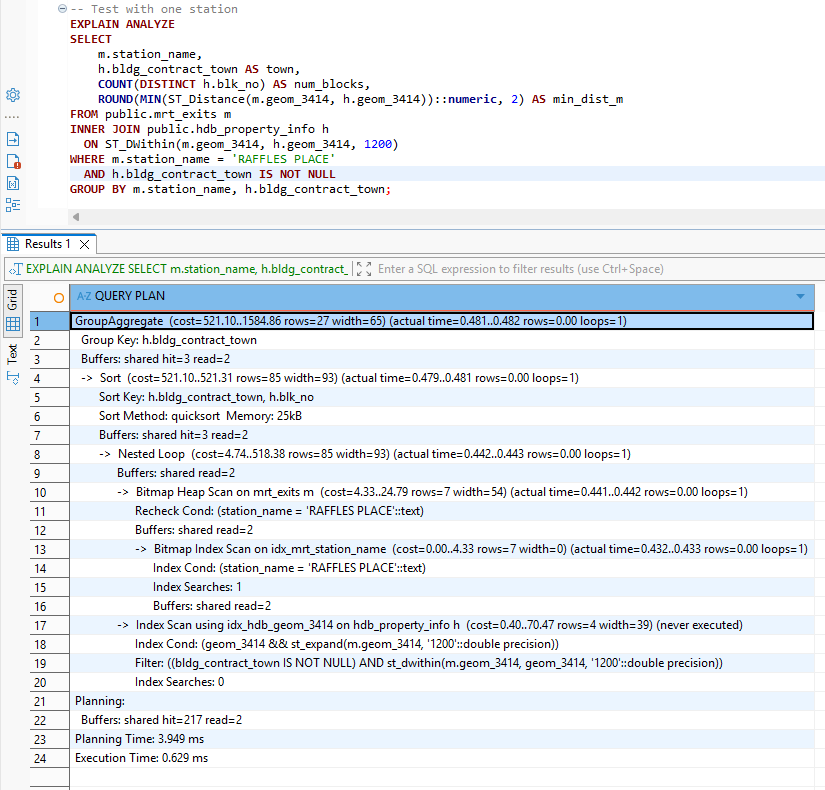
Creates the table:
CREATE TABLE public.mrt_to_hdb_town AS
SELECT
    m.station_name,
    h.bldg_contract_town AS town,
    COUNT(DISTINCT h.blk_no) AS num_blocks,
    ROUND(
        MIN(ST_Distance(
            m.geom_3414,
            h.geom_3414
        ))::numeric, 2
    ) AS min_dist_m
FROM public.mrt_exits m
INNER JOIN public.hdb_property_info h
  ON ST_DWithin(
      m.geom_3414,
      h.geom_3414,
      1200  -- 1.2km in meters
  )
WHERE h.bldg_contract_town IS NOT NULL
  AND m.station_name IS NOT NULL
GROUP BY m.station_name, h.bldg_contract_town
ORDER BY m.station_name, min_dist_m;Deep Agent
High-Level Architecture
The DeepAgent pipeline transforms a user query into a multi-stage reasoning workflow:
- Intent extraction
- Town/MRT inference
- Resale transaction retrieval
- Geospatial enrichment
- LLM summarization
Each transformation is handled by a LangGraph node, while DeepAgents provides the routing and orchestration needed to connect the user query with the underlying multi-step pipeline.
Code Walkthrough
1. Imports and LLM
We use Amazon Nova via OpenRouter for consistent, deterministic intent parsing and summarization.
import os
import json
import asyncio
from typing import List, Dict, Optional
from pydantic import BaseModel, ConfigDict

from deepagents import CompiledSubAgent, create_deep_agent
from langchain_openai import ChatOpenAI
from langchain_core.messages import BaseMessage, AIMessage, HumanMessage
from langgraph.graph import StateGraph, END
from toolbox_langchain import ToolboxClient

llm = ChatOpenAI(
    api_key=os.getenv("OPENROUTER_API_KEY"),
    base_url="https://openrouter.ai/api/v1",
    model="amazon/nova-2-lite-v1:free",
    temperature=0
)2. Tool Loading
Tools are lazily loaded via the MCP Toolbox server, ensuring startup efficiency.
_toolbox_client: Optional[ToolboxClient] = None

async def get_toolbox_client():
    global _toolbox_client
    if _toolbox_client is None:
        _toolbox_client = ToolboxClient("http://127.0.0.1:5000")
    return _toolbox_client

async def load_tools():
    client = await get_toolbox_client()
    tools = await client.aload_toolset()
return {t.name: t for t in tools}3. Pipeline State
The state object tracks messages, intents, flats, enriched metadata, and search constraints.
class PipelineState(BaseModel):
    model_config = ConfigDict(arbitrary_types_allowed=True)

    messages: List[BaseMessage] = []
    flats: List[Dict] = []
    enriched_flats: List[Dict] = []
    # Intent
    town: Optional[str] = None
    flat_type: Optional[str] = None
    max_price: Optional[int] = None
    mrt_radius: Optional[int] = None
mrt_station: Optional[str] = None4. Intent Extraction Node
Uses structured prompting and robust JSON parsing to extract actionable parameters.
async def intent_node(state: PipelineState):
    user_msg = None
    for m in state.messages:
        if isinstance(m, HumanMessage):
            user_msg = m.content
            break

    if not user_msg:
        return state

    prompt = """
Extract user intent. Return JSON with these fields (include even if null):
{
  "town": "string or null",
  "mrt_station": "string or null",
  "flat_type": "string or null",
  "max_price": "number or null",
  "mrt_radius": "number or null"
}

RULES:
1. MRT mentions: "near <name> MRT", "<name> station", "around <name>" → extract "mrt_station"
   Examples: "Bukit Panjang MRT" → "BUKIT PANJANG", "Toa Payoh station" → "TOA PAYOH"

2. Town mentions (explicit): "in <town>", "<town> area" → extract "town"
   Examples: "in Bedok", "Tampines area" → "BEDOK", "TAMPINES"

3. Flat types: "4-room", "4 room", "4rm" → "4 ROOM"; "5-room" → "5 ROOM"

4. Prices: "$500k", "500k", "500,000", "under 600k" → numeric

5. Radius: "within 500m", "800m" → numeric (in meters)

6. Use UPPERCASE for town/station names.

7. Return null if not mentioned. Return ALL five fields.

User query: "%s"

RETURN JSON ONLY. NO EXPLANATION.
""" % user_msg

    resp = await llm.ainvoke(prompt)
    content = resp.content.strip()

    # Try to extract JSON from response
    try:
        # Handle case where LLM wraps response in markdown
        if content.startswith("```json"):
            content = content[7:]
        if content.startswith("```"):
            content = content[3:]
        if content.endswith("```"):
            content = content[:-3]
        content = content.strip()

        intent = json.loads(content)
    except Exception as e:
        print(f"[INTENT] JSON parse error: {e}, raw: {content}")
        intent = {}

    print("[INTENT] Parsed intent →", intent)

    return PipelineState(
        messages=state.messages,
        flats=state.flats,
        enriched_flats=state.enriched_flats,
        town=intent.get("town"),
        flat_type=intent.get("flat_type"),
        max_price=intent.get("max_price"),
        mrt_radius=intent.get("mrt_radius"),
        mrt_station=intent.get("mrt_station")
)5. Town Code to Full Name Mapping
Provides a uniform internal representation regardless of user phrasing or MRT inference.
TOWN_CODE_MAP = {
    "AMK": "ANG MO KIO",
    "BB": "BUKIT BATOK",
    "BD": "BEDOK",
    "BH": "BISHAN",
    "BM": "BUKIT MERAH",
    "BP": "BUKIT PANJANG",
    "BT": "BUKIT TIMAH",
    "CCK": "CHOA CHU KANG",
    "CL": "CLEMENTI",
    "CT": "CENTRAL AREA",
    "GL": "GEYLANG",
    "HG": "HOUGANG",
    "JE": "JURONG EAST",
    "JW": "JURONG WEST",
    "KWN": "KALLANG/WHAMPOA",
    "MP": "MARINE PARADE",
    "PG": "PUNGGOL",
    "PRC": "PASIR RIS",
    "QT": "QUEENSTOWN",
    "SB": "SEMBAWANG",
    "SGN": "SERANGOON",
    "SK": "SENGKANG",
    "TAP": "TAMPINES",
    "TG": "TENGAH",
    "TP": "TOA PAYOH",
    "WL": "WOODLANDS",
    "YS": "YISHUN",
}6. Mrt Resolver Node
Maps MRT stations → towns using real geospatial distance from MRT exits.
async def mrt_resolve_node(state: PipelineState):
    if not state.mrt_station:
        print("[MRT-RESOLVE] No MRT station detected → skip")
        return state

    tools = await load_tools()
    tool = tools["get-mrt-towns"]

    print(f"[MRT-RESOLVE] Resolving MRT station: {state.mrt_station}")

    res = await tool.ainvoke({"mrt_station": state.mrt_station})

    if isinstance(res, str):
        try:
            res = json.loads(res)
        except:
            res = []

    if not (isinstance(res, list) and len(res) > 0):
        print("[MRT-RESOLVE] No rows returned → skipping town override")
        return state

    # Get the nearest/best town mapping
    best = res[0]
    town_code = best.get("town")

    if not town_code:
        print("[MRT-RESOLVE] No town code found in result")
        return state

    # Map town code to full town name
    resolved_town = TOWN_CODE_MAP.get(town_code.upper())

    if resolved_town:
        print(f"[MRT-RESOLVE] MRT → {town_code} → {resolved_town}")
    else:
        print(f"[MRT-RESOLVE] Warning: No mapping for town code '{town_code}'")
        # Try to use distance to determine best town from all results
        resolved_town = None
        for row in res:
            tc = row.get("town", "").upper()
            if tc in TOWN_CODE_MAP:
                resolved_town = TOWN_CODE_MAP[tc]
                print(f"[MRT-RESOLVE] Using alternative: {tc} → {resolved_town}")
                break

    return PipelineState(
        messages=state.messages,
        flats=state.flats,
        enriched_flats=state.enriched_flats,
        town=resolved_town or state.town,
        flat_type=state.flat_type,
        max_price=state.max_price,
        mrt_radius=state.mrt_radius,
        mrt_station=state.mrt_station
)7. Resale Node
Fetches raw resale candidate flats using SQL tools.
async def resale_node(state: PipelineState):
    town = state.town or "TOA PAYOH"
    flat_type = state.flat_type or "4 ROOM"
    max_price = state.max_price or 600000

    tools = await load_tools()
    sql = tools["list-hdb-flats"]

    print(f"[RESALE] Fetching {flat_type} in {town} <= {max_price}...")

    flats = await sql.ainvoke({
        "town": town,
        "max_price": max_price,
        "flat_type": flat_type
    })

    if isinstance(flats, str):
        try: flats = json.loads(flats)
        except: flats = []

    if not isinstance(flats, list):
        flats = []

    print(f"[RESALE] Retrieved {len(flats)} flats")

    return PipelineState(
        messages=state.messages,
        flats=flats,
        enriched_flats=[],
        town=town,
        flat_type=flat_type,
        max_price=max_price,
        mrt_radius=state.mrt_radius,
        mrt_station=state.mrt_station
)8. MRT Enrichment Node
Enhances each flat with nearest MRT station + distance (unit-normalized).
async def mrt_node(state: PipelineState):
    flats = state.flats or []
    radius = state.mrt_radius or 800

    print(f"[MRT] Enriching {len(flats)} flats (radius={radius})")

    tools = await load_tools()
    geo = tools["geospatial-query"]

    # Deduplicate coords
    uniq = {}
    for f in flats:
        lat = f.get("lat")
        lon = f.get("lon")
        if lat and lon:
            uniq.setdefault((lat, lon), []).append(f)

    coord_results = {}
    for (lat, lon), group in uniq.items():
        res = await geo.ainvoke({
            "mode": "nearest_mrt",
            "lat": lat,
            "lon": lon,
            "radius": radius
        })

        if isinstance(res, str):
            try:
                res = json.loads(res)
            except:
                res = []

        if isinstance(res, list) and res:
            best = res[0]
            raw_dist = best.get("dist_m")

            # Determine unit and format
            if raw_dist is not None:
                # Check if it's likely degrees (small values < 0.1)
                if raw_dist < 0.1:
                    # Assume degrees, convert to meters
                    meters = raw_dist * 111000  # 1 degree ≈ 111km
                    formatted = format_meters(meters)
                    unit = "degrees"
                elif raw_dist < 1000:
                    # Assume kilometers (0.1 to 1000)
                    meters = raw_dist * 1000
                    formatted = format_meters(meters)
                    unit = "km"
                else:
                    # Assume meters
                    formatted = format_meters(raw_dist)
                    unit = "m"
            else:
                formatted = "N/A"
                unit = None

            coord_results[(lat, lon)] = {
                "nearest_mrt": best.get("label"),
                "dist_raw": raw_dist,
                "dist_formatted": formatted,
                "dist_unit": unit
            }
        else:
            coord_results[(lat, lon)] = {
                "nearest_mrt": None,
                "dist_raw": None,
                "dist_formatted": "N/A",
                "dist_unit": None
            }

    enriched = []
    for f in flats:
        lat = f.get("lat")
        lon = f.get("lon")
        extra = coord_results.get((lat, lon), {})
        f["nearest_mrt"] = extra.get("nearest_mrt")
        f["dist_raw"] = extra.get("dist_raw")
        f["dist_formatted"] = extra.get("dist_formatted")
        f["dist_unit"] = extra.get("dist_unit")
        enriched.append(f)

    if enriched:
        example = enriched[0]
        print(f"[MRT] Enrichment complete — example: {example['street_name']} → {example['nearest_mrt']} ({example['dist_formatted']})")
    else:
        print("[MRT] Enrichment complete — no flats")

    return PipelineState(
        messages=state.messages,
        flats=state.flats,
        enriched_flats=enriched,
        town=state.town,
        flat_type=state.flat_type,
        max_price=state.max_price,
        mrt_radius=radius,
        mrt_station=state.mrt_station
    )

def format_meters(meters):
    """Format distance in meters to human-readable string."""
    if meters is None:
        return "N/A"

    if meters < 1000:
        return f"{int(round(meters))}m"
    else:
        km = meters / 1000
        if km < 10:
            # Show 1 decimal for < 10km
            return f"{km:.1f}km".rstrip('0').rstrip('.') + "km"
        else:
            # Round to nearest km for >= 10km
return f"{int(round(km))}km" 9. Summary Node
Produces a concise, human-friendly explanation with price ranges and best-value highlights.
async def summary_node(state: PipelineState):
    flats = state.enriched_flats or []
    print("[SUMMARY] Summarizing", len(flats), "flats")

    if not flats:
        summary = "No flats found matching your criteria."
    else:
        # Create a preview with formatted distances
        preview = []
        for flat in flats[:5]:  # Show first 5 as preview
            preview.append({
                "block": flat.get("block"),
                "street": flat.get("street_name"),
                "price": f"${flat.get('resale_price', 0):,}",
                "nearest_mrt": flat.get("nearest_mrt", "Unknown").replace(" MRT STATION", ""),
                "distance": flat.get("dist_formatted", "N/A")
            })

        prompt = f"""
Summarize the following HDB flats near {state.mrt_station or state.town or 'the area'}:

Flats data (first {len(preview)} of {len(flats)}):
{json.dumps(preview, indent=2)}

Total flats found: {len(flats)}

Please provide a concise summary that includes:
1. Price range
2. Closest flats to MRT stations (use the actual distances like "350m", "1.2km")
3. Best value picks
4. Any notable patterns

Format distances in a human-readable way (e.g., "350m" not "0.35km").
"""
        resp = await llm.ainvoke(prompt)
        summary = resp.content

    return PipelineState(
        messages=state.messages + [AIMessage(content=summary)],
        flats=state.flats,
        enriched_flats=state.enriched_flats,
        town=state.town,
        flat_type=state.flat_type,
        max_price=state.max_price,
        mrt_radius=state.mrt_radius,
        mrt_station=state.mrt_station
)10. Pipeline Graph
graph = StateGraph(PipelineState)
graph.add_node("intent", intent_node)
graph.add_node("mrt_resolve", mrt_resolve_node)
graph.add_node("resale", resale_node)
graph.add_node("mrt", mrt_node)
graph.add_node("summary", summary_node)

graph.set_entry_point("intent")
graph.add_edge("intent", "mrt_resolve")
graph.add_edge("mrt_resolve", "resale")
graph.add_edge("resale", "mrt")
graph.add_edge("mrt", "summary")
graph.add_edge("summary", END)

compiled_orchestrator = graph.compile()

orchestrator_subagent = CompiledSubAgent(
    name="orchestrator",
    description="Orchestrates intent → MRT resolve → resale → MRT-enrichment → summary.",
    runnable=compiled_orchestrator
)11. Deep Agent
system_prompt = """
You are an HDB property finder. Always forward user queries to the orchestrator.
"""

deep_agent = create_deep_agent(
    model=llm,
    system_prompt=system_prompt,
    subagents=[orchestrator_subagent]
)12. CLI Entry Point
def extract_final_message(result):
    msgs = result.get("messages")
    if isinstance(msgs, list):
        for m in reversed(msgs):
            if isinstance(m, AIMessage):
                return m.content
    return None

async def run_cli(query: str):
    result = await deep_agent.ainvoke({
        "messages": [HumanMessage(content=query)]
    })

    final = extract_final_message(result)
    return final or "No output extracted."


if __name__ == "__main__":
    import sys
    if len(sys.argv) < 2:
        print("Usage: uv run agent.py \"your query\"")
        sys.exit(1)

    query = sys.argv[1]

    async def main():
        out = await run_cli(query)
        print("\n=== FINAL RESPONSE ===\n")
        print(out)

asyncio.run(main())Deep Agent In Action
Example query:
uv run agent.py "Show me 5-room flats near MRT in Bishan under 900k"
Note: When running the agent locally (via
uv run agent.py), ensure that both PostgreSQL and the MCP Toolbox server are already running.If these services are not started, the agent will not be able to resolve MRT mappings or fetch resale data.
Alternatively, you may skip local setup and use the Docker Compose environment described in the next section, which launches the backend, toolbox, and Postgres automatically.
Optional — Running in Docker Containers
If you prefer to run the HDB DeepAgents pipeline in a fully containerized environment, you can use the provided Dockerfile and docker-compose.yml configuration. This setup allows you to launch:
- The Python DeepAgent service
- The MCP Toolbox server
- A PostgreSQL + PostGIS database
…all within isolated containers for reproducible development.
1. Build the Image
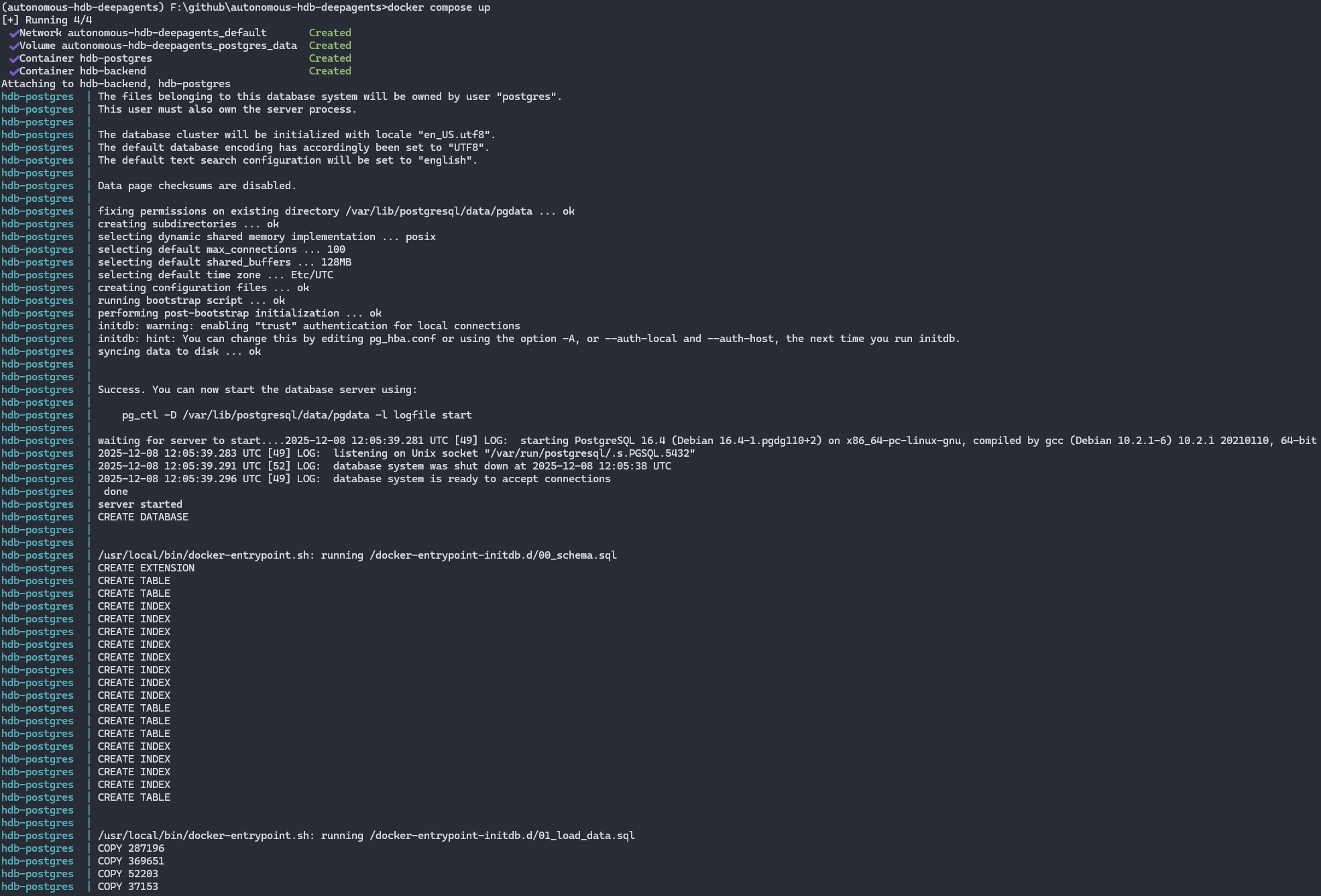
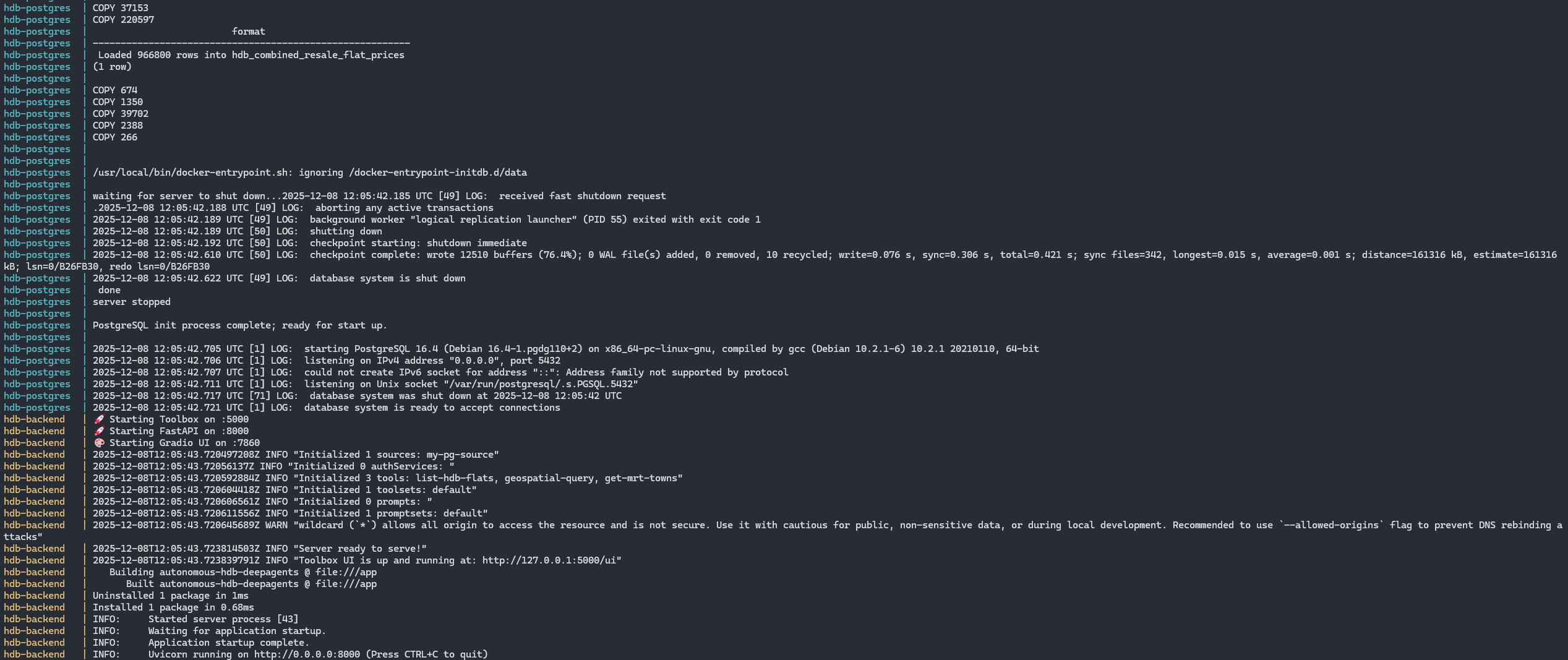
docker build -t hdb-deepagents .2. Start the Full Stack
docker compose upThis starts:
- deepagents — the LangGraph/DeepAgents orchestrator
- toolbox — MCP Tool server exposing SQL/geospatial tools
- postgres — PostgreSQL 15 + PostGIS extension
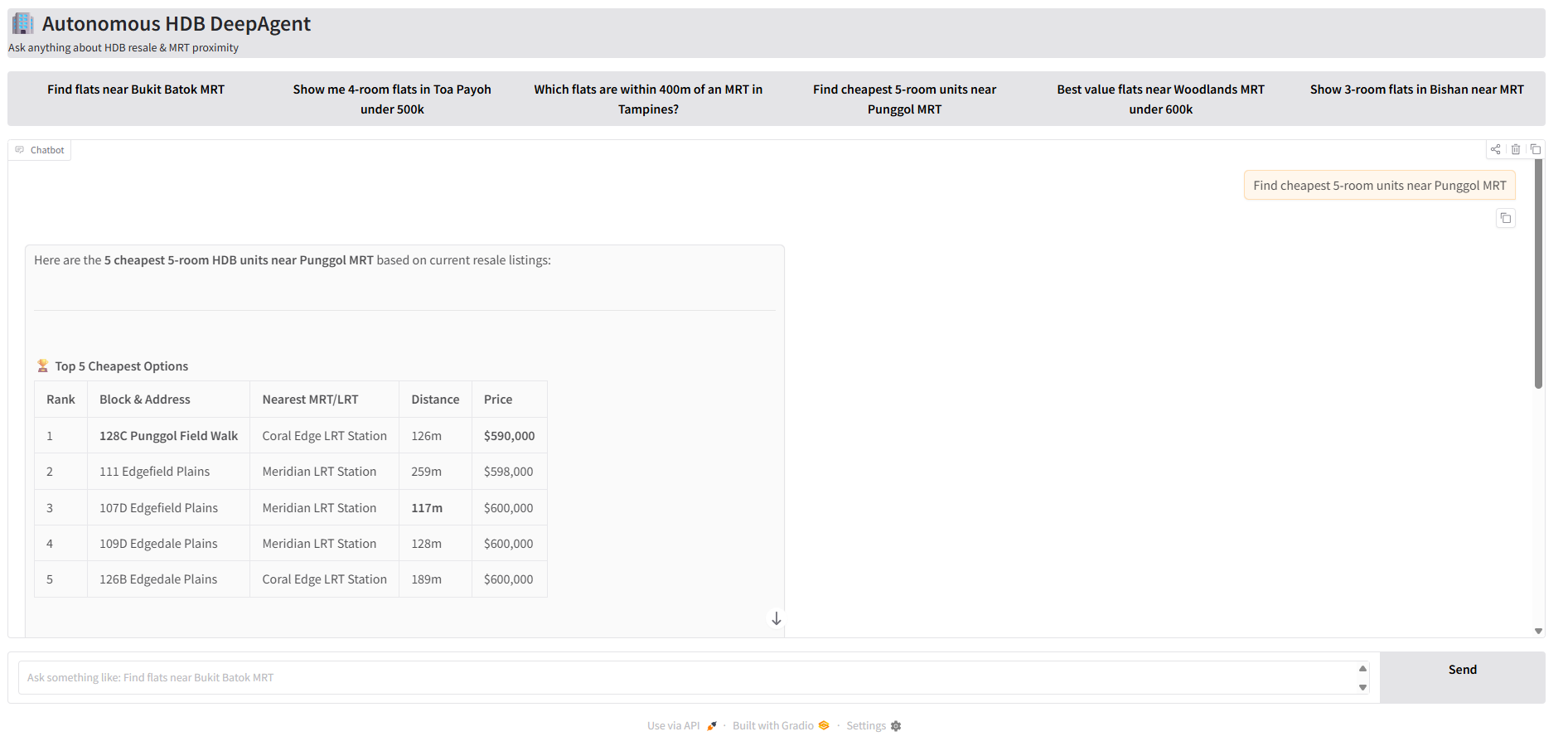
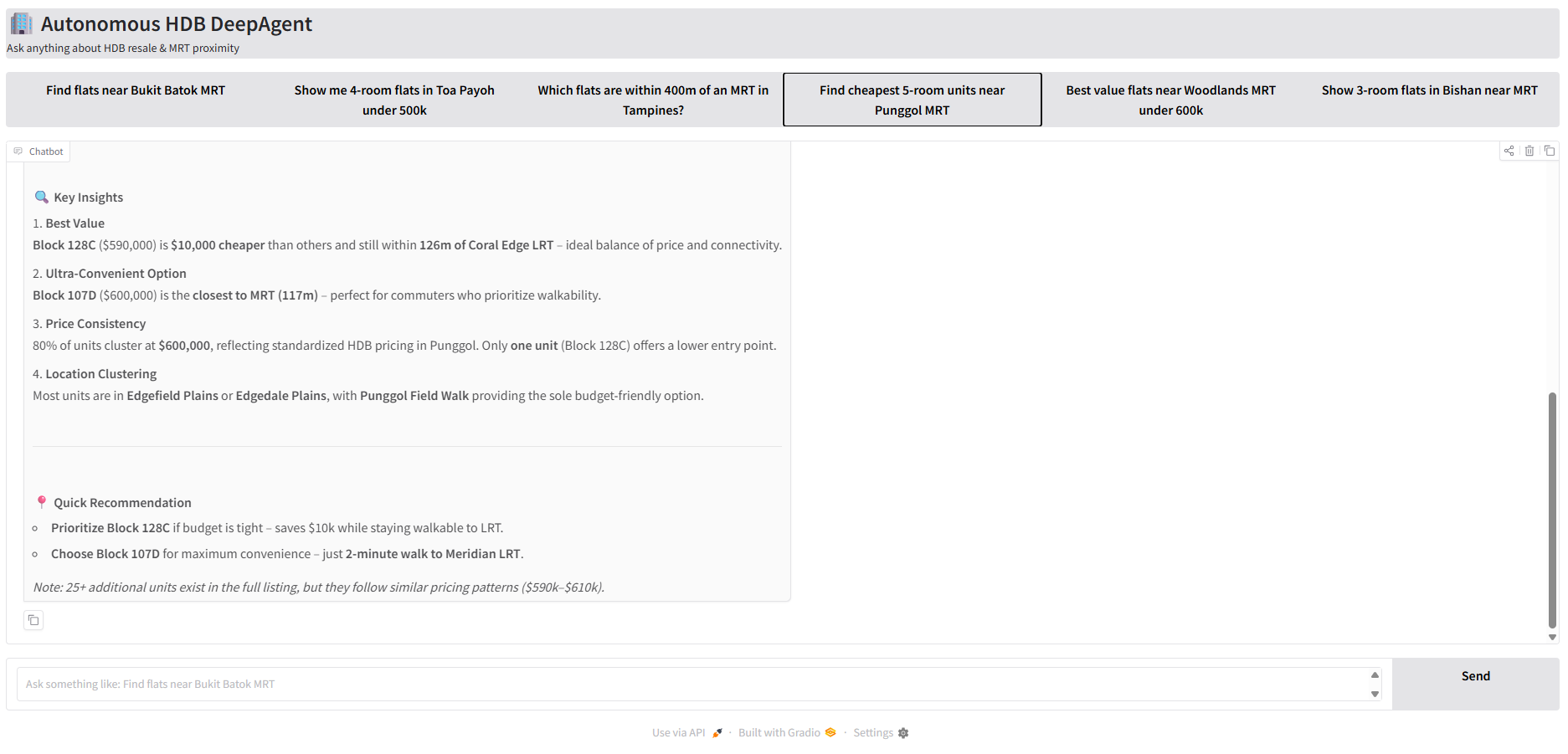
3. Run the Graio App
Navigate to http://localhost:7860/ and test the sample queries!
Conclusion
This project brings together geospatial data, natural-language understanding, and a structured DeepAgents workflow to create a practical, autonomous HDB insights assistant. By combining LangGraph’s deterministic execution model with PostGIS, the MCP Toolbox, and a modern LLM, the system is able to interpret user intent, resolve MRT proximity, retrieve relevant flats, enrich them with spatial context, and present concise summaries—all from a single user query.
Whether you run the agent locally or through Docker Compose, the architecture is modular, transparent, and designed for experimentation. It serves as a foundation for building more capable real-estate intelligence tools, and demonstrates how modern agent frameworks can be integrated into real-world, domain-specific applications.
If you’d like to explore the source code, test the pipeline, or contribute improvements, the project is openly available here:
👉 GitHub Repository: https://github.com/seehiong/autonomous-hdb-deepagents
What’s Next?
Potential future enhancements include:
- Integrating schools, parks, and amenities
- Adding more agent autonomy and memory
- Improving MRT/amenity scoring and visualization
Contributions and suggestions are welcome.